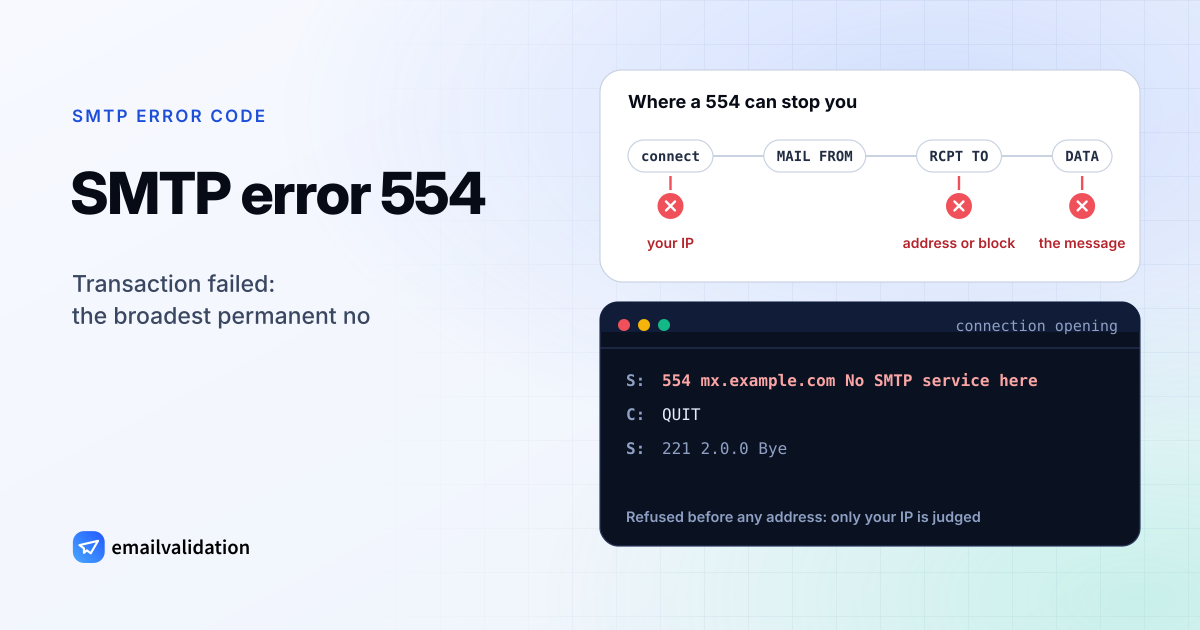
What SMTP error 554 means
RFC 5321 gives SMTP error 554 two meanings: “Transaction failed”, or, “in the case of a connection-opening response, ‘No SMTP service here’”. That second case is special. According to section 3.1, a server “MAY” greet you with 554 instead of the usual 220. It must then wait for your QUIT and should answer any other command with “503 bad sequence of commands”. A server that refuses you at that point can only be judging your IP address, because it knows nothing else about you yet.
Later in the conversation, a 554 refuses the message itself, typically after RCPT TO or after the message body. Compared with SMTP error 550, which is about a mailbox, 554 is the broader “no”. Both are permanent.
554 error messages by provider
| Provider | Reply or description | What it means |
|---|---|---|
| Yahoo | 554 delivery error: dd This user doesn't have a yahoo.com account | Unknown address: hard bounce |
| Yahoo | 553 or 554 for an invalid address, failed DMARC or DKIM, content refused for policy reasons, or an IP listed by Spamhaus | Block, unless it’s the address |
| Yahoo | 554 when the domain in MAIL FROM or the From header doesn’t resolve (451 if the lookup timed out) | Your sending domain lacks DNS records |
| Gmail | 554 5.4.6 Message exceeded 50 hops, this may indicate an email loop. | A mail loop: Exchange Online reports it as 5.4.14 |
| Gmail | 554 5.6.0 Email message is malformed. Not accepted. | Broken message format |
| Gmail | 554 5.7.0 Too many unauthenticated commands. | The client didn’t log in: see 554 5.7.0 |
| Postfix | 554 5.7.1 <…>: Relay access denied | The server won’t pass your mail on: see 554 5.7.1 |
Sources: Yahoo Sender Hub, Gmail SMTP errors and codes, and the Postfix text as documented by Red Hat. Yahoo doesn’t publish enhanced codes for its 554 replies; it groups errors by the three-digit code and explains them in words.
Causes, sorted by what follows the code
- The address doesn’t exist. Yahoo uses 554 where Gmail and Microsoft 365 use 550.
- You are blocked. Your IP or domain is on a blocklist, authentication failed, or the content was refused. Yahoo names Spamhaus listings explicitly.
- The server won’t talk to you. A 554 at connection opening, before any address is exchanged.
- Your setup is wrong. A forwarding loop, a malformed message from your own code, or a mail program that didn’t authenticate.
- The receiving admin blocked you. On Postfix servers, an entry that rejects you in an access table answers with 554 by default; the postconf documentation lists
access_map_reject_codewith a default of 554.
How to fix SMTP error 554 as the sender
- Unknown account: check the spelling, ask for a current address, then remove the old one.
- Blocked: look up your sending IP and domain in the Spamhaus reputation checker and other blocklists, and fix the cause before you request removal. Test SPF, DKIM and DMARC with the SPF checker, DKIM checker and DMARC checker.
- Refused at connection: your IP is not welcome there. If you send from a home connection, a cloud server or a new IP, relay through your email provider’s SMTP server instead.
- Unresolvable domain: give the domain you send from DNS records. Yahoo asks for an A or MX record, and SOA records for subdomains used in MAIL FROM or From.
- Mail loop: look for forwarding rules, or MX records that send mail back and forth between two systems.
- Malformed message or unauthenticated commands: fix the sending program. Log in before sending, on the submission port your provider names; the SMTP settings list has them for common providers.
If you run the receiving server
Check your mail log for the session. It names the restriction, blocklist or content rule that returned 554. If the rejection was wrong, allow that one sender rather than relaxing the rule for everyone.
Would email verification have prevented it?
Partly. For the unknown-account case, often: a verification asks the receiving server about the address the same way your message would, and a server that refuses the address at that step gives the check the same answer. Servers that accept every address first and only refuse after the message body was sent can’t be checked this way. Running sign-up addresses through the email checker before they reach your list prevents these bounces. For blocks, loops and malformed messages, no: the address may be perfectly fine, and the fix is on your sending side.