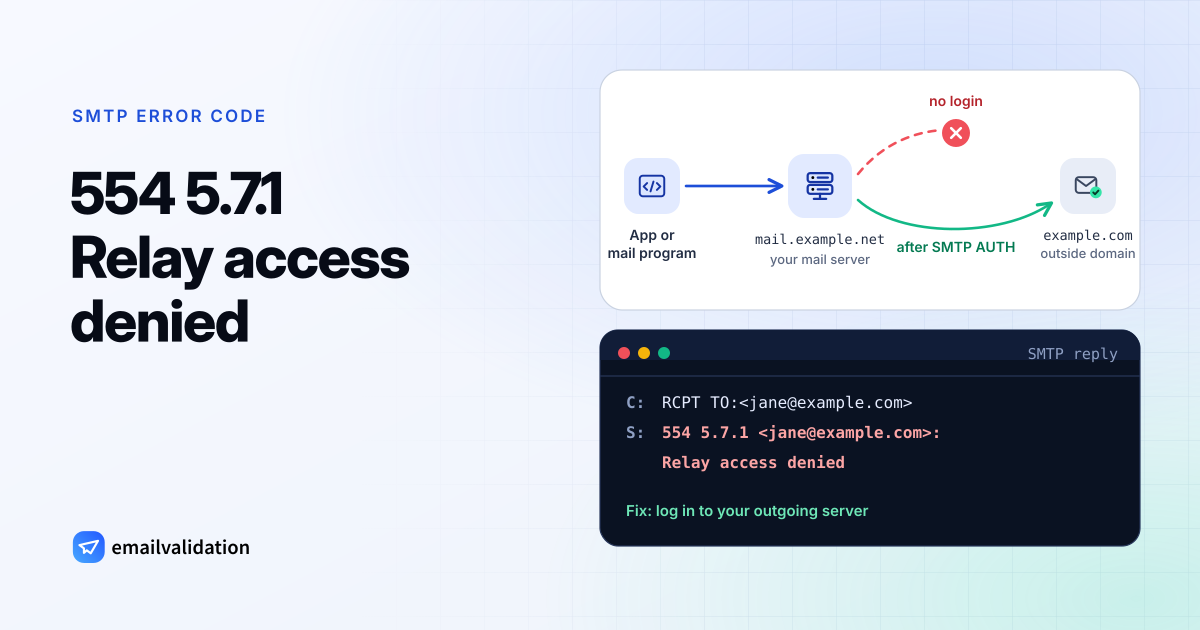
What 554 5.7.1 means
554 is “transaction failed” (RFC 5321); 5.7.1 is “delivery not authorized, message refused” (RFC 3463). Together, a 554 5.7.1 says: this server won’t accept the transaction from you, and the reason is a policy, not a missing mailbox.
The same enhanced code behind 550 is what Gmail and Microsoft 365 use for spam and recipient rules; that case is on the 550 5.7.1 page, and the 5.7.1 status code page compares all variants. With 554, two situations account for most bounces.
“Relay access denied”: the most common 554 5.7.1
Postfix, a widely used mail server, rejects relay attempts with this text. Red Hat documents it in this form (address replaced):
554 5.7.1 <jane@example.com>: Relay access denied
A mail server accepts mail from strangers only for the domains it hosts. Passing mail on to any other domain, relaying, is reserved for clients it trusts. Postfix’s access documentation describes the usual policy: “local clients and authenticated clients may specify any destination domain.” Everyone else gets “Relay access denied”. Microsoft 365 has the same idea under 5.7.1 with the texts Unable to relay and Client was not authenticated (NDR reference).
You hit it in one of three ways:
- Your mail program doesn’t log in. Outgoing mail works for your own domain but fails for every outside address. Turn on authentication for the outgoing server; the SMTP settings for common providers list the right host and port.
- An app, website or device uses a server that doesn’t know it. A contact form or a scanner sends through a mail server without credentials, or through one the company no longer uses.
- The message reached the wrong server. You deliver directly, but the recipient domain’s MX record points to a server that no longer handles that domain, for example after a move to a new provider. Check it with the MX lookup.
Blocked by a filter or blocklist
The other common 554 5.7.1 comes from filters. The server refuses your IP or domain because it’s on a blocklist, has a poor reputation, or failed authentication. Yahoo’s sender help lists an IP listed by Spamhaus, DMARC or DKIM failures, and content refused for policy reasons among the causes of its permanent 553 and 554 errors.
The admin of the receiving server may also have blocked you deliberately. Postfix answers a match in its access table with 554 by default (access_map_reject_code).
How to fix 554 5.7.1 as the sender
- Read the text after the code. “Relay access denied” and “Unable to relay” point to authentication or routing. Words like “blocked”, “listed” or a blocklist’s name point to reputation.
- For relay errors in a mail program: enable “my outgoing server requires authentication” and use the submission port your provider specifies, usually 587.
- For relay errors from an app or device: give it credentials for your provider’s SMTP server, or set up the relay your provider documents for devices. Microsoft 365 calls the device version of this problem 5.7.57.
- For blocklists: look up your IP and domain in the Spamhaus reputation checker and other lists, fix whatever caused the listing (a hacked account, an infected machine, a bad list), then request removal.
- For authentication: check your domain with the SPF checker, DKIM checker and DMARC checker.
If you run the receiving server
If legitimate users get “Relay access denied” from your server, check that they authenticate and that your relay rules allow authenticated clients. If outside senders get it for your own domain, your server doesn’t consider that domain local: add it to the domains it accepts mail for, and make sure the domain’s MX points to this server. For deliberate blocks, the mail log shows which access entry or blocklist matched.
Would email verification have prevented it?
No. Relay denials and blocklist rejections happen no matter which address you write to, and a verification would report the recipient as fine. Fix the sending setup first. Once mail flows again, keeping the email bounce rate low helps you stay off blocklists, and that part a verification does support.