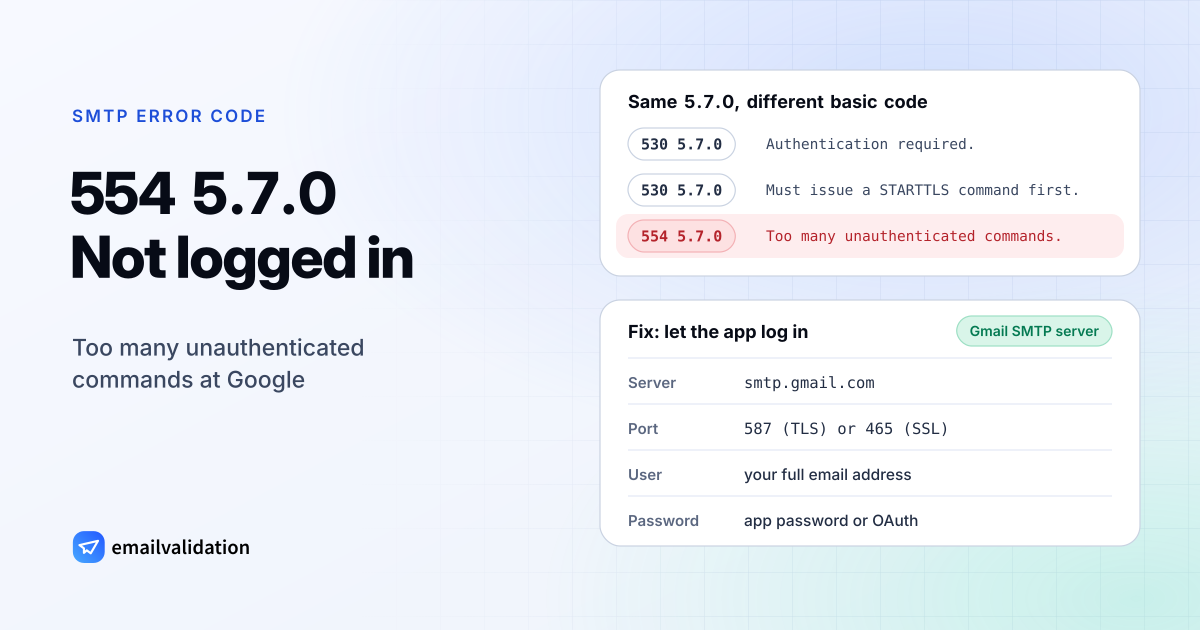
What 554 5.7.0 means
A 554 5.7.0 reply means the server ended the transaction for a security reason. The basic code is the broadest permanent failure in RFC 5321: “554 Transaction failed”. The enhanced code is the catch-all of the security class in RFC 3463. X.7.0, “Other or undefined security status”, is for when “something related to security caused the message to be returned, and the problem cannot be well expressed with any of the other provided detail codes.” It “may also be used when the condition cannot be further described because of security policies in force.”
That second sentence matters. RFC 7372 notes that an operator who doesn’t want to reveal its policy “can continue using a generic result code such as 5.7.7, 5.7.1, or even 5.7.0.” So from an unknown server, 554 5.7.0 tells you little beyond “security”. The text after the code is what counts.
554 5.7.0 at Google: “Too many unauthenticated commands”
Google documents this code with a specific text. From Gmail SMTP errors and codes:
554 5.7.0 Too many unauthenticated commands.
The client connected and kept sending SMTP commands without logging in. Google uses the same enhanced code, with other basic codes, for related problems, which helps you tell them apart:
| Google reply | Text | What’s wrong |
|---|---|---|
530 5.7.0 | Authentication required. | The client must log in before sending |
530 5.7.0 | Must issue a STARTTLS command first. | The client must switch to an encrypted connection first |
554 5.7.0 | Too many unauthenticated commands. | The client kept going without logging in |
454 4.7.0 | Too many login attempts, please try again later. | Login attempts were throttled (temporary) |
550 5.7.0 | Email relay denied … | The SMTP relay service doesn’t know your IP or domain: see 550 5.7.0 |
552 5.7.0 | This message was blocked because its content presents a potential security issue. | An attachment or the content was blocked |
What causes 554 5.7.0
- SMTP authentication is off in the app, printer, scanner, website plugin or script. It connects to
smtp.gmail.comand tries to send right away. - The wrong port or no encryption. Google’s SMTP server expects SSL on port 465 or TLS on port 587; a client that never starts TLS never gets to log in.
- An old sign-in method. Google says: “Starting May 1, 2025, Google Workspace accounts no longer support less secure apps, third-party apps, or devices that ask you to sign in to your Google Account with your username and password.” Devices that only know user name and password stop working, and some older devices can’t use OAuth at all.
- 2-Step Verification without an app password. Google notes that a device logging in directly gets an authentication error when 2-Step Verification is on, and that an app password fixes it.
How to fix 554 5.7.0
Pick one of the three ways Google offers for apps and devices (Send email from a printer, scanner, or app):
| Option | Server and port | Login | Who can receive | Limit |
|---|---|---|---|---|
| Gmail SMTP server | smtp.gmail.com, 465 (SSL) or 587 (TLS) | Full email address plus app password | Anyone | 2,000 messages per day |
| SMTP relay service | smtp-relay, 25, 465 or 587 | By the device’s IP address, registered by your admin | Anyone | 10,000 recipients per user per day |
| Restricted Gmail SMTP server | aspmx, 25 | None | Only Gmail and Google Workspace users | Workspace limits per user |
For most apps, the first option is the quickest fix: turn on SMTP authentication, choose port 587 with TLS (or 465 with SSL), and enter the full address and an app password. Our page on Gmail SMTP settings has the settings in one place.
If the device can’t log in at all, ask your Workspace admin to set up the SMTP relay service for its IP address. The restricted server works without login, but only for internal recipients, and Google says you must add the device’s IP address to the allowlist and include it in your SPF record. The SPF record generator builds that record. For other providers, our SMTP settings list the right server and port.
If you see 554 5.7.0 from another server
Read the text. Without an explanation, ask the server’s admin what failed: the code alone doesn’t say. Compare it with SMTP error 554, the general “transaction failed”, and with the 5.7.1 status code, the specific “delivery not authorized”, which covers relay denials and blocklists.
Would email verification have prevented it?
No. The error happens before your message reaches any recipient, and it has nothing to do with whether the address exists. Once your app sends correctly, the remaining bounces are about addresses and policy, and the list of SMTP error codes shows which ones a verification catches.