What 550 means
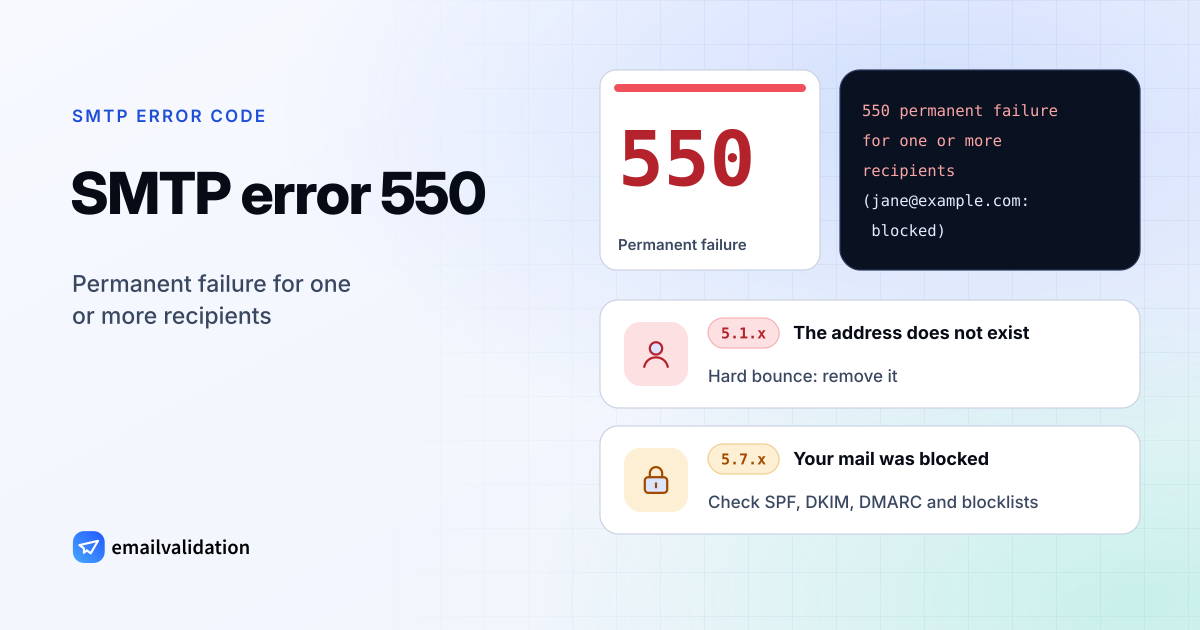
RFC 5321 defines 550 as “requested action not taken: mailbox unavailable”, with three examples: the mailbox was not found, there is no access, or the command was rejected for policy reasons. That covers two very different problems, so look at what follows the code:
- An enhanced code starting with
5.1(5.1.1,5.1.10) means the address is the problem. It doesn’t exist at that domain. - An enhanced code starting with
5.7(5.7.1,5.7.26,5.7.509) means the receiver refused your mail. The address may well exist. - No enhanced code, as in “550 permanent failure for one or more recipients”, means you have to read the text.
The list of SMTP error codes has every variant with its meaning.
“550 permanent failure for one or more recipients (…:blocked)”
This wording comes from the mail filter in front of the recipient’s mailbox; it is often reported from Barracuda email security gateways. The bracket names the recipient and the reason:
550 permanent failure for one or more recipients (jane@example.com:blocked)
blocked tells you that the filter made a final decision, not which rule fired. Common reasons are:
- Your sending IP or domain has a poor reputation. Look it up in the Barracuda reputation lookup; if it is listed, fix the cause (a hacked account, a bought list, a spam run) and then file a removal request.
- Authentication failed. The filter checks SPF, DKIM and DMARC like any receiver. Test your domain with the SPF checker, DKIM checker and DMARC checker.
- Content or links. A URL on a blocklist, an attachment type the organization refuses, or wording that scores as spam. The email spam checker shows how a filter scores your message.
- A local rule. The recipient’s organization blocks your domain, your country or outside senders in general. Only their IT team can see and change that.
Typical 550 replies
| Sent by | Reply | What it means |
|---|---|---|
| Gmail | 550 5.1.1 The email account that you tried to reach does not exist. | Unknown address: hard bounce |
| Gmail | 550 5.2.1 The email account that you tried to reach is inactive. | Disabled account: hard bounce |
| Gmail | 550 5.7.1 … This message is likely unsolicited email. | Blocked as spam |
| Gmail | 550 5.7.26 This email has been blocked because the sender is unauthenticated. | SPF and DKIM failed |
| Microsoft 365 | 550 5.1.10 … Recipient not found … | Unknown address: hard bounce |
| Microsoft 365 | 550 5.4.1 Recipient address rejected: Access denied | Usually an unknown address |
| Microsoft 365 | 550 5.7.509 Access denied, sending domain … does not pass DMARC verification and has a DMARC policy of reject. | Your domain’s own DMARC policy rejected the message |
| Postfix servers | 550 5.1.1 <…>: Recipient address rejected: User unknown in local recipient table | Unknown address: hard bounce |
| Barracuda-style filters | 550 permanent failure for one or more recipients (…:blocked) | Blocked by the recipient’s filter |
Texts are short excerpts from each provider’s documentation; the exact wording in your bounce can differ. Yahoo uses 554 instead of 550 for an unknown account.
How to fix a 550 error as the sender
If the address doesn’t exist:
- Check the spelling: a swapped letter (
jhon@) or a missing character is the most common cause. - Ask the person for their current address another way: people change jobs, and companies delete old mailboxes.
- Remove the address from your lists. Your email tool should suppress it after one hard bounce; repeated sends to unknown addresses hurt your sender reputation.
If your mail was blocked:
- Read the full reply and the bounce message for a reason or a link.
- Make sure SPF, DKIM and DMARC pass for your From domain. The SPF record generator and DMARC generator write the records.
- Check your sending IP and domain on blocklists, and stop any campaign that is causing complaints.
- Ask the recipient’s IT team: they can look up the message in their filter’s log and allow your domain.
If the reply says “Relay access denied”: your mail program sent the message to a server that doesn’t accept it for that destination. Turn on SMTP authentication in your mail program (usually port 587), or check the recipient domain’s MX records with the MX lookup.
If you run the receiving server
A legitimate sender gets 550 replies from your server because of your own configuration: a deleted mailbox or alias, a missing accepted domain, or a filter rule. Check your mail gateway’s message log for the sender’s address; it names the rule that rejected the message. If the rejection was wrong, add an exception for that sender rather than lowering the filter for everyone.
Would email verification have prevented it?
For the address-related 550s, yes. An email verification asks the recipient’s server about the mailbox before you send, the same way your message would, and stops before any message is sent. A server that would reply 550 5.1.1 to your email gives the same answer to the check. Blocks are different: they depend on your server, domain and content, so fix those with the authentication checkers above.