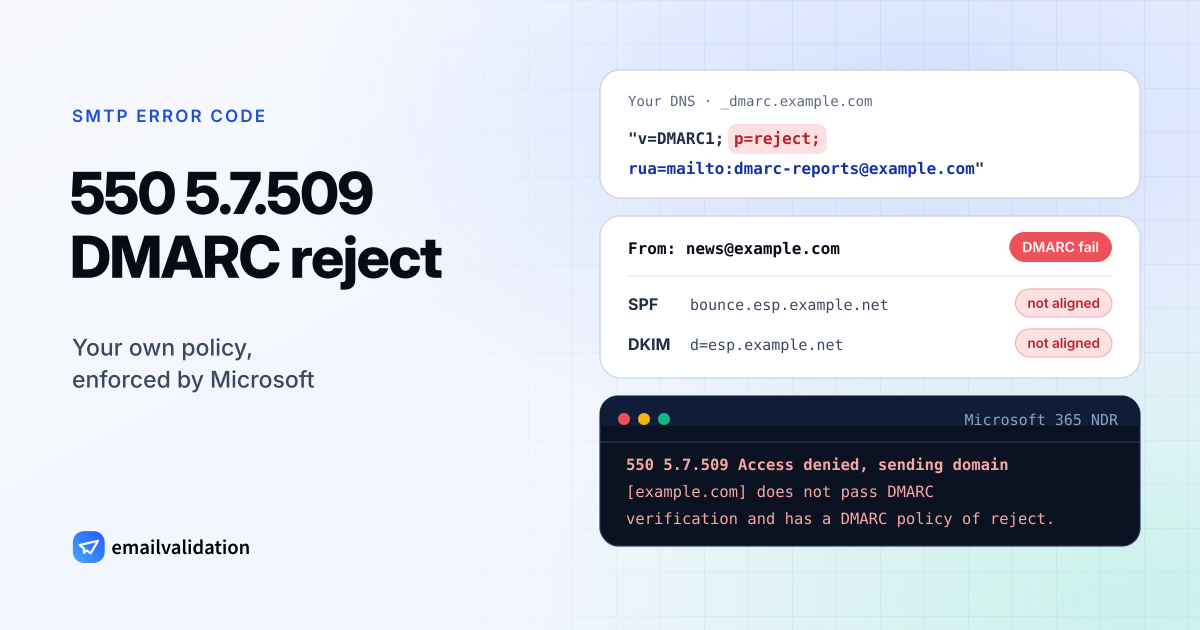
What 550 5.7.509 means
Microsoft sends 550 5.7.509 with this text, as listed in its NDR reference:
Access denied, sending domain [$SenderDomain] does not pass DMARC verification and has a DMARC policy of reject.
Its stated cause: “The sender’s domain in the 5322.From address doesn’t pass DMARC.” The 5322.From address is the one people see in the From line. The code is Microsoft’s own; the IANA registry has no X.7.509.
Two conditions have to come together for a 550 5.7.509. Your domain publishes a DMARC record with p=reject, and this message failed DMARC. According to Microsoft’s DMARC documentation, “a message passes DMARC if one or both of the described SPF or DKIM checks pass”, where a check passes only if its domain is aligned with the From domain. The same documentation shows these rejections in Microsoft 365 as 550 5.7.1 with dmarc=fail action=oreject in the headers, so a DMARC rejection can reach you under either code.
Why DMARC fails
Microsoft names three groups of causes:
- Missing or incorrect DNS records: SPF missing, alignment problems, policy errors.
- Missing DKIM: no public key in DNS, or messages that aren’t signed when they’re sent.
- Forwarding: a forward that breaks SPF or DKIM on the way.
In practice it usually looks like this. A service sends with your domain in From, but uses its own domain for the bounce address and its own DKIM key. SPF passes, for the service’s domain. DKIM passes, also for the service’s domain. Neither matches your From domain, so DMARC fails, and your p=reject turns that into a bounce.
How to fix 550 5.7.509
- Read the NDR and the headers. The
Authentication-Resultsheader of a bounced copy shows the SPF, DKIM and DMARC results with their domains. The email header analyzer makes them readable. - Find every sending source. DMARC aggregate reports list the IPs and services sending as your domain and whether they pass. If you pay a DMARC report service, Microsoft suggests asking it first.
- Fix DKIM for each service. Turn on signing with your own domain and publish the keys the service gives you. Check them with the DKIM checker.
- Fix SPF alignment where you can. If a service offers a custom bounce (return-path) domain under your own domain, set it up so SPF aligns too. Add the services to your SPF record with the SPF record generator.
- Check the DMARC record itself. The DMARC checker shows it. A typical strict record:
_dmarc.example.com. TXT "v=DMARC1; p=reject; rua=mailto:dmarc@example.com"
If legitimate mail fails at scale and you can’t fix it quickly, lowering the policy to p=quarantine or p=none stops the bounces, at the cost of less protection against spoofing. Treat that as a pause, not a fix. The guide what is a DMARC record explains the policy levels.
If you run the receiving tenant
When a partner’s legitimate mail fails DMARC because it passes through a service that changes it, Microsoft’s DMARC documentation lists three ways to let it through. The preferred one is to configure that service as a trusted ARC sealer. The alternatives are a mail flow rule matching the sender’s IP and domain that skips spam filtering, or a temporary allow entry in the Tenant Allow/Block List, which expires after 30 days. If a third-party filter sits in front of Microsoft 365, Enhanced Filtering for Connectors lets Microsoft evaluate SPF and DMARC against the real source.
Would email verification have prevented it?
No. The recipient exists, and a verification would report the address as deliverable. 550 5.7.509 depends only on your domain’s authentication; once SPF or DKIM passes and aligns, the same message to the same address is accepted.