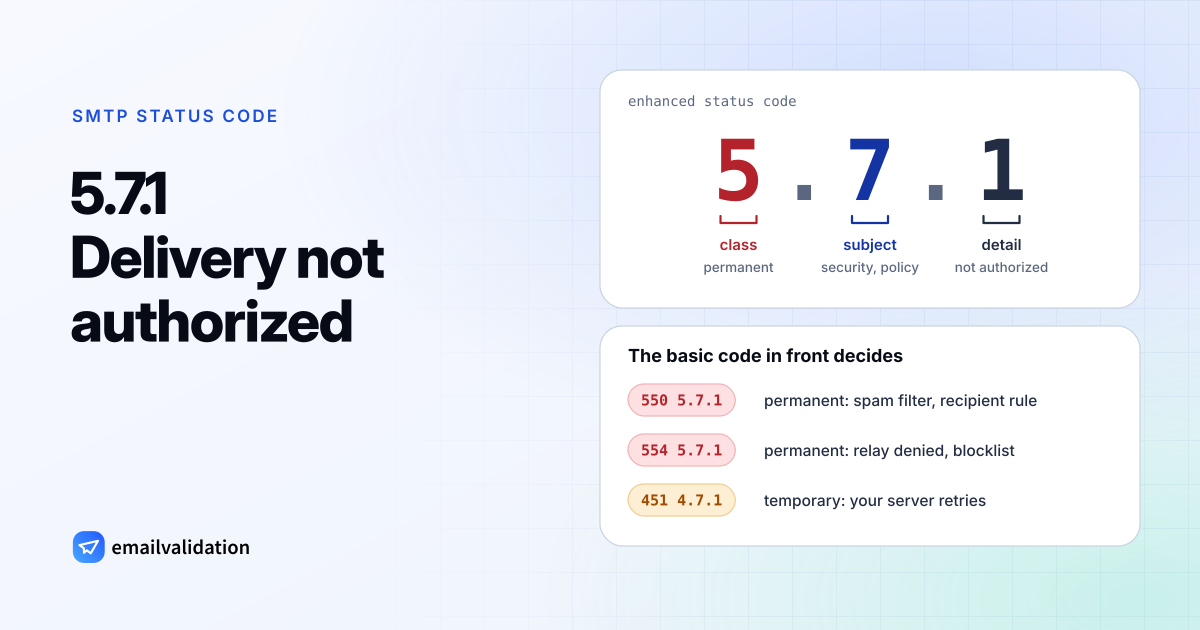
Reading 5.7.1: class, subject, detail
5.7.1 is an enhanced status code, and like every enhanced code it has three parts, defined in RFC 3463:
| Part | Value | Meaning |
|---|---|---|
| Class | 5 | Permanent failure: “not likely to be resolved by resending the message in the current form” |
| Subject | 7 | Security or policy status |
| Detail | 1 | Delivery not authorized, message refused |
RFC 3463 (section 3.8) explains the detail: “The sender is not authorized to send to the destination. This can be the result of per-host or per-recipient filtering.” Per-host means your server or IP address; per-recipient means a rule tied to the person or group you wrote to. The RFC also says the code is “useful only as a permanent error”. Yet the IANA registry lists the basic codes 451, 454, 502, 503, 533, 550 and 551 alongside it, so temporary 4.7.1 replies exist too.
5.7.1 is also the generic policy code. RFC 7372 added more specific X.7 codes, such as 5.7.23 for a failed SPF check “in place of 5.7.1”. Servers that don’t use them still say 5.7.1.
SMTP error 5.7.1 in its variants
What you do depends on the full reply. Each variant has its own page:
| Full reply | Permanent? | Typical cause | Details |
|---|---|---|---|
550 5.7.1 | Yes | Spam filter, reputation, malformed message, or a recipient rule at Gmail or Microsoft 365 | 550 5.7.1 |
554 5.7.1 | Yes | “Relay access denied”, or your IP is on a blocklist | 554 5.7.1 |
451 4.7.1 | No | Temporary policy refusal; your server retries | 451 |
5.7.1 in a Microsoft 365 NDR | Yes | Restricted recipient, relay or authentication, blocklisted IP | See below |
Other codes in the same family are more specific and easier to fix: 550 5.7.26 for unauthenticated mail at Gmail, 550 5.7.509 for a DMARC reject at Microsoft, and 550 5.7.520 for blocked forwarding. The generic 550 5.7.0 is what Google’s SMTP relay sends when it doesn’t recognize your server.
5.7.1 in Microsoft 365 NDRs
Microsoft’s article on 5.7.1 covers the whole range from 5.7.0 to 5.7.999 and sums it up: “Typically, this error indicates a security setting in your organization or the recipient’s organization is preventing your message from reaching the recipient.” The texts you’ll meet:
| Text in the NDR | Meaning |
|---|---|
Delivery not authorized | You aren’t allowed to send to this recipient or group |
Unable to relay | The receiving system doesn’t accept mail for that domain from you |
Client was not authenticated | Your system had to log in before sending and didn’t |
5.7.1 Service unavailable; Client host [xxx | Your sending IP is on Microsoft’s blocklist |
550 5.7.1 RESOLVER | A public folder accepts mail only from authenticated (internal) senders |
550 5.7.1, with dmarc=fail action=oreject in the headers | The sender’s domain failed DMARC and publishes p=reject |
The first three come from Microsoft’s NDR reference, the next two from the 5.7.1 article, and the DMARC case from Microsoft’s DMARC documentation. For the blocklist case, Microsoft tells admins to forward the NDR to the delisting address quoted in the bounce.
How to tell which problem you have
Look at the words after the code. They map to a cause more reliably than the numbers:
- “relay”, “not authenticated”, “authentication required”: your mail program or device didn’t log in, or the message went to the wrong server. Fix your outgoing server settings; the SMTP settings for common providers help.
- “blocked using”, “listed”, “client host”: your IP or domain is on a blocklist. Find the list, fix the cause, request removal.
- “unsolicited”, “spam”, “reputation”: a filter judged your mail. Check SPF, DKIM and DMARC with the DMARC checker, and run a test message through a spam filter.
- “not authorized”, “restricted”, “policy prohibits”: a rule at the recipient. Only their admin or the group owner can lift it.
- A first digit of 4: wait. The block is temporary, and your server retries.
When the text is vague, the bounced message’s headers often hold more detail; the email header analyzer shows them.
Would email verification have prevented it?
No. 5.7.1 is a decision about your mail, not about whether the mailbox exists, and a verification would report most of these recipients as deliverable. What verification does protect is your reputation over time: fewer bounces to dead addresses mean one less reason for filters to distrust you. The list of SMTP error codes shows which codes it does catch.