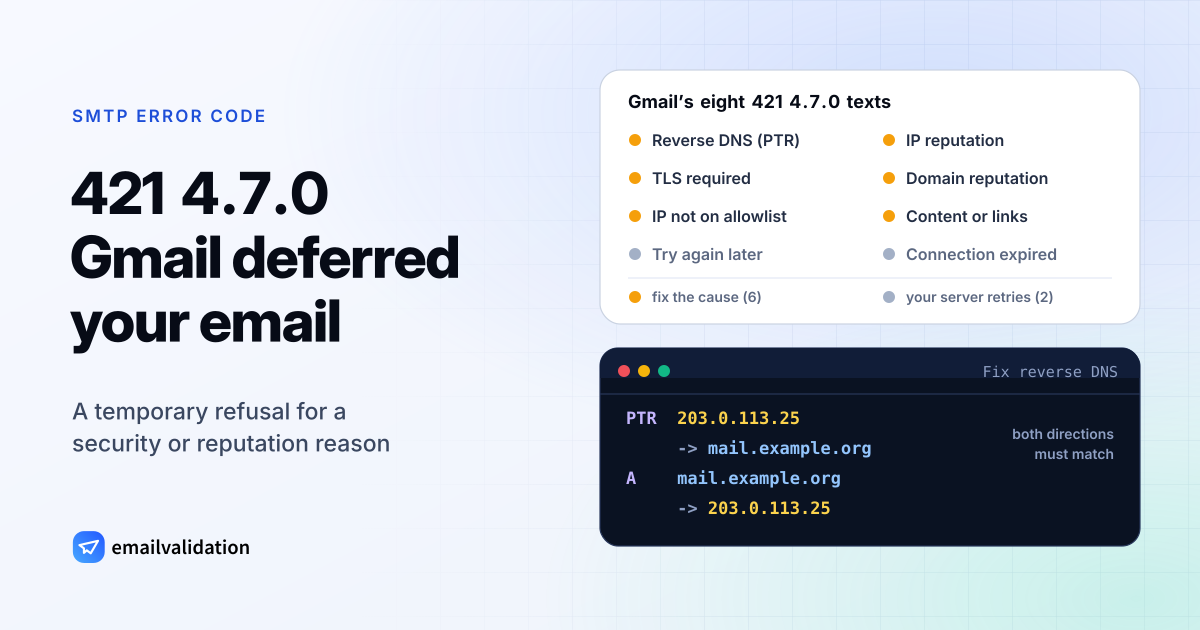
What 421 4.7.0 means
A 421 4.7.0 reply means the receiving server has deferred your message and closed the connection for a security or policy reason. RFC 5321 defines 421 as “Service not available, closing transmission channel”. The enhanced code comes from RFC 3463: X.7.0, “Other or undefined security status”, used when a security problem “cannot be well expressed with any of the other provided detail codes.”
Put together: temporary, security-related, and not further specified by the code. The IANA registry doesn’t list 421 among the basic codes for X.7.0, but Gmail uses the pair for eight different messages, and the text after it carries the actual reason.
Your server handles the deferral itself: it keeps the message and tries again later. The general SMTP error 421 page explains the retry rules. What’s specific about 4.7.0 is that most of its causes sit on your side, so waiting alone often doesn’t help.
Gmail’s eight 421 4.7.0 messages
From Gmail SMTP errors and codes:
| Reason | Text after 421 4.7.0 | First thing to check |
|---|---|---|
| Reverse DNS | The IP address sending this message does not have a PTR record, or the corresponding forward DNS entry does not point to the sending IP. | Your server’s PTR and A records |
| TLS | TLS required for RCPT domain, closing connection. | TLS on your outgoing server; the recipient’s domain only accepts encrypted connections |
| Allowlist | IP not in whitelist for RCPT domain, closing connection. | The recipient’s domain only accepts listed IPs: ask its admin |
| IP reputation | This message is suspicious due to the very low reputation of the sending IP address. | Volume, complaints, the IP’s history; Gmail rate-limits the IP |
| Domain reputation | This message is suspicious due to the very low reputation of the sending domain. | Your domain’s sending practices; Gmail says the message “has been blocked” |
| Content | This message is suspicious due to the nature of the content or the links within. | Links and wording; also “has been blocked” |
| Temporary | Try again later, closing connection. (command) | Let your server retry |
| Timeout | Connection expired, try reconnecting. | Usually nothing; your server reconnects |
The PTR and IP-reputation texts go on: “To protect our users from spam, email sent from your IP address has been temporarily rate limited.” The domain-reputation and content texts instead say “To best protect our users from spam, the message has been blocked.” The code still starts with a 4, so your server retries, but those retries keep failing until Gmail’s verdict changes.
421 4.7.0 vs. other Gmail deferrals
Gmail has more specific temporary codes for authentication and volume, and they’re easier to act on:
| Gmail reply | Reason |
|---|---|
421 4.7.26 | Unauthenticated: neither SPF nor DKIM passed. See the 5.7.26 status code |
421 4.7.27 / 4.7.30 / 4.7.40 | SPF didn’t pass / DKIM didn’t pass / no DMARC record |
421 4.7.28 | “Gmail has detected an unusual rate of email.” |
421 4.4.5 | “Server busy, try again later.” Google’s side, not yours |
How to fix 421 4.7.0
Set up reverse DNS. Gmail’s sender guidelines require that “the public IP address of a sending SMTP server must have a corresponding PTR record that resolves to a hostname” and that the same host name has an A or AAAA record for that IP. Whoever runs your IP address sets the PTR record. Both directions have to match:
PTR  203.0.113.25
     -> mail.example.org
A    mail.example.org
     -> 203.0.113.25
Turn on TLS for outgoing connections. Gmail’s requirements for all senders include: “Use a TLS connection for transmitting email.” Some recipient domains refuse anything else.
Allowlist error: only the recipient’s Google Workspace admin can add your IP address. Contact them with the IP from the bounce.
Authenticate. Publish SPF with the SPF record generator, sign with DKIM for your own domain, and verify both with the SPF checker and the DKIM checker. Gmail asks every sender for SPF or DKIM.
Repair reputation. Gmail says to keep the spam rate in Postmaster Tools “below 0.10% and avoid ever reaching a spam rate of 0.30% or higher”, and to “start with a low sending volume to engaged users, and slowly increase the volume over time.” Pause campaigns to old or bought lists. The Gmail and Yahoo sender requirements collect all the rules.
Check content and links. Gmail names them as the reason in one of its texts. Remove links you don’t need, and run a test message through the email spam checker.
If you send through an email service, the PTR record and TLS are normally its job; ask its support if the deferrals come from its IP addresses. The domain-reputation and content messages stay your responsibility.
Similar temporary blocks at Microsoft 365
Microsoft uses its own numbers for temporary security blocks. Its NDR reference lists 4.7.500 to 4.7.699 and 4.7.850 to 4.7.899 with the text “Access denied, please try again later”: suspicious activity was detected, and sending or the IP address is restricted while Microsoft evaluates it. “If this activity is valid, this restriction is lifted shortly.” When Microsoft blocks a whole tenant’s outgoing mail, it uses permanent 5.7.7xx codes such as 550 5.7.708.
Would email verification have prevented it?
No. Every cause of 421 4.7.0 is about your server, your domain or your message. Verification helps with reputation only indirectly: Gmail’s guidelines advise sending to engaged users, and a list without dead addresses is a start. Checking a list with the bulk email verifier before you send removes the addresses that would bounce. The list of SMTP error codes has every other code.