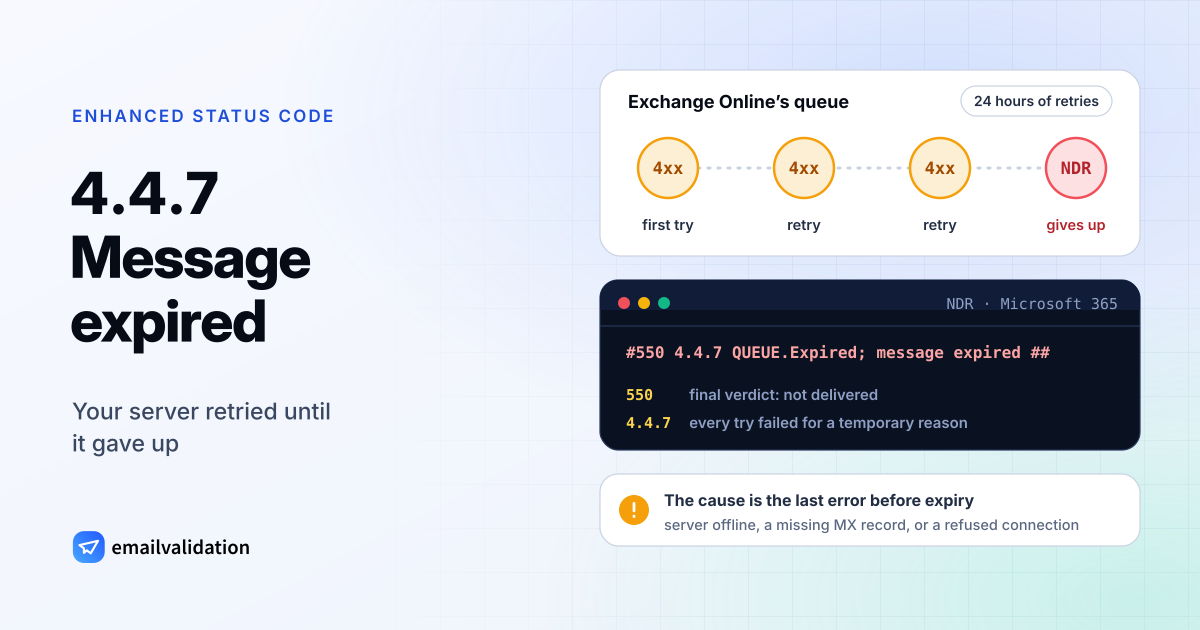
What 4.4.7 means
4.4.7 is an enhanced status code from RFC 3463, named “Delivery time expired”: “The message was considered too old by the rejecting system, either because it remained on that host too long or because the time-to-live value specified by the sender of the message was exceeded.”
In practice, the “rejecting system” is usually your own mail server or your email service. It accepted your message, tried to hand it to the recipient’s server, got temporary errors (or no connection at all), and kept retrying. RFC 5321 asks senders to retry for a while: “the give-up time generally needs to be at least 4-5 days.” Each system sets its own limit. When the message reaches it, the server stops and sends you a bounce with 4.4.7.
The 4 in front says the problem was temporary all along. That’s why the code says so little. RFC 3463 itself recommends something more specific: “If possible, the code for the actual problem found when delivery was attempted should be returned rather than this code.” The real reason is in the last error your server received, so look for it.
Error 4.4.7 in Microsoft 365 bounces
Exchange Online is where most people meet 4.4.7. Microsoft’s article on the error shows this line in the NDR’s diagnostic section:
#550 4.4.7 QUEUE.Expired; message expired ##
The mix of a 5 and a 4 looks odd, but it’s consistent: 550 is the final verdict, the message won’t be delivered, and 4.4.7 records that every attempt failed for a temporary reason. Microsoft says Exchange Online “repeatedly tries to deliver the message over 24 hours. Only after 24 hours of unsuccessful delivery attempts does a recipient receive this NDR.”
Microsoft’s NDR reference lists the same code as Message expired and adds that it “can also indicate that a message header limit was reached on a remote server, or some other protocol timeout occurred”. Two lines in the NDR help narrow it down:
| Clue | Also in the NDR | What it points to |
|---|---|---|
| Last error | 450 4.7.0 Proxy session setup failed on Frontend with '451 4.4.0 Primary target IP address responded with …' | The last error from the recipient’s server. Microsoft says to note “the error that follows this string and the last end point attempted.” |
| Directory | Ambiguous | Not a network problem: two objects in the directory share the same address, for example a mailbox and a mail contact |
What causes a 4.4.7 error
Microsoft lists these causes on the receiving side:
- “The destination email server is offline or unreachable.”
- “The server won’t accept delivery of the message.” Microsoft names aggressive anti-spam settings that block legitimate senders as one example.
- “A network problem is causing message delivery to time out.”
- “Incorrect DNS record of the destination domain.” For example, the MX record is missing or points to a server that no longer exists.
- “A message header limit was reached on a remote server, or some other protocol timeout occurred” (Microsoft’s NDR reference).
On the sending side, Microsoft names an SPF record that misses some of your sending sources, a sending domain that expired at the registrar, and, in hybrid setups, on-premises IP or firewall changes that need the Hybrid Configuration Wizard to run again.
How to fix 4.4.7 as the sender
- Check whether only one domain is affected. If all your 4.4.7 bounces go to one recipient domain, the problem is almost certainly there.
- Look up the recipient domain’s MX records with the MX lookup. No MX record, or one pointing to a host that doesn’t exist, explains the bounce. The MX record guide shows what a working setup looks like.
- Find the last error. In the NDR, or in your email service’s log, look for the temporary error before the expiry. It tells you whether the server was down, refused your IP, or timed out.
- Tell the recipient another way, with the server name, the error and a copy of the NDR, so their admin can fix it.
- Send the message again once the cause is fixed. Microsoft: “If you send the message again, the message is placed in the queue again. If the receiving server is available, the message is delivered.”
- If the last error mentions a header limit, send to fewer recipients per message.
If you’re the admin of the sending side, check your SPF record with the SPF checker and confirm with your registrar that your domain hasn’t expired.
If you run the receiving domain
Your users don’t get mail from that sender, and the sender only learns about it a day or more later. Microsoft recommends that recipient-side admins stop blocking messages from Exchange Online, or allow the sender’s domain, and check that MX and other DNS records are correct. Its Remote Connectivity Analyzer has an Outbound SMTP Email test for exactly that. Temporary refusals such as SMTP error 421 and SMTP error 451 are what senders’ servers retry; when every retry fails, they end as 4.4.7.
Would email verification have prevented it?
Partly. An email verification looks up the recipient domain’s MX records and talks to its mail server before you send. A domain that doesn’t exist or has neither MX nor A records comes back as undeliverable (reason invalid_mx), and a server that doesn’t answer comes back as unknown (no_connect), so you see the problem before your message sits in a queue for a day. What it can’t predict is an outage that starts after the check. To check a single address, use is this a real email address; to check addresses inside your own software, use the email validation API. The list of SMTP error codes has the other temporary failures, and hard vs. soft bounces explains how your email tool counts this one.