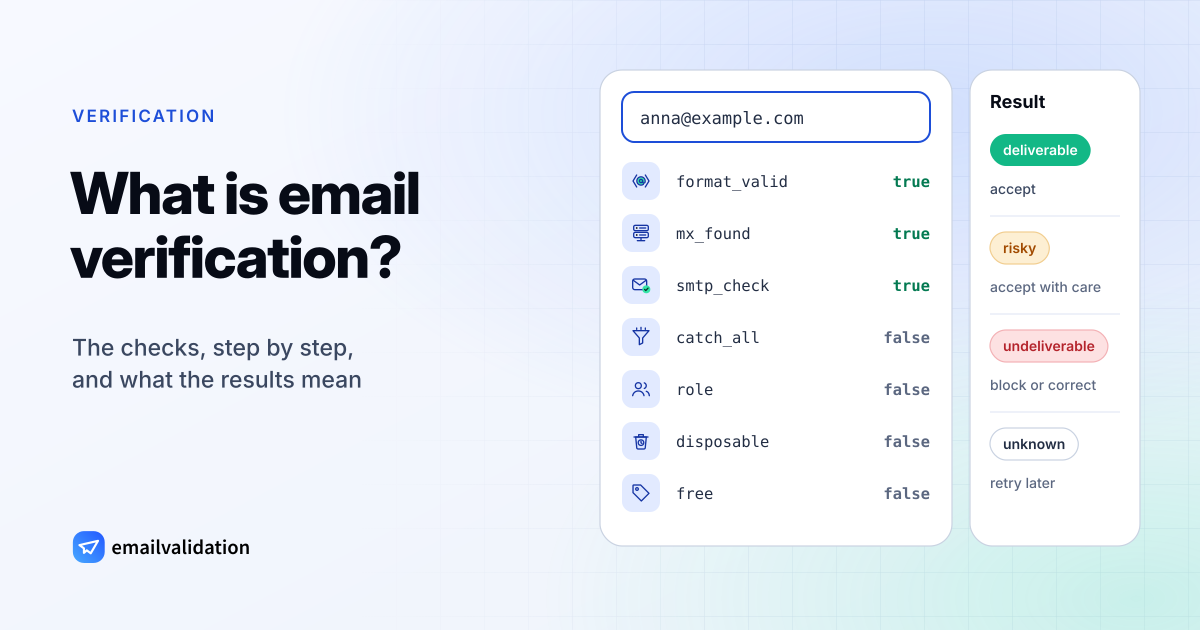
Email verification is the process of checking whether an email address exists and can receive mail, without sending a message to it. A verifier answers with a verdict (for example deliverable, undeliverable or unknown) and the reasons behind it, so you can decide whether to accept the address on a form, keep it on a list or remove it.
How does email verification work? It runs the same steps a mail server would take to deliver a message (read the address, find the domain’s mail server, ask it about the recipient) and stops right before the message would be handed over. The rest of this page goes through each check, explains what the results mean and where every verifier reaches its limits.
How email verification works, step by step
| # | Check | Question it answers | Field in the result |
|---|---|---|---|
| 1 | Syntax | Is the address written correctly? | format_valid |
| 2 | Domain | Does the domain exist? | covered by mx_found |
| 3 | MX records | Does the domain have mail servers? | mx_found |
| 4 | SMTP mailbox check | Does the mail server accept this mailbox? | smtp_check |
| 5 | Catch-all | Does the server accept every address? | catch_all |
| 6 | Role address | Is it a shared inbox like info@? | role |
| 7 | Disposable | Is it a throwaway inbox? | disposable |
| 8 | Free provider | Is it a free webmail account? | free |
1. Syntax. The address must follow the format rules: one @, a local part of up to 64 characters, a domain made of valid labels, at most 254 characters in all. Spaces, double dots and missing top-level domains fail here. A likely typo in a well-known domain (jane@gmial.com) gets a suggestion in did_you_mean. The rules are in email address format.
2. Domain. The domain has to exist in the DNS. A typo such as example.con usually fails here.
3. MX records. The verifier looks up the domain’s MX records, the DNS entries that name its mail servers. A domain can also publish a “null MX” (MX 0 .) to declare that it accepts no mail at all (RFC 7505). Missing or invalid MX records make the address undeliverable with the reason invalid_mx. The MX lookup shows a domain’s records.
4. SMTP mailbox check. The verifier connects to the domain’s mail server and starts a normal delivery: it greets the server, names a sender and then names the recipient with RCPT TO. If the server knows the mailbox, it answers 250; if it knows the address isn’t deliverable, it answers 550 (RFC 5321, section 3.3). The verifier then ends the conversation without sending the DATA command, so no message is delivered and the person never notices. How to check if an email exists shows the full SMTP dialog.
5. Catch-all. Some domains accept mail for any address, real or not. The verifier tests this by asking about an address that can’t exist, such as a random string. If the server accepts that too, a 250 for the real address proves nothing. In the emailvalidation.io API this test runs when you send catch_all=1 (Small plan and up); otherwise catch_all is null. For domains we already know to be catch-all, the mailbox check is skipped and the address comes back as deliverable with the reason low_deliverability (the free checker shows it as Catch-all). More in catch-all email.
6. Role address. Addresses such as support@, sales@ or postmaster@ usually reach a team or a shared inbox rather than a person. They can be perfectly deliverable; the flag lets you treat them differently in marketing.
7. Disposable. Addresses at temporary inbox services are typically used for one sign-up and then abandoned. The disposable email checker checks a single domain.
8. Free provider. Addresses at free webmail services (Gmail, Yahoo, Outlook.com and many others) are flagged in free. Useful when a business sign-up form should get work addresses.
The first four checks build on each other: an address with broken syntax never gets an MX lookup, and a domain without mail servers never gets an SMTP conversation. The role, disposable and free-provider flags are set for every address.
What email verification results mean
A verifier sums up the checks in a status. emailvalidation.io returns one of three states, each with a reason, and a score from 0 (bad) to 1 (good):
| State | Reason | What it means | What to do |
|---|---|---|---|
deliverable | valid_mailbox | A valid mailbox that can receive email | Accept the address |
deliverable | low_ | Accepted, but delivery is doubtful: a catch-all domain where no single mailbox can be confirmed, a disposable address or a full mailbox | Accept with care, or ask again |
deliverable | low_quality | The mailbox exists, but it is a role address such as info@ or support@ | Accept with care, or ask again |
undeliverable | invalid_format | The address format is invalid | Block it or ask for a correction |
undeliverable | invalid_mx | MX records are missing or invalid | Block it or ask for a correction |
undeliverable | invalid_smtp | Only returned for a sandbox test address; live checks don’t return it | – |
undeliverable | invalid_mailbox | The mail server refused the address | Block it or ask for a correction |
unknown | no_connect | No connection to the mail server | Retry later |
unknown | timeout | The SMTP connection timed out | Retry later |
unknown | unavailable_smtp | The server did not allow verification | Retry later |
unknown | unexpected_error | An unexpected error occurred | Retry later |
Branch on the state and keep the reason for your logs and your support team. The score helps you sort within a state, for example when you want to mail the best catch-all (low_deliverability) addresses first. Every result also carries the individual checks (format_valid, mx_found, smtp_check, catch_all, role, disposable, free) and the parts of the address (user, tag, domain), 21 fields in all, including a status, sub_status and recommended_action that tell you what to do. The email validation API page documents each one.
Other verifiers use their own labels (some call catch-all results “risky”), but the split is the same: the server said yes, the server said no, the server said yes to everything, or the server didn’t answer.
Email verification vs. email validation
The two terms are used for the same thing, and search engines show the same results for both. Where people do draw a line, it runs like this:
| Row label | Validation (narrow sense) | Verification (narrow sense) |
|---|---|---|
| Checks | Format, sometimes the domain | Format, domain, MX and the mailbox over SMTP |
| Network needed | Not for the format check | Yes |
| Domain without mail servers | Not caught | Caught |
| Mailbox of someone who left | Not caught | Caught, if the server rejects it |
A regular expression in a form is validation in the narrow sense: useful for catching obvious mistakes, but it can’t know whether the mailbox exists. The email regex guide shows a pattern that rejects the obvious mistakes without blocking valid addresses. emailvalidation.io uses “validation” and “verification” for the full set of checks.
Benefits of email verification
- Fewer hard bounces. Addresses the server rejects today would hard bounce tomorrow. Removing them keeps your email bounce rate down, which email services and mailbox providers watch.
- Better deliverability. Mailbox providers expect senders to remove invalid addresses: Yahoo’s sender best practices say to monitor bounces and remove invalid addresses promptly. A clean list is one of the five levers of email deliverability.
- Typos fixed at the source. A check on the sign-up form catches
jane@gmial.comwhile Jane is still there to correct it. After she leaves, the address is just lost. - Fewer recycled spam traps. Abandoned addresses bounce for a long time before mailbox providers turn them into spam traps. Verification removes them during that window.
- Cleaner data. Role, disposable and free-provider flags let you route business leads, block throwaway sign-ups and keep shared inboxes out of personal campaigns.
Limits: what verification can’t tell you
Every verifier, whatever it charges, works with the answers mail servers give. Where the server doesn’t give a clear answer, nobody can:
- Catch-all domains accept every address, so a
250doesn’t prove the mailbox exists. The best a verifier can do is detect the catch-all and say so. - Greylisting answers the first attempt from an unknown sender with a temporary
4xxcode on purpose (RFC 6647). The verifier has to try again later; until then, the result isunknown. - Servers that accept at RCPT and bounce later. Some mail systems accept every recipient during the SMTP conversation and decide afterwards. A check that doesn’t send a message can’t see that later bounce.
- A moment in time. The result is valid when it’s made. People change jobs and close accounts; a list verified a year ago needs another check.
- Existence isn’t engagement. A deliverable address can belong to an inbox nobody reads, and a pristine spam trap is a working mailbox. Verification can’t tell whether a person wants your mail; only confirmed opt-in can.
- Privacy. Verification processes email addresses, which are personal data under the GDPR when they identify a person (the European Commission’s own example is an address of the form name
.surname@company). You need a legal basis for holding and checking them, as for any other processing. The check itself sends nothing to the person.
Email validation best practices
- Check in real time on forms. Call the API when the address is entered and show the
did_you_meansuggestion. Don’t blockunknownresults or catch-all addresses (low_deliverability); ask the person to double-check instead. - Keep format rules loose. Accept plus addresses (
jane+news@example.com), long domains and new top-level domains. Let the mailbox check decide. - Use confirmed opt-in (double opt-in) for newsletters. Verification proves the mailbox exists; the confirmation click proves its owner wants your mail.
- Re-verify before campaigns to lists you haven’t mailed in a few months, with the bulk email verifier or the email list cleaning service.
- Retry
unknownresults later instead of deleting them; the cause is often temporary, like a timeout or greylisting. - Handle catch-all and role addresses separately: smaller batches, and removal of those that bounce or never engage.
Try it
Enter any address in the free email checker to see these checks run, or ask is this a real email address? to see every field explained. For your own app, the email validation API returns the same result as JSON; the free plan includes 100 validations a month.
Sources
Checked October 10, 2026: RFC 5321, section 3.3 (the SMTP RCPT TO replies); RFC 7505 (null MX); RFC 6647 (greylisting); Yahoo Sender Hub best practices; European Commission: Data protection explained (an email address as an example of personal data).