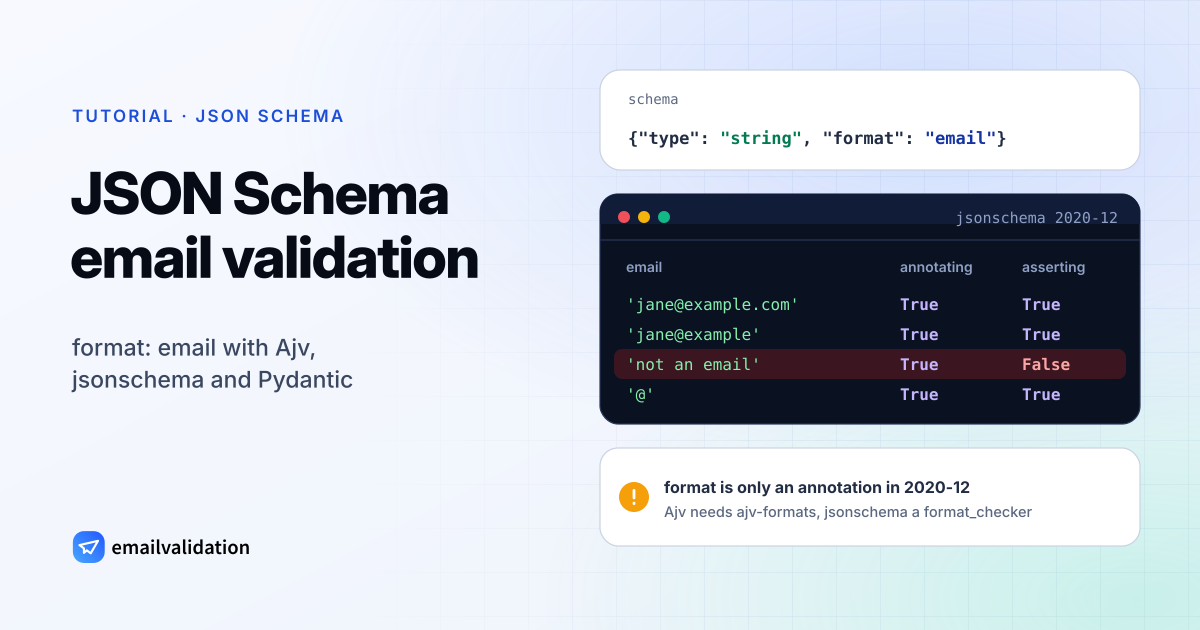
Here is a JSON Schema email validation example in its shortest form, and the catch that comes with it:
{
  "$schema": "https://json-schema.org/draft/2020-12/schema",
  "type": "object",
  "properties": {
    "email": { "type": "string", "format": "email", "maxLength": 254 }
  },
  "required": ["email"]
}
Whether "not an email" passes this schema depends on your validator and its settings, not on the schema. This guide shows why, and how to get a real check in Ajv (Node.js) and in Python, followed by the check no schema can do: whether the mailbox exists.
Tested with Ajv 8.20.0 and ajv-formats 3.0.1 on Node.js 26, and with jsonschema 4.26.0, Pydantic 2.14.2 and email-validator 2.3.0 on Python 3.11, October 29, 2026.
Email validation in JSON Schema: format is an annotation
The JSON Schema 2020-12 validation specification splits format into two vocabularies:
- Format-Annotation (required for every implementation): “The value of format MUST be collected as an annotation”. Implementations “MAY still treat “format” as an assertion”, but must offer an option for it that “MUST be disabled by default”.
- Format-Assertion (optional): when a schema declares it, implementations must fully validate every format the specification defines.
For email, the specification defines two formats:
| Format | Defined as | Example it allows |
|---|---|---|
email | The “Mailbox” ABNF rule in RFC 5321, section 4.1.2 | jane@example.com |
idn-email | The extended “Mailbox” rule in RFC 6531, section 3.3 | josé@example.com |
The email address format guide explains what these RFC rules allow in practice. By the specification, "format": "email" alone is a label. What happened with the schema above and four different setups in our test:
| Setup | "not an email" | "@" |
|---|---|---|
| Ajv 2020 without ajv-formats | Schema doesn’t compile: unknown format "email" ignored in schema at path "#/properties/email" | – |
| Ajv 2020 with ajv-formats | Rejected | Rejected |
| Python jsonschema, no format checker | Passes | Passes |
Python jsonschema with FORMAT_CHECKER | Rejected | Passes |
Ajv’s strict mode turns an unknown format into an error, which is helpful: you notice the missing plugin. With strict: false it only logs a warning and lets every string through.
JSON Schema email validation in Node.js with Ajv
Ajv dropped its built-in formats in version 7; they now live in the ajv-formats plugin. For 2020-12 schemas, import the Ajv2020 class:
npm install ajv ajv-formats
import Ajv2020 from "ajv/dist/2020.js";
import addFormats from "ajv-formats";

const schema = {
  $schema: "https://json-schema.org/draft/2020-12/schema",
  type: "object",
  properties: {
    email: { type: "string", format: "email", maxLength: 254 },
  },
  required: ["email"],
  additionalProperties: false,
};

const ajv = new Ajv2020({ allErrors: true });
addFormats(ajv);
const validate = ajv.compile(schema);

for (const email of ["jane@example.com", "jane@example", "jane..doe@example.com"]) {
  const ok = validate({ email });
  console.log(email, ok, ok ? "" : JSON.stringify(validate.errors));
}
Output:
jane@example.com true
jane@example false [{"instancePath":"/email","schemaPath":"#/properties/email/format","keyword":"format","params":{"format":"email"},"message":"must match format \"email\""}]
jane..doe@example.com false [{"instancePath":"/email","schemaPath":"#/properties/email/format","keyword":"format","params":{"format":"email"},"message":"must match format \"email\""}]
In CommonJS, const Ajv2020 = require("ajv/dist/2020") works the same way. The schema checks data on the server; for instant feedback in the browser and typo hints, see JavaScript email validation.
ajv-formats has two modes. "full" is the default; addFormats(ajv, { mode: "fast" }) uses simplified regular expressions. For email, the difference is real:
| Address | full | fast |
|---|---|---|
jane@example.com | ✓ | ✓ |
jane+news@ | ✓ | ✓ |
JANE@EXAMPLE.COM | ✓ | ✓ |
jane@example | ✗ | ✓ |
.jane@ | ✗ | ✓ |
jane..doe@ | ✗ | ✓ |
jane@example.c | ✓ | ✓ |
| 65 characters before the @ | ✓ | ✓ |
jane@ | ✗ | ✗ |
jane doe@example.com | ✗ | ✗ |
"jane doe"@example.com | ✗ | ✗ |
jane@[192 | ✗ | ✗ |
josé@example.com | ✗ | ✗ |
jane@example.com (leading space) | ✗ | ✗ |
Neither mode trims whitespace, so trim the value before validating, and keep maxLength: 254 in the schema, since neither mode limits the length of the part before the @.
idn-email isn’t in ajv-formats. In our test, "format": "idn-email" failed to compile with the same unknown-format error. The ajv-formats README points to the separate ajv-formats-draft2019 plugin for internationalized formats.
The Ajv formats guide adds a warning: “It is recommended NOT to use “format” keyword implementations with untrusted data”, because they may rely on regular expressions that are unsafe with crafted input. If you validate request bodies from the internet, cap the body size and string lengths before the data reaches the validator.
JSON Schema email validation in Python
The jsonschema package follows the specification: “By default, as per the specification, no validation is enforced.” Pass a format checker to turn it on:
from jsonschema import Draft202012Validator

schema = {
    "$schema": "https://json-schema.org/draft/2020-12/schema",
    "type": "object",
    "properties": {"email": {"type": "string", "format": "email"}},
    "required": ["email"],
}

annotating = Draft202012Validator(schema)
asserting = Draft202012Validator(schema, format_checker=Draft202012Validator.FORMAT_CHECKER)

for email in ["jane@example.com", "jane@example", "not an email", "@"]:
    print(repr(email), annotating.is_valid({"email": email}), asserting.is_valid({"email": email}))
'jane@example.com' True True
'jane@example' True True
'not an email' True False
'@' True True
The documentation is open about it: the email check “only provides a sanity check”. In the source, the checker for both email and idn-email returns "@" in instance. Every string with an @ passes, including jane doe@example.com and a lone @.
Pydantic EmailStr
If your Python schema comes from Pydantic models, EmailStr gives you a much stricter check and still writes format: email into the generated JSON Schema. It needs the email-validator package:
pip install pydantic email-validator
from pydantic import BaseModel, EmailStr, ValidationError

class Signup(BaseModel):
    email: EmailStr

print(Signup(email="Jane.Doe@Example.COM").email)  # Jane.Doe@example.com

try:
    Signup(email="jane@example")
except ValidationError as e:
    print(e.errors()[0]["msg"])

print(Signup.model_json_schema())
Jane.Doe@example.com
value is not a valid email address: The part after the @-sign is not valid. It should have a period.
{'properties': {'email': {'format': 'email', 'title': 'Email', 'type': 'string'}}, 'required': ['email'], 'title': 'Signup', 'type': 'object'}
EmailStr normalizes as it validates: it lowercases the domain, keeps the local part as typed, and strips surrounding whitespace. Its error messages come straight from email-validator and say what is wrong, for example “An email address cannot have two periods in a row.” In Pydantic’s source, the call is email_validator, so no DNS lookup happens. Some results worth knowing:
| Address | EmailStr | Note |
|---|---|---|
jane@example | ✗ | “It should have a period.” |
jane@ | ✗ | Special-use domain |
jane@localhost | ✗ | |
jane@ | ✗ | |
josé@example.com | ✓ | Internationalized addresses are allowed |
jane@ | ✓ | Same |
jane@example.c | ✓ | |
| 65 characters before the @ | ✓ | email-validator checks this length only with strict=True |
To reject internationalized addresses, call email-validator yourself with allow_smtputf8=False; the Python email validation guide shows the library on its own.
After the schema: check that the mailbox exists
Every validator above answers one question: is this string shaped like an email address? jane.doe@example.com passes all of them and still bounces, because example.com accepts no mail. The schema is the right place for the shape; the existence check belongs in the handler after it. In Node.js:
import Ajv2020 from "ajv/dist/2020.js";
import addFormats from "ajv-formats";

const ajv = new Ajv2020({ allErrors: true });
addFormats(ajv);
const validateSignup = ajv.compile({
  $schema: "https://json-schema.org/draft/2020-12/schema",
  type: "object",
  properties: { email: { type: "string", format: "email", maxLength: 254 } },
  required: ["email"],
});

async function checkMailbox(email) {
  const url = new URL("https://api.emailvalidation.io/v1/info");
  url.searchParams.set("email", email);
  url.searchParams.set("timeout", "8"); // seconds the API waits for the mail server
  const res = await fetch(url, {
    headers: { apikey: process.env.EMAILVALIDATION_KEY },
    signal: AbortSignal.timeout(10_000),
  });
  if (!res.ok) throw new Error(`emailvalidation.io answered ${res.status}`);
  return res.json();
}

export async function handleSignup(body) {
  if (!validateSignup(body)) {
    return { status: 422, errors: validateSignup.errors };
  }
  try {
    const result = await checkMailbox(body.email);
    if (result.state === "undeliverable") {
      return { status: 422, errors: [{ instancePath: "/email", message: `mailbox check failed: ${result.reason}` }] };
    }
  } catch {
    // API unreachable or timed out: accept the address and check it later
  }
  return { status: 201 };
}
The mailbox errors use the same shape as Ajv’s, so your client can show them the same way. Run against a local mock of the email validation API with its documented response format, handleSignup returned 201 for a deliverable address, 422 with “mailbox check failed: invalid_mailbox” for an undeliverable one, 422 with Ajv’s errors for jane@example and a missing field, and 201 when the API was unreachable or answered with an error.
The API result has 21 fields: state is deliverable, undeliverable or unknown; reason explains it; status, sub_status and recommended_action (send, send_with_caution, suppress, retry_later) say what to do with the address; disposable, role and free flag throwaway, role and free-provider addresses. Addresses on catch-all domains come back as deliverable with the reason low_deliverability and the status catch_all, because such domains accept every address. The timeout parameter (3 to 60 seconds, 30 by default) keeps a slow mail server from holding up the signup; set the request’s own limit a few seconds above it. The same API call in Python, with requests, is in the Python email validation guide.
If you’d rather keep a regular expression in the schema itself, use pattern instead of format. The specification lists pattern among the keywords that are “all assertions without any annotation behavior”, so every validator applies it. It also notes that “regular expressions are not implicitly anchored”: start the pattern with ^ and end it with $. Here is the tested pattern from the email regex guide as a schema, with its 254-character lookahead replaced by maxLength and every backslash doubled for JSON:
{
  "$schema": "https://json-schema.org/draft/2020-12/schema",
  "type": "string",
  "maxLength": 254,
  "pattern": "^(?=.{1,64}@)[A-Za-z0-9!#$%&'*+/=?^_`{|}~-]+(?:\\.[A-Za-z0-9!#$%&'*+/=?^_`{|}~-]+)*@(?:[A-Za-z0-9](?:[A-Za-z0-9-]{0,61}[A-Za-z0-9])?\\.)+(?:[A-Za-z]{2,63}|xn--[A-Za-z0-9-]{2,59})$"
}
Ajv and Python’s jsonschema both accepted jane@example.com and o'brien@example.ie with it, and rejected jane@example, jane..doe@example.com and a 65-character local part, without any format plugin. Lists of addresses that are already in a database are better checked in one job with the bulk email verifier than one request at a time.
Sources
All checked October 29, 2026: