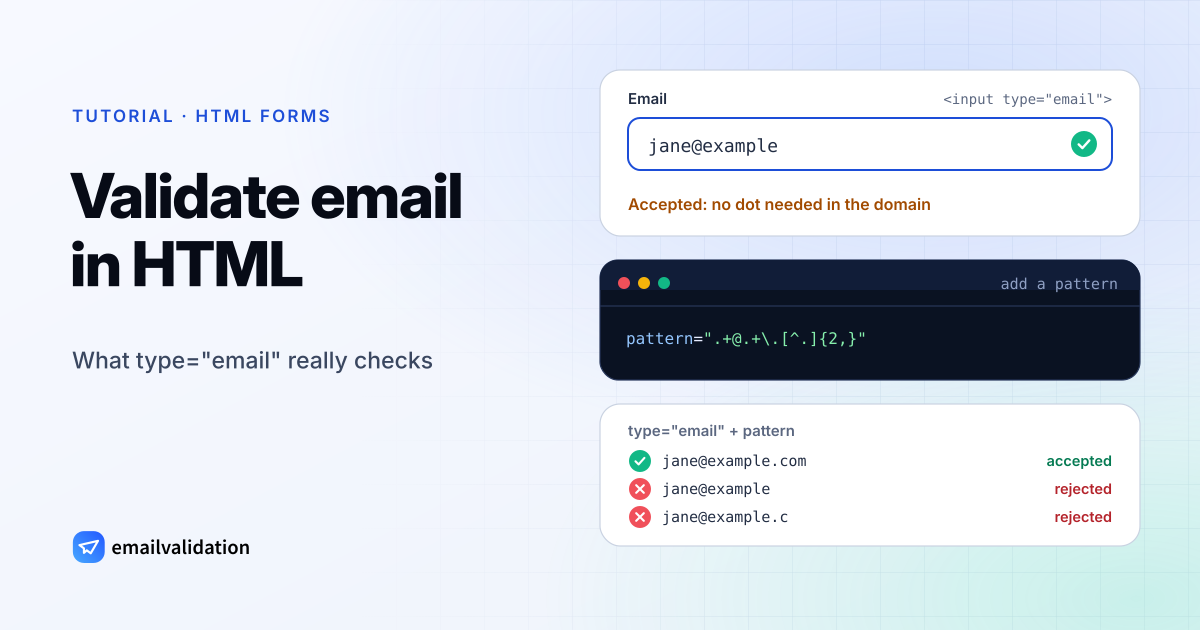
The HTML email validator you already have is <input type="email">: the browser checks the value against one rule from the HTML standard before it submits the form. That rule is deliberately loose. It catches typing mistakes and nothing else, so the useful questions are what exactly it accepts, how to tighten it, and what your server has to do anyway.
<input type="email" name="email" required autocomplete="email">
The rule behind type="email"
The HTML standard defines a valid email address with this ABNF:
email         = 1*( atext / "." ) "@" label *( "." label )
label         = let-dig [ [ ldh-str ] let-dig ]  ; limited to a length of 63 characters by RFC 1034 section 3.5
atext         = < as defined in RFC 5322 section 3.2.3 >
let-dig       = < as defined in RFC 1034 section 3.5 >
ldh-str       = < as defined in RFC 1034 section 3.5 >
and gives a JavaScript regular expression that implements it:
/^[a-zA-Z0-9.!#$%&'*+\/=?^_`{|}~-]+@[a-zA-Z0-9](?:[a-zA-Z0-9-]{0,61}[a-zA-Z0-9])?(?:\.[a-zA-Z0-9](?:[a-zA-Z0-9-]{0,61}[a-zA-Z0-9])?)*$/
The standard calls this “a willful violation of RFC 5322”, whose syntax is “simultaneously too strict (before the “@” character), too vague (after the “@” character), and too lax (allowing comments, whitespace characters, and quoted strings in manners unfamiliar to most users) to be of practical use here.”
Read the ABNF closely and three consequences follow:
- The local part is any mix of
atextand dots. Leading, trailing and double dots pass. - The domain needs no dot. One label like
exampleis enough, which suits intranet hosts but not sign-up forms. - There is no total length limit. Only each domain label is limited to 63 characters.
The value is also cleaned before it is checked: the browser strips line breaks and leading and trailing whitespace (the “value sanitization algorithm”). An empty value is valid unless the input is required.
HTML email validator test: 23 addresses
We set each address as the value of an <input type="email"> in Chrome 156 and called checkValidity(). The same addresses through the standard’s regex in Node.js, after trimming, gave identical results.
| Address | Valid? | Why |
|---|---|---|
jane@example.com | ✓ | |
jane.doe@ | ✓ | |
jane+news@ | ✓ | + is atext |
o'brien@ | ✓ | ' is atext |
JANE@EXAMPLE.COM | ✓ | |
jane@example | ✓ | No dot needed in the domain |
.jane@ | ✓ | Dots anywhere in the local part |
jane | ✓ | Same |
jane..doe@ | ✓ | Same |
jane@example.c | ✓ | One-letter labels are allowed |
| 65 characters before the @ | ✓ | No length limit on the local part |
jane@example.com | ✓ | Whitespace is stripped first |
jane@example.com + line break | ✓ | Line break is stripped first |
jane@-example.com | ✗ | Label can’t start with a hyphen |
jane@ | ✗ | Empty domain label |
jane@ | ✗ | _ not allowed after the @ |
jane doe@example.com | ✗ | Space |
jane@ | ✗ | Second @ |
"jane doe"@example.com | ✗ | No quoted local parts |
jane@[192 | ✗ | No IP address literals |
josé@example.com | ✗ | Non-ASCII local part |
jane@ (set by script) | ✗ | Non-ASCII domain in value |
| 64-character domain label | ✗ | Labels are limited to 63 |
Two of these depend on how the value gets in. When we entered jane@bücher.example as typed text instead, Chrome stored jane@xn--bcher-kva.example and the field was valid: the standard says browsers “should convert punycode in the domain labels of the value to IDN in the display and vice versa”. And the error messages are the browser’s own. For jane@exa_mple.com, Chrome said: “A part following ‘@’ should not contain the symbol ‘_’.”
To see each format rule spelled out for a single address, use the email syntax checker; the email address format guide explains where the rules come from.
Validate email in HTML5: required, multiple and pattern
Three attributes change what the email validator accepts.
required makes an empty field invalid (validity.valueMissing). Without it, an empty email field submits.
multiple accepts a comma-separated list. Each address must pass on its own, and whitespace around each one is stripped:
Value with multiple | Valid? | value after sanitizing |
|---|---|---|
jane@example.com, bob@example.org | ✓ | jane@ |
jane@example.com ,bob@example.org | ✓ | jane@ |
jane@ | ✗ | (unchanged) |
jane@ | ✗ | (unchanged) |
Semicolons, which many mail programs use as separators, are not accepted.
pattern adds your own regular expression on top of the type check. The browser anchors it for you (it wraps it in ^(?: and )$), and with multiple it applies to each address. To require a dot and a top-level domain of at least two characters:
<input type="email" name="email" required
       pattern=".+@.+\.[^.]{2,}"
       title="An email address with a domain such as example.com">
In our run, the pattern rejected jane@example and jane@example.c (both patternMismatch), and accepted jane@mail.example.co.uk, JANE@EXAMPLE.COM and jane@example.xn--p1ai. The standard asks for a title that describes the pattern, since browsers may show it in the error message.
The pattern that silently does nothing
Browsers compile pattern with the JavaScript v flag, as the pattern attribute section of the standard specifies. In v mode, a hyphen at the end of a character class is a syntax error, and a pattern that doesn’t compile is simply ignored. This common copy-paste pattern is one of them:
<!-- ignored in current browsers: the "-" at the end of each class is invalid in v mode -->
<input type="email" pattern="[a-z0-9._%+-]+@[a-z0-9.-]+\.[a-z]{2,}">
Chrome logged this to the console and then accepted jane@example:
Pattern attribute value [a-z0-9._%+-]+@[a-z0-9.-]+\.[a-z]{2,} is not a valid regular expression: Uncaught SyntaxError: Failed to execute 'checkValidity' on 'HTMLInputElement': Invalid regular expression: /[a-z0-9._%+-]+@[a-z0-9.-]+\.[a-z]{2,}/v: Invalid character in character class
Escaped as [a-z0-9._%+\-] and [a-z0-9.\-], the pattern works, but note that it is case-sensitive and rejected Jane@Example.com in the same run. Check the console whenever you add a pattern.
Custom error messages with the constraint validation API
The browser’s messages differ between browsers and languages. To show your own, turn off the built-in bubbles with novalidate and read the constraint validation API yourself:
<form id="signup" action="/signup" method="post" novalidate>
  <label for="email">Email</label>
  <input id="email" name="email" type="email" required autocomplete="email"
         pattern=".+@.+\.[^.]{2,}" aria-describedby="email-error">
  <p id="email-error" role="alert"></p>
  <button>Sign up</button>
</form>

<script>
  const form = document.getElementById("signup");
  const email = document.getElementById("email");
  const error = document.getElementById("email-error");

  function messageFor(input) {
    if (input.validity.valueMissing) return "Please enter your email address.";
    if (input.validity.typeMismatch) return "That doesn't look like an email address.";
    if (input.validity.patternMismatch) return "Please check the part after the @, e.g. example.com.";
    return "";
  }

  email.addEventListener("input", () => { error.textContent = ""; });

  form.addEventListener("submit", (event) => {
    if (!email.checkValidity()) {
      event.preventDefault();
      error.textContent = messageFor(email);
      email.focus();
    }
  });
</script>
In Chrome, an empty field, jane doe@example.com and jane@example each stopped the form with the matching message, and jane@example.com was submitted as email=jane%40example.com, already trimmed.
The other tools of the API: setCustomValidity("…") marks a field invalid with your own message (for example after a server answer) and setCustomValidity("") clears it; reportValidity() checks and shows the browser’s message; validity.typeMismatch is the flag for a value that fails the email rule.
Why the browser check is not enough
The HTML email validator runs in a program you don’t control. Three reasons to check again on the server:
- It can be skipped. A form with
novalidate, a disabled script, a bot or a plain HTTP request sends whatever it likes. - It’s loose by design.
jane@exampleandjane..doe@example.compass, as the table shows. - It knows nothing about the mailbox.
jane.doe@example.compasses every format rule and still bounces, becauseexample.comaccepts no mail. The same goes for typos in real domains, mailboxes that were deleted, and disposable inboxes.
On the server, repeat the format rule and then ask the recipient’s mail server. A Node.js handler for the form above:
// The browser's rule from the HTML standard, plus "the domain needs a dot".
const HTML_EMAIL = /^[a-zA-Z0-9.!#$%&'*+\/=?^_`{|}~-]+@[a-zA-Z0-9](?:[a-zA-Z0-9-]{0,61}[a-zA-Z0-9])?(?:\.[a-zA-Z0-9](?:[a-zA-Z0-9-]{0,61}[a-zA-Z0-9])?)*$/;

export async function checkEmailField(raw) {
  const email = String(raw ?? "").trim();
  if (!HTML_EMAIL.test(email) || !email.split("@")[1].includes(".")) {
    return { ok: false, message: "Please enter a valid email address." };
  }
  try {
    // timeout=8: the API answers "unknown" after 8 s instead of waiting for a slow mail server
    const url = `https://api.emailvalidation.io/v1/info?timeout=8&email=${encodeURIComponent(email)}`;
    const res = await fetch(url, {
      headers: { apikey: process.env.EMAILVALIDATION_KEY },
      signal: AbortSignal.timeout(10_000),
    });
    if (res.ok) {
      const result = await res.json();
      if (result.state === "undeliverable") {
        return { ok: false, message: "This mailbox doesn't exist. Please check the address." };
      }
    }
  } catch {
    // network error or timeout: don't block the form
  }
  return { ok: true, email };
}
The API’s timeout parameter (3 to 60 seconds, 30 by default) caps the mail server check, so the 10-second limit on the request is never the one that fires in normal operation. Against a local mock of the email validation API with its documented response format, this accepted a deliverable address, rejected one reported as undeliverable, and accepted the address when the API was unreachable, answered with an error or took longer than 10 seconds. The result also carries status and recommended_action (a disposable inbox comes back as do_not_mail with suppress) and did_you_mean if you want to block throwaway inboxes or suggest a correction. Keep the API key on the server; a key in front-end code can be read by anyone.
For a stricter format rule than the standard’s, the tested pattern in the email regex guide works in JavaScript, Python, PHP, Java, Go and Ruby. To try a single address by hand, use the free email validator.
Recommended setup
type="email",requiredandautocomplete="email"on the input: right keyboard on phones, instant feedback.- A
patternthat requires a top-level domain, with atitle, and a look at the console to make sure it compiles. - Your own messages via
novalidateandvalidityif the browser’s wording doesn’t fit. - The same format check on the server, then the mailbox check. Typo hints in the browser are in the JavaScript email validation guide.
Sources
All checked October 29, 2026:
- HTML Standard: Email state (type=email), valid email address, the pattern attribute, the constraint validation API
- Test runs: Google Chrome 156.0.8078.48 (headless, driven over the DevTools protocol) and Node.js 26.12, October 29, 2026