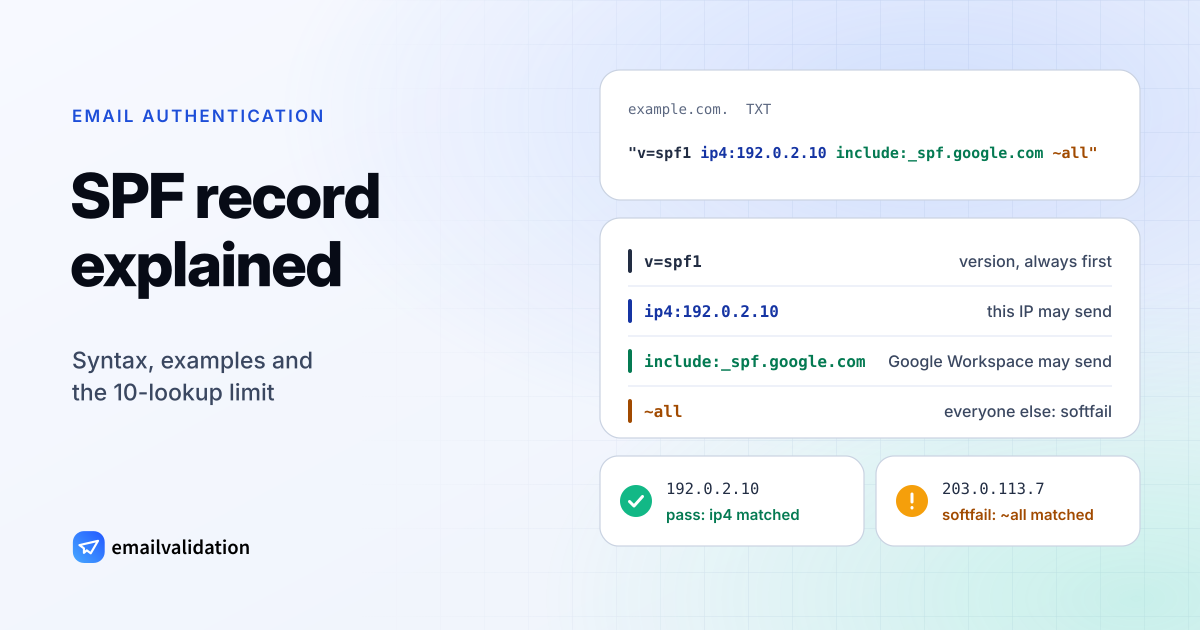
An SPF record is a TXT record in your domain’s DNS that lists every server allowed to send email for the domain. Receiving mail servers look it up for each incoming message and compare the sending server’s IP address with the list. The format is defined in RFC 7208, and a typical record is one short line:
example.com. TXT "v=spf1 include:_spf.google.com ~all"
That record says: servers listed in Google’s SPF record may send for example.com; mail from anywhere else is suspicious.
What an SPF record does
SPF (Sender Policy Framework) answers one question for the receiving server: is this IP address allowed to send mail for this domain?
The domain it checks is not the one in the visible From line. SPF checks the envelope sender, the address in the SMTP MAIL FROM command that ends up in the Return-Path header, and RFC 7208 recommends checking the HELO name too (section 2.3). When an email service sends with its own bounce domain, SPF is checked against that domain, not yours. Linking SPF to the From address people see is the job of DMARC, covered in what is a DMARC record.
The check returns one of seven results (section 2.6):
| Result | Meaning |
|---|---|
pass | The IP address is authorized. |
fail | The domain says the IP address is not authorized (usually because -all matched). |
softfail | The IP address is probably not authorized (usually because ~all matched). |
neutral | The domain makes no statement about this IP address (usually because ?all matched). |
none | The domain has no SPF record. |
temperror | A temporary DNS error during the check. Receivers may retry later. |
permerror | The record could not be interpreted: a syntax error, two records, or too many DNS lookups. |
SPF records must be published as TXT records. The separate SPF record type was dropped in RFC 7208 (section 3.1), so don’t create one even if your DNS host still offers it.
SPF record syntax: mechanisms and qualifiers
Every SPF record has the same structure: the version tag, then a list of terms separated by spaces, usually ending with all.
v=spf1 ip4:192.0.2.10 include:_spf.google.com include:mail.zendesk.com -all
v=spf1is the version and must come first.ip4:192.0.2.10,include:_spf.google.comandinclude:mail.zendesk.comare mechanisms: each describes a set of allowed servers.-allmatches every server not matched before it.
The receiver checks the mechanisms from left to right and stops at the first one that matches the sending IP address. The qualifier in front of that mechanism decides the result.
Mechanisms and modifiers
| Term | Example | Matches when the sending IP … | DNS lookups |
|---|---|---|---|
ip4 | ip4:192.0.2.0/24 | is in this IPv4 address or range | 0 |
ip6 | ip6: | is in this IPv6 address or range | 0 |
a | a or a: | is an A or AAAA address of the domain (the current domain if none is given) | 1 |
mx | mx or mx:example.com | is an address of one of the domain’s MX hosts | 1 |
include | include: | passes the SPF record of the other domain | 1, plus the lookups inside that record |
exists | exists: | makes the (expanded) name resolve to any A record | 1 |
ptr | ptr | has reverse DNS in the domain. RFC 7208 says it SHOULD NOT be published. | 1 |
all | -all | always matches. It goes last. | 0 |
redirect= (modifier) | redirect= | use that domain’s record when nothing else matched | 1 |
exp= (modifier) | exp= | not a match: points to an explanation text for rejections | 0 |
a and mx accept a prefix length, so a:mail.example.com/28 authorizes the whole /28 network around that host. Section 5 of the RFC defines every mechanism in detail.
redirect= is useful when many domains share one policy. Each domain publishes v=spf1 redirect=_spf, and you maintain the list in one place. The modifier is ignored when the record also contains an all mechanism (section 6.1), so a redirect record never ends with ~all or -all.
Qualifiers
| Qualifier | Example | Result when it matches |
|---|---|---|
+ (default) | +mx, or just mx | pass |
- | -all | fail |
~ | ~all | softfail |
? | ?all | neutral |
The + is implied when no qualifier is written, which is why include:_spf.google.com means “pass if Google’s list matches”.
Long records
A single string in a TXT record holds at most 255 characters. Longer SPF records are published as several strings in one record; receivers join them without adding spaces (section 3.3), so end each string with a space:
example.com.  TXT  ( "v=spf1 ip4:192.0.2.0/24 ip4:198.51.100.0/24 ip4:203.0.113.0/24 "
                     "include:_spf.google.com ~all" )
Some DNS hosts’ web forms split long values for you, others expect the quoted strings; their help pages say which. RFC 7208 also asks that the record stay small enough for the DNS answer to fit in 512 bytes (section 3.4).
SPF record examples: Google Workspace, Microsoft 365, multiple senders
The include values below come from each provider’s own documentation, checked October 29, 2026.
Google Workspace SPF record
Google’s SPF setup page gives this record for domains that send only through Google Workspace, and recommends ~all:
example.com. TXT "v=spf1 include:_spf.google.com ~all"
To add another sender, put its include: before ~all in the same record. Google notes that SPF can take up to 48 hours to start working after you publish it.
Microsoft 365 SPF record
Microsoft’s SPF configuration guide gives this record for Microsoft 365 domains and recommends -all, because it also recommends DKIM and DMARC for the domain:
example.com. TXT "v=spf1 include:spf.protection.outlook.com -all"
GCC High and DoD tenants use include: instead. Your *.onmicrosoft.com domain already has an SPF record that you can’t change.
Multiple senders
A domain on Microsoft 365 that also sends from its own server and from Zendesk lists all three:
example.com. TXT "v=spf1 ip4:198.51.100.25 include:spf.protection.outlook.com include:mail.zendesk.com -all"
Microsoft recommends a subdomain for bulk email services and other senders that aren’t under your direct control. The subdomain gets its own record, because the record on the main domain doesn’t cover it:
mg.example.com. TXT "v=spf1 include:mailgun.org ~all"
A domain that sends no email at all publishes a record that authorizes nobody:
example.com. TXT "v=spf1 -all"
SPF includes for common services
| Service | SPF include | Note | Provider documentation |
|---|---|---|---|
| Google Workspace | include: | Google recommends ~all. | Documentation |
| Microsoft 365 | include: | Microsoft recommends -all. GCC High and DoD use spf.protection.office365.us. | Documentation |
| Zoho Mail | include: | Zoho suggests one.zoho.com instead if you send from several Zoho apps. | Documentation |
| Proton Mail | include: | – | Documentation |
| Fastmail | include: | Fastmail’s own example ends with ?all. | Documentation |
| iCloud+ (custom domain) | include: | – | Documentation |
| Hostinger Email | include: | – | Documentation |
| IONOS | include: | Only needed when your DNS is not at IONOS: IONOS publishes its SPF rule by default for domains whose DNS it hosts. | Documentation |
| ALL-INKL.COM | include: | ALL-INKL’s own example is v=spf1 a mx include:spf. | Documentation |
| STRATO | include: | STRATO’s default record v=spf1 redirect=_spf allows only STRATO; to add other senders, choose “Keine STRATO SPF-Regel” and use include:_spf.strato.com, not redirect=. | Documentation |
| SendGrid | include: | Not needed if you set up Domain Authentication with automated security (CNAME records). | Documentation |
| Mailgun | include: | Mailgun asks for it on the domain you verified with them, often a subdomain. | Documentation |
| Mailjet | include: | – | Documentation |
| Zendesk | include: | Zendesk’s own example ends with -all. | Documentation |
| Freshdesk | include: | – | Documentation |
| CleverReach | include: | CleverReach’s own example for a new record is v=spf1 a mx include:spf. | Documentation |
Values checked against each provider’s documentation on October 9, 2026. Providers change their setup now and then, so follow their current instructions if they differ.
The 10-lookup limit and flattening
Section 4.6.4 caps the DNS lookups for one SPF check at 10. include, a, mx, ptr, exists and redirect count, and so does every one of those terms inside the records you include. ip4, ip6, all and exp don’t. A check that needs an 11th lookup ends with permerror.
Here is how a record adds up (the included domains are fictional):
| Term | Lookups |
|---|---|
ip4:192.0.2.10 | 0 |
mx | 1 |
include:, whose record contains 2 more includes (with only ip4 inside) | 3 |
include:, whose record contains 1 a and 1 more include (with only ip4 inside) | 3 |
~all | 0 |
| Total | 7 |
Two more limits apply. Lookups that return no data or a “domain doesn’t exist” answer (“void lookups”) should be limited to two, and exceeding that limit also produces permerror. And an include that points to a domain without an SPF record returns permerror too (section 5.2), which is what happens after a typo in an include value.
The count depends on the providers’ current records, which they change without notice. The SPF checker resolves the whole include tree and shows the live total.
How to get back under 10
- Remove senders you no longer use. Old CRMs and newsletter tools are the usual leftovers.
- Check whether a sender needs the include at all. Many services send with their own bounce domain, so SPF is checked on their domain, and they authenticate your domain with DKIM instead. Their setup guide says which.
- Move bulk senders to a subdomain. Give it its own SPF record, as in the Mailgun example above. Each subdomain’s record gets its own budget of 10 lookups.
- Replace includes with IP ranges (“flattening”). This saves lookups, but your record goes stale as soon as the provider changes its servers. Microsoft suggests replacing an include with
ip4:orip6:values when a vendor has “a stable, documented set of sending IP addresses”; for everyone else, keep the include.
~all vs -all
The qualifier on all decides what the record says about every server you didn’t list:
~all(softfail): probably not authorized. Receivers accept the mail but treat it as suspicious. Google recommends it for Google Workspace.-all(fail): not authorized. Receivers may reject the mail. Microsoft recommends it for Microsoft 365.?all(neutral): no statement. Only useful while you test a new record.+all: every server on the internet passes. Never publish it.
Once DMARC is in place, the difference matters less than it seems: DMARC counts both ~all and -all as SPF failures, as Microsoft’s guide points out, and the DMARC policy decides what happens to the message. Microsoft adds a caveat: for ~all failures in messages without a DKIM signature, the DMARC policy is effectively ignored, which is why it recommends -all. Use -all when you are sure every legitimate sender is listed, and ~all while you are still finding them.
Common SPF errors (PermError, multiple records)
| Problem | Result | Fix |
|---|---|---|
Two TXT records starting with v=spf1 | permerror (section 3.2) | Merge them into one record. |
| More than 10 DNS lookups | permerror | Remove, move or flatten includes (see above). |
include: of a domain without an SPF record, often a typo | permerror | Copy the value from the provider’s documentation. |
Syntax error, for example include: _spf (space after the colon) or ip4:192.0.2.0/33 | permerror | Rebuild the record with the SPF record generator. |
| DNS timeout or server failure during the check | temperror (section 4.4) | Usually transient; check your DNS host if it persists. |
| Record published as type SPF instead of TXT | none | Publish it as TXT. |
| Sending subdomain without its own record | none | Add a record on the subdomain. |
| A sender’s IP address is missing | softfail or fail | Add its include or IP range. |
The double record usually appears when a new service’s setup guide says “add this SPF record” and someone adds a second one instead of editing the first. Merge them like this:
; Before: two records, SPF returns permerror for every message
example.com.  TXT  "v=spf1 include:_spf.google.com ~all"
example.com.  TXT  "v=spf1 include:mail.zendesk.com -all"

; After: one record with both senders and one all
example.com.  TXT  "v=spf1 include:_spf.google.com include:mail.zendesk.com ~all"
Other TXT records on the domain, such as site verification codes, are unaffected. Only records starting with v=spf1 count.
A permerror is easy to miss because much of your mail still arrives, signed with DKIM. It shows up as spf=permerror in the Authentication-Results header of delivered messages, which the email header analyzer reads for you, and, once your DMARC policy is reject, as bounces such as 550 5.7.26 for mail that had no DKIM signature to fall back on.
Create and check your SPF record
- List every service that sends email as your domain. Include your mailbox provider, newsletter tool, CRM, help desk, invoicing system and your own servers.
- Build the record. Use the SPF record generator: it has presets for the services above and counts the lookups before you publish.
- Publish it as one TXT record. Put it on the domain itself (
@at most DNS hosts). If av=spf1record exists, edit it instead of adding a second one. - Check what receivers see. Enter your domain below; the checker shows the record, every include and the lookup count.
Live DNS lookup over DNS-over-HTTPS. You can also paste an email address.
SPF is one of three records. Add DKIM signing, explained in what is a DKIM record, and a DMARC policy from the DMARC generator. Gmail, Yahoo and Outlook.com require all three from bulk senders; the Gmail, Yahoo and Outlook sender requirements list the rest.