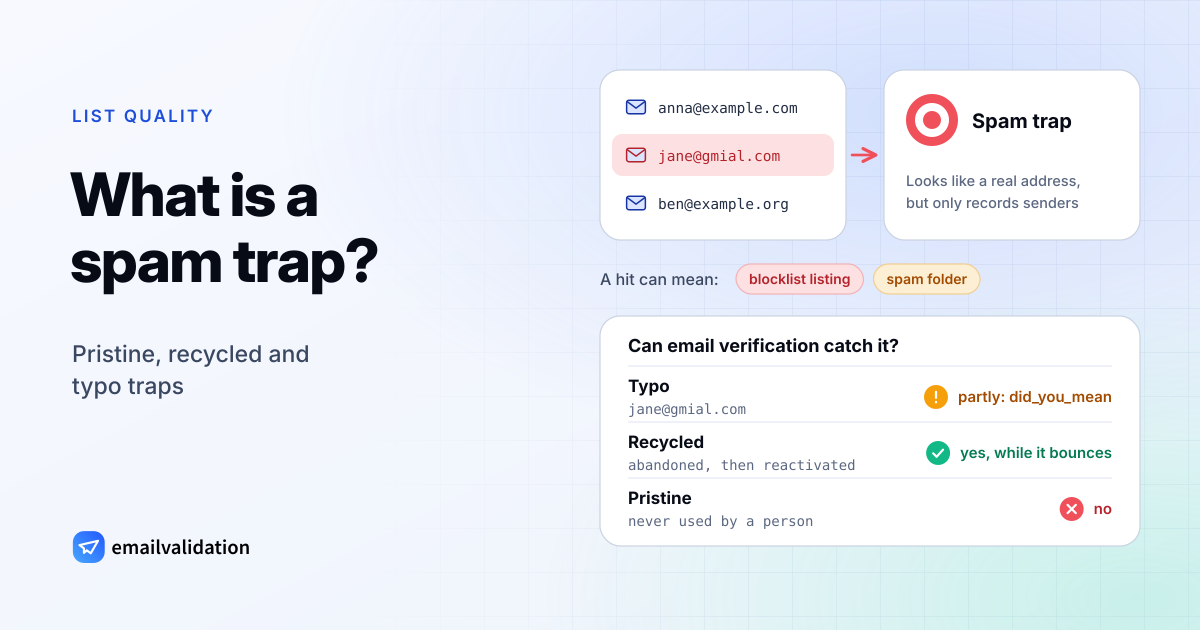
A spam trap is an email address that never asked to receive mail and is operated to catch senders who send it anyway. Mailbox providers, blocklist operators and anti-spam organizations run them. A hit tells the operator that the sender added addresses without permission, or kept mailing addresses that stopped working long ago, and that information feeds blocklists and spam filters.
Once active, a spam trap accepts your mail without complaint and records what arrives, which is why the first sign of a problem is usually a blocklist listing or a sudden drop in inbox placement, not anything in your reports.
Pristine, recycled and typo traps
Trap operators use several kinds. The three that matter most to legitimate senders:
| Type | What it is | What a hit says about you |
|---|---|---|
| Pristine (pure) | An address that has never belonged to a person, sometimes on a domain that accepts mail for any address | You got addresses that nobody gave you: harvested from websites, guessed, or bought |
| Recycled | A real address that was abandoned, rejected mail as unknown for a long period, and was then reactivated as a trap | You kept mailing an address that bounced, or used a very old list |
| Typo | An address on a misspelled domain, such as jane@gmial.com | You don’t confirm addresses when they are entered |
Spamhaus also names seeded traps (addresses hidden on web pages to catch scrapers), dead domains bought and reactivated after they expired, and the role addresses published in domain registration records, such as postmaster@ or abuse@, which “should almost never be on a marketing mailing list” (Spamhaus, Spamtraps: fix the problem, not the symptom, February 2022).
Typo traps get special treatment. Typo domains often receive real mail too, so operators weigh those hits differently from pristine traps, according to both Spamhaus and AWS (June 2023). They are still a sign that your sign-up process accepts unconfirmed addresses.
How long does a dead address bounce before it becomes a trap? M3AAWG, the industry working group, recommends that operators reject mail to a retired address as “no such user” for at least 12 months before reusing it (M3AAWG spamtrap best practices, August 2016). A sender that removes hard bounces never reaches that point.
How you end up hitting a spam trap
M3AAWG’s guide for email services whose customers hit traps lists the usual sources (Help! I Hit a Spam Trap!, February 2023):
- Bought, rented or appended lists. Pristine and seeded traps end up in these because the addresses were collected without anyone’s consent.
- Harvested addresses. Collected from websites by software or by hand.
- Old lists. Lists that haven’t been mailed for a long time, and bounce processing that doesn’t remove unknown addresses. These are where recycled traps sit.
- Unconfirmed sign-ups. Addresses typed in at a point of sale, sweepstakes and refer-a-friend forms, social media sign-ups and single opt-in forms. These collect typo traps.
The pattern is the same in every case: an address reached your list without its owner confirming it, or stayed on it after its owner left.
What happens when you hit a spam trap
Consequences depend on who runs the trap and how many hits you produce:
- Blocklisting. Trap hits can lead to a listing on a real-time blocklist, and mail from listed IPs or domains is refused by every receiver that uses the list. AWS warns that a listing can be immediate and public.
- Spam-folder placement. The mailbox provider that runs the trap moves your mail to spam, often without any bounce to tell you.
- Action by your email service. Email services watch for customers who hit traps, and M3AAWG’s guidance for them covers notifying the customer and auditing how the customer acquires addresses, so expect questions about your list sources, and possibly restrictions on your sending.
How to avoid spam traps
Every prevention step works the same way: make sure each address on your list was given to you by its owner, and drop it once it stops working.
- Use confirmed opt-in. Send a confirmation email after sign-up and mail only addresses that click it. A trap can’t click. Spamhaus recommends it specifically against typo traps, and AWS recommends it too.
- Verify addresses as they are entered. M3AAWG: “The best practice is to validate the email address as it is entered.” A real-time check with the email validation API rejects addresses on domains that can’t receive mail and suggests a correction for likely typos (
gmial.com→gmail.com) while the person is still on the form. - Remove hard bounces at once. Retire addresses that keep soft bouncing, too. See hard vs. soft bounce for the rules.
- Have a sunset policy. Stop mailing contacts who haven’t opened or clicked for a set period; AWS suggests not mailing addresses that have been inactive for 6 months or more. Try one re-engagement email first if you like, then remove the ones that don’t respond.
- Never buy, rent or scrape lists. No amount of cleaning makes a list of people who didn’t ask for your mail safe.
- Protect your forms. A CAPTCHA or similar keeps bots from filling your list with addresses.
- Verify old lists before you mail them again. If a list hasn’t been mailed for months, run it through the bulk email verifier first and drop what comes back undeliverable.
Can a spam trap checker detect spam traps?
Not reliably, and be wary of any tool that promises it. Trap operators keep their addresses secret on purpose: M3AAWG’s best practices tell them not to let trap identities “become publicly known”, and AWS says operators “keep them secret and never reveal them; this is by design.”
What email verification can do is remove the addresses that turn into traps or that only reach your list the way traps do:
| Trap type | Caught? | Why |
|---|---|---|
| Recycled | Yes, before it becomes a trap | During the bounce period, the address is rejected as unknown, so verification reports it as undeliverable (invalid_mailbox). Remove it and you never mail the trap. Once reactivated, it accepts mail like any real mailbox. |
| Typo | Partly | A misspelled domain with no mail server fails the MX check, and a likely typo gets a did_you_mean suggestion. A typo domain that does accept mail passes like any other address. |
| Pristine | No | It’s a working mailbox. Nothing in the SMTP conversation distinguishes it from a real person. |
| Seeded | No | Same as pristine. The cure is not to scrape or buy addresses. |
| Role addresses | Flagged, not judged | Verification flags role addresses such as abuse@ or postmaster@ so you can keep them out of marketing sends. |
So verification is a hygiene step, not a trap detector. It lowers the recycled and typo risk, and it can’t make a bought list safe. How email verification works explains what each check can and can’t tell you.
You hit a spam trap: what now?
You won’t be told which address was the trap, and removing a single address wouldn’t fix anything anyway. Spamhaus puts it plainly: “Attempting to locate and remove traps only treats the symptom and not the underlying problem.” Work on the cause:
- Find the source. Which list or sign-up path did you start mailing recently? A new import or a form without confirmation is the usual suspect.
- Stop mailing that segment. Pause any contacts with no engagement for a long period, too.
- Verify what’s left. Remove undeliverable addresses.
- Reconfirm doubtful segments. Send a permission pass: one email asking people to confirm they still want your mail. Remove everyone who doesn’t confirm.
- Fix collection. Use confirmed opt-in, real-time verification and a CAPTCHA, and buy no lists.
- Request delisting. Once the cause is fixed, ask any blocklist that listed you to remove you, through the operator’s own process. For the Spamhaus Blocklist (SBL), the network owner (your hosting or email service) handles removal, and Spamhaus never charges for it.
Then watch bounces, complaints and blocklist status closely for the next campaigns. The email deliverability guide covers the monitoring tools, and the email spam checker shows whether your sending IP is on a blocklist.
Sources
Checked October 9, 2026: M3AAWG Best Current Practices for Building and Operating a Spamtrap (version 1.2.0, August 2016); M3AAWG Help! I Hit a Spam Trap! (February 2023); Spamhaus: Spamtraps, fix the problem, not the symptom (February 15, 2022); Spamhaus Blocklist (SBL); AWS Messaging Blog: What is a spam trap, and why you should care (June 26, 2023).