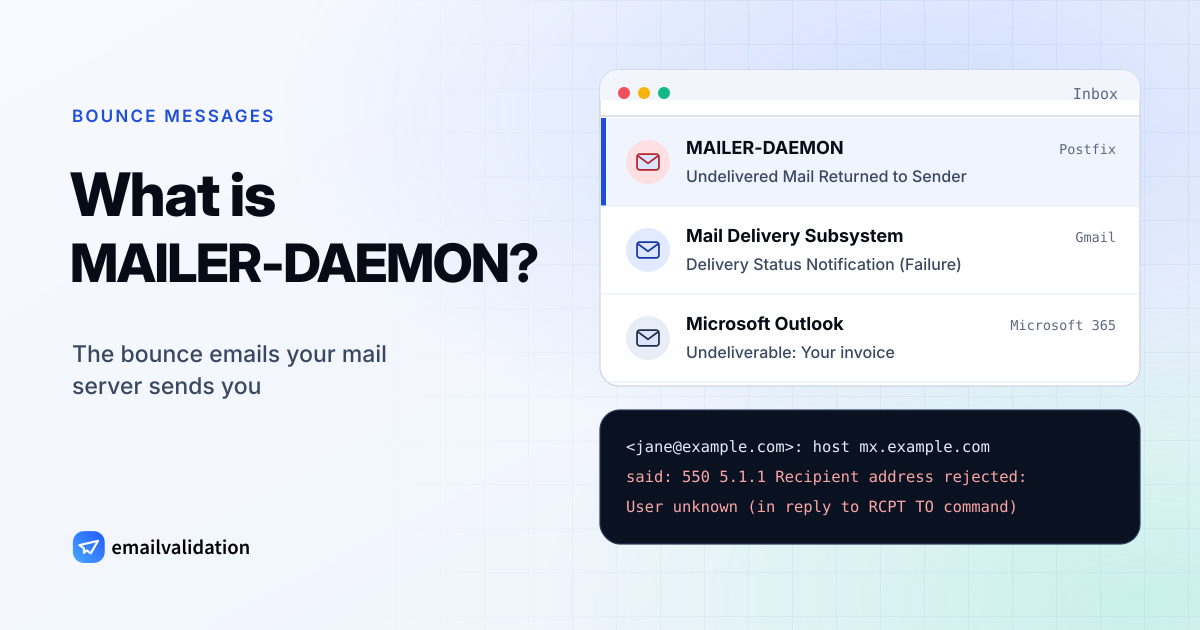
MAILER-DAEMON in one paragraph
Every mail server runs programs in the background. On Unix systems these are called daemons, which is where the name comes from: MAILER-DAEMON is the part of the mail system that delivers messages and, when that fails, tells the sender. A MAILER-DAEMON email is a bounce message. It names the address that failed, quotes the error the receiving server gave, and usually attaches or quotes your original message. Nobody wrote it by hand, and replying to it rarely reaches a person.
1You send
Your mail app hands the message for jane@
example.com to your outgoing mail server. 2Your server delivers
It looks up example.com’s MX records and connects to its mail server over SMTP.
3The receiver refuses
The server answers with an error such as 550 5.1.1: no mailbox by that name.
4MAILER-DAEMON reports back
Your own server writes the bounce and sends it to you from MAILER-DAEMON.
Why you get MAILER-DAEMON emails
- An email you sent couldn’t be delivered. The address doesn’t exist, the domain has no mail server, the recipient’s mailbox is full, or the receiving server refused your message. The code in the bounce says which; look it up in the SMTP error codes.
- Someone sent spam with your address. Spammers put real addresses in the From field. When their mail bounces, the bounce goes to the forged sender. This “backscatter” doesn’t mean your account was hacked.
- Your account or device sends spam. If the bounced messages are in your Sent folder and you didn’t write them, someone has your password or malware sends mail from your computer.
- It’s phishing. Fake bounces that ask you to sign in, release “held” mail or open an attachment use the MAILER-DAEMON name to look harmless.
Is it spam or a virus?
A genuine MAILER-DAEMON message is neither. It’s a notice from a mail server, and it is the only way you learn that an email didn’t arrive. Two things deserve care:
- Attachments. A real bounce may include your original message. If it contains a file you never sent, especially an .html, .zip or .exe file, it’s backscatter from malware spam or a disguised attack. Don’t open it.
- Links and buttons. Real bounces don’t need you to click anything. A “bounce” with a button to retry delivery or log in is phishing; delete it and report it.
Not sure whether a bounce is genuine? Paste its full headers into the email header analyzer: it shows which servers the message really passed through and whether it passed SPF, DKIM and DMARC for the domain it claims to come from.
How to stop MAILER-DAEMON emails
- For your own mail: correct the address or remove it. If you send to many people, verify the list first so dead addresses stop bouncing; every bounce from a dead address counts against you with mailbox providers. The email deliverability guide explains how bounces fit in with authentication and sender reputation.
- If your account sends spam: change the password, turn on two-factor authentication, remove forwarding rules and app passwords you don’t recognize, and scan your computer.
- If your address is forged: for a domain you own, publish an SPF record, DKIM signing and a DMARC record with
p=reject. Receivers that check them refuse forged mail during delivery instead of accepting it and bouncing it to you later. - During a wave of backscatter: a filter for the bounce sender keeps your inbox usable. Remove it once the wave ends, or you’ll miss real bounces.
MAILER-DAEMON vs. Mail Delivery Subsystem vs. postmaster
Different mail systems sign their bounces differently. The content is the same: a failed delivery, the recipient, and the error code.
| Sender name | Used by | Typical subject |
|---|---|---|
| MAILER-DAEMON, “Mail Delivery System” | Postfix and Exim, and the providers that run them | “Undelivered Mail Returned to Sender” (Postfix), “Mail delivery failed: returning message to sender” (Exim) |
| MAILER-DAEMON, “Mail Delivery Subsystem” | Sendmail | “Returned mail: see transcript for details” |
| Mail Delivery Subsystem | Gmail and Google Workspace, from mailer-daemon@ | “Delivery Status Notification (Failure)” or “(Delay)”, see the Delivery Status Notification guide |
| Microsoft Outlook, postmaster | Microsoft 365 and Outlook.com | “Undeliverable: ” followed by your original subject |
| MAILER-DAEMON, Mail Delivery Subsystem | Yahoo Mail | “Failed delivery” notices |
postmaster is also an address every mail domain is expected to have (RFC 5321) for questions about mail problems. If you need a person at the recipient’s organization to look at a rejected message, postmaster@ their domain is the official place to ask.
For Gmail’s version in detail, including how to tell real bounces from fakes, read Mail Delivery Subsystem: why you get these emails.