How to find someone’s email address depends on what you already know. With a name and the company the person works for, you can usually find their work address in a few minutes: company addresses follow a pattern, and a mail server will tell you whether an address exists. With a name alone, it’s much harder, and for private addresses there is no public directory to look in.
| # | Method | Cost | Best for |
|---|---|---|---|
| 1 | Email finder | 10 credits per search | Any work address when you know name and company |
| 2 | Guess the format and verify | Free | Companies with a consistent address format |
| 3 | Company website, press pages, author bios | Free | Executives, press contacts, writers, researchers |
| 4 | 10 credits per search | People you found on LinkedIn or Sales Navigator | |
| 5 | Google search operators | Free | Addresses published anywhere on the web |
| 6 | GitHub and open-source commits | Free | Developers, for project-related contact only |
| 7 | WHOIS | Free | Rarely useful since 2018 |
| 8 | Ask a mutual contact or the company | Free | Anyone you can reach through others |
1. The fastest way: an email finder for name and company
An email finder takes a first name, a last name and a company domain and returns the person’s work address. The email finder on emailvalidation.io works this way: enter, for example, a first and last name and example.com, and you get the address back if one can be found. The finder checks every address with the mail server; on catch-all domains, which accept any address, it returns the most common pattern (first.last@) and marks it as risky. You can save the people you find to lists and export them as CSV.
What you need:
- The person’s first and last name, spelled the way they’d appear in an address. For names with accents or umlauts, try the common spellings (
mülleris oftenmuellerormuller). - The company’s email domain. It’s usually the website domain without
www., but not always; the MX lookup shows whether a domain receives mail at all.
An email search costs 10 credits. The free plan includes 100 credits a month, so you can run 10 searches a month without paying (pricing).
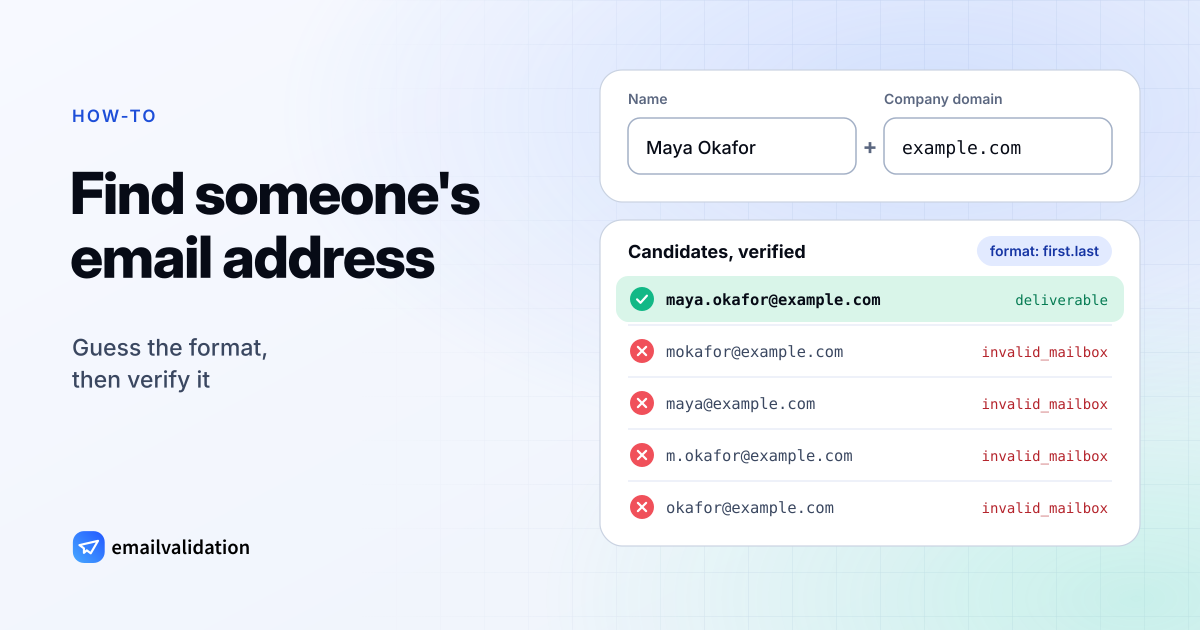
2. Guess the email format and verify it
Most companies give every employee an address in the same format, such as first.last@ or flast@. If you know the format, you know the address. If you don’t, generate the candidates and let the mail server tell you which one exists:
- Enter the name and domain in the free email permutator. It lists the common formats:
anna.becker@example.com,abecker@example.com,anna@example.comand so on. - Check the candidates with the bulk email verifier: up to 50 per run; without an account it checks a few addresses an hour.
- The address the company’s mail server accepts is the real one; the others come back
undeliverablewith the reasoninvalid_mailbox.
One catch: catch-all domains. Some companies accept mail for every address, so every candidate is accepted and the check can’t tell you which one is real. When every candidate comes back as deliverable or Risky, combine the guess with method 3: find one real address at the company, and use its format. Catch-all email addresses explains how verifiers detect these domains.
3. Check the company website, press pages and author bios
Companies publish more addresses than you’d think:
- Team and about pages, often with a direct address or a
mailto:link behind the name. - Press releases and newsroom pages, which usually end with a media contact by name.
- Blog posts and author bios, on the company’s site and on sites the person writes for.
- Event pages, conference programs and speaker bios.
- PDFs: annual reports, white papers, research papers and presentations often list contact addresses.
- The person’s own website, often linked from their social profiles.
Even when the person you want isn’t listed, one published address from a colleague shows you the company’s format (method 2).
4. Find an email address from LinkedIn
If you found the person on LinkedIn, the LinkedIn email finder Chrome extension looks up their work email address from the profile. It works on profiles, in Sales Navigator and in Groups (Recruiter support is coming soon), and saves the leads to your emailvalidation.io account. A LinkedIn email search costs 10 credits, the same as a search in the email finder.
Without the extension, look at the profile’s contact info section: some people list an email address or a personal website there.
5. Use Google search operators
Google’s search operators narrow results to the pages that are likely to contain an address. Google documents these (Refine web searches, checked October 9, 2026):
| Operator | What it does | Example |
|---|---|---|
" " | Exact match of a word or phrase | "Maya Okafor" "@example.com" |
site: | Results from one site or domain only | "@example.com" site:example.com |
filetype: | Documents of one file type | "@example.com" filetype:pdf |
- | Excludes a word | "@example.com" -jobs -careers |
before: / after: | Pages last updated before or after a date | "@example.com" after:2025 |
Don’t put a space between the operator and the search term. Useful patterns:
"Maya Okafor" "@example.com"
"@example.com" site:example.com
"@example.com" filetype:pdf
"@example.com" -jobs -careers
Searching for "@example.com" alone, without a name, is often the fastest way to learn the company’s address format, even if the person you want doesn’t show up.
6. GitHub and open-source commits (with an ethics note)
Every Git commit records an author name and email address. GitHub notes that the address you set in Git “will be visible in any future commits you push to GitHub from the command line” (GitHub Docs: setting your commit email address). Many developers therefore commit with a GitHub-provided noreply address instead of their own, in the form ID+USERNAME@ (GitHub email addresses reference).
Ethics note: a commit address was published so that people can attribute and discuss code, not so that it ends up in a sales sequence. GitHub’s Acceptable Use Policies say you may not use information from GitHub, “whether scraped, collected through our API, or obtained otherwise”, for spamming, “including for the purposes of sending unsolicited emails to users” (GitHub Acceptable Use Policies, section 7). Use a commit address only to contact someone about their project. If they commit with a noreply address, take that as a sign that they don’t want to be emailed, and use the project’s issue tracker or discussion forum instead.
7. WHOIS: mostly redacted since GDPR
Domain registration records (WHOIS) used to list the owner’s name and email address. Since the GDPR took effect, they mostly don’t:
- ICANN’s Temporary Specification for gTLD Registration Data, adopted on May 17, 2018 and effective May 25, 2018, made registrars redact personal data of registrants. For email, the registrar must offer “an email address or a web form” for contacting the registrant that does not identify the contact’s own address (ICANN).
- The Registration Data Policy, effective August 21, 2025, keeps this: where personal data is redacted, the registrar must publish an email address or a link to a web form that “MUST NOT identify the contact email address or the contact itself” (section 9.2.3, ICANN Registration Data Policy).
So a WHOIS lookup today usually gives you a relay address or a web form, not the owner’s email. That relay is still a legitimate way to reach a domain owner about the domain itself, for example to ask about buying it. Look up a domain with ICANN’s own registration data lookup.
8. Ask a mutual contact or the company
The slowest method is often the most effective one:
- Ask someone you both know for the address, or for an introduction. An introduced email gets read.
- Write to the company’s general address (
info@,press@, the contact form) and ask to be forwarded to the person by name and role. - Message the person directly on a platform you share and ask for the best address.
None of these needs a tool, and all of them come with permission built in.
How to find someone’s email address by name only
With only a name, every method above gets harder, because the company domain is what makes them work. Find the employer first: search the name together with a job title, a city or an industry, and look for a professional profile, a team page or a conference program that says where the person works. Once you know the company, you’re back to methods 1–3.
Personal addresses at Gmail, Outlook.com or Yahoo are a different matter. They follow no company pattern, so there’s nothing to derive the address from, and verification doesn’t help either: a Gmail address made from Maya Okafor’s name may well exist and belong to a different Maya Okafor. The only reliable sources for a personal address are the person themselves, someone who knows them, or a page where they published it. The emailvalidation.io email finder doesn’t look for personal addresses: it finds work addresses at a company domain and is not a people search.
Worked example: finding a work email step by step
A fictional case: you want to reach Maya Okafor, head of procurement at a logistics company whose website is example.com.
Step 1: Confirm the email domain. The website is example.com. In this fictional case, an MX lookup of the domain shows mail servers. If a real company’s website domain has none, the company sends and receives mail on another domain, often visible in the footer of its press releases.
Step 2: Try the email finder. Enter Maya, Okafor and example.com in the email finder. If it returns an address that isn’t marked as risky, you’re done, at a cost of 10 credits. A risky result on a catch-all domain is only the most common pattern, so check it against the format you find in step 3.
Step 3: Find the format by hand. Search Google for "@example.com" site:example.com. Suppose a press release ends with “Media contact: Daniel Reyes, daniel.reyes@example.com”. That suggests the format first.last, so Maya’s address is probably maya.okafor@example.com.
Step 4: Generate and verify the candidates. Put Maya Okafor and example.com into the email permutator and paste the list into the bulk email verifier. If the server accepts maya.okafor@example.com and rejects the others, you have the address, and it matches the format from step 3.
Step 5: Handle a catch-all result. If every candidate is accepted, the domain is probably catch-all. The API can confirm it: with catch_all=1 (paid plans from Small), a catch-all domain comes back with catch_all: true. In that case, go with the format you found in step 3, send one personal message, and watch for a bounce.
Verify before you send
Whatever method you used, check the address before you write to it. Addresses found on the web are often outdated: the person changed jobs, the company changed its format, or the address was a typo to begin with. A bounce costs you more than the check:
- Is this a real email address? checks one address and explains every result: syntax, domain, MX records and whether the mail server accepts the mailbox.
- The bulk email verifier checks a list of candidates at once.
- What is email verification? explains what deliverable, Risky and unknown results mean.
For outreach at volume, the rules in the email deliverability guide apply as well: authenticate your domain, keep volumes low, and remove addresses that bounce.
What’s legal: GDPR and CAN-SPAM
Finding an address is one question; writing to it is another. The rules depend on where the recipient is and why you write. The following is a summary of the official sources, not legal advice.
In the European Union (GDPR and ePrivacy):
- A work address that identifies a person is personal data. The European Commission’s own example of personal data is “an email address such as
name.surname@company.com” (European Commission: What is personal data?). Collecting it, storing it and verifying it are processing under the GDPR. - You need a legal basis. The GDPR says that direct marketing “may be regarded as carried out for a legitimate interest” (Recital 47), but only after a balancing test: the Commission explains that the person’s rights and freedoms must not be “seriously impacted” (legitimate interest).
- If you didn’t get the data from the person, you must tell them where it came from and how you use it within a reasonable period (Recital 61), and they can object to direct marketing at any time (Recital 70) (GDPR text on EUR-Lex).
- On top of the GDPR, the ePrivacy Directive (Article 13) allows email for direct marketing only to subscribers who have given prior consent, with an exception for existing customers buying similar products. How this applies to business addresses is left partly to each member state, so B2B cold email rules differ across the EU (Directive 2002/58/EC).
In the United States (CAN-SPAM):
- CAN-SPAM doesn’t require prior consent for commercial email, and “makes no exception for business-to-business email” (FTC CAN-SPAM Act compliance guide, checked October 9, 2026).
- Every commercial message needs accurate header information, a subject line that isn’t deceptive, a clear statement that it’s an ad, your valid physical postal address, and a working way to opt out. Opt-outs must be honored within 10 business days.
- Each email that violates the law can cost up to $53,088 in penalties, according to the FTC.
- Harvesting addresses or generating them by a dictionary attack (sending to made-up addresses in the hope that some exist) are aggravated violations.
The practical rule that keeps you safe almost everywhere: write to one person at a time, about something relevant to their job, say who you are and how you found them, and stop at the first “no”.
Sources
Checked October 9, 2026: Google: Refine web searches; GitHub Docs: setting your commit email address and email addresses reference; GitHub Acceptable Use Policies; ICANN Temporary Specification for gTLD Registration Data; ICANN Registration Data Policy; European Commission: What is personal data?; GDPR (Regulation (EU) 2016/679); ePrivacy Directive 2002/58/EC; FTC CAN-SPAM Act: A Compliance Guide for Business.