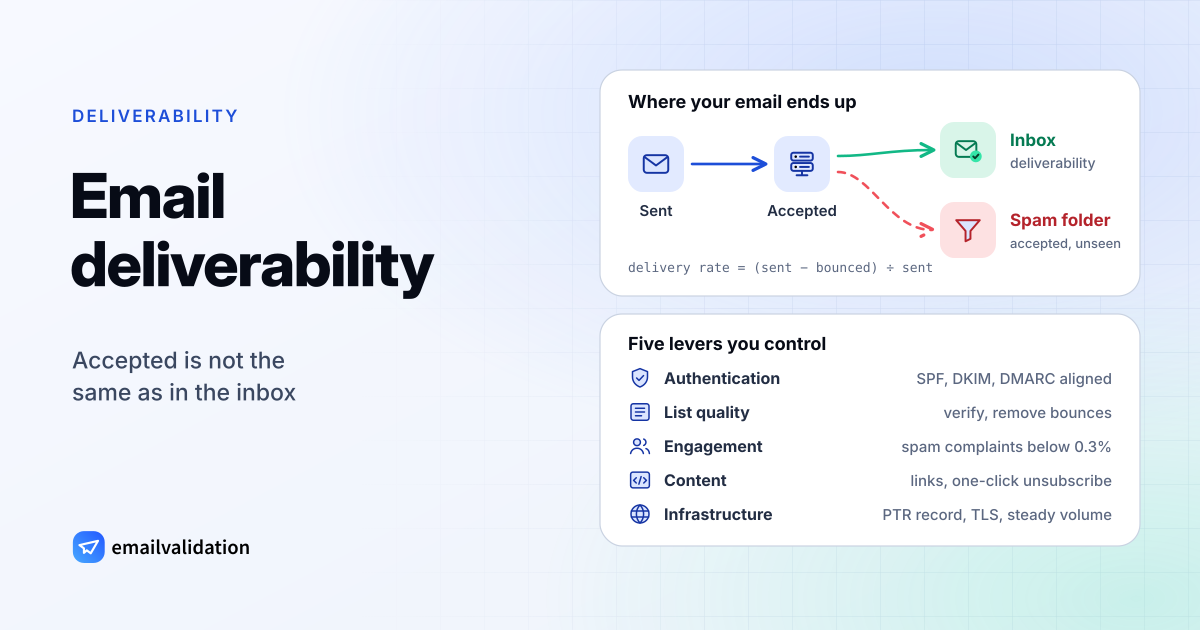
Email deliverability is the share of your email that reaches the inbox, as opposed to bouncing or landing in spam. It is decided by the receiving mailbox provider, message by message, based on who you are (authentication), who you send to (list quality), how those people react (engagement), what you send (content) and how you send it (infrastructure). You control all five.
Gmail, Yahoo and Microsoft have turned part of this into hard rules: since February 2024 (Gmail, Yahoo) and May 2025 (Outlook.com), high-volume senders that skip authentication get their mail filtered or rejected, and Gmail and Yahoo also require one-click unsubscribe in bulk marketing mail. The sections below go lever by lever, then cover the provider rules, monitoring and testing, and end with a checklist you can work through for an email deliverability audit.
Deliverability vs. delivery rate
The two terms sound alike but measure different things:
| Row label | Delivery rate | Deliverability (inbox placement) |
|---|---|---|
| Question | Did the receiving server accept the message? | Did the message reach the inbox? |
| How it fails | Bounces: the server answers with a 4xx or 5xx code | The server accepted the message and filed it as spam |
| Who reports it | Your email service, from the SMTP replies | Nobody directly: you infer it from opens, clicks and provider dashboards |
| Formula | (sent − bounced) ÷ sent | Not measurable from the sender’s side alone |
A 99% delivery rate can hide a deliverability problem: the receiving server said 250 OK and then filed the message as spam. That is why bounce reports alone don’t tell you whether a campaign worked. Watch opens and clicks per mailbox provider (a sudden drop at one provider points to filtering there) and use the provider dashboards described under monitoring.
There is no published industry standard for a “good” inbox rate. What the big providers do publish is a spam complaint threshold (Gmail and Yahoo: below 0.3%) and their sender requirements, so those are the numbers to hold yourself to.
How to improve email deliverability: the five levers
| Lever | What receivers look at | Where to start |
|---|---|---|
| Authentication | SPF, DKIM and DMARC pass and align with the From domain | Authentication checklist |
| List quality | Unknown recipients, bounces, spam traps | List quality |
| Engagement | Spam complaints, opens, replies, deletions without reading | Send only to people who asked; remove long-inactive contacts |
| Content | Links, formatting, spam-filter rules, a working unsubscribe | Test before you send |
| Infrastructure | Reverse DNS, TLS, IP and domain reputation, volume patterns | Valid PTR record, consistent volume, separate streams |
Authentication proves the mail is really from your domain. Without it, receivers can’t tell your mail from forgeries or tie a reputation to your domain, and Gmail, Yahoo and Outlook.com now require it from bulk senders.
List quality is the lever most often left to chance. Every message to an address that doesn’t exist produces a bounce, and providers expect you to act on them: Yahoo asks senders to monitor bounces and remove invalid addresses promptly, and Microsoft’s Outlook.com policy says not to retransmit to a recipient after a permanent (5xx) failure. Old lists also contain recycled spam traps.
Engagement is what recipients do with your mail: open, reply, ignore or report it as spam. The one engagement number you can see directly is the spam complaint rate in Google Postmaster Tools. Yahoo’s sender guidance is blunt about the basics: send only to users who requested mail, use opt-in confirmation, and don’t buy lists (Yahoo Sender Hub best practices, checked October 9, 2026).
Content is what a filter can read in the message itself: headers, links, formatting and wording. Open-source filters such as SpamAssassin score each message against a large rule set, and the same problems hurt with the big providers’ own filters. A missing or broken unsubscribe link is also a content problem, and for bulk senders a rule violation.
Infrastructure covers the plumbing: a sending IP with a valid PTR record (reverse DNS) that matches its forward DNS, TLS on the connection, and steady volumes. Gmail and Yahoo both require valid forward and reverse DNS for sending IPs. Yahoo also asks senders not to send bulk or marketing mail from the IPs used for user, transactional or alert mail.
Authentication checklist: SPF, DKIM, DMARC, BIMI
| Record | What it proves | Learn | Check | Create |
|---|---|---|---|---|
| SPF | The sending server is allowed to send for the domain in the envelope sender | SPF record | SPF checker | SPF record generator |
| DKIM | The message was signed by the domain and not changed in transit | DKIM record | DKIM checker | DKIM generator |
| DMARC | SPF or DKIM passes for the domain in the From header, and what receivers should do if not | What is a DMARC record | DMARC checker | DMARC generator |
| BIMI | Proves nothing by itself: shows your logo in supporting inboxes once DMARC is enforced | BIMI Group | – | – |
Work through them in that order:
SPF: one TXT record on each domain used as the envelope sender (Return-Path), listing every service that sends with it. Stay within the 10 DNS lookups SPF allows.
DKIM: turn on domain authentication at every email service you use (newsletter tool, CRM, help desk, your own app). Each one publishes its own selector under
_domainkey. Google asks for keys of at least 1024 bits and recommends 2048 (Gmail sender guidelines).DMARC: start with a monitoring policy and a report address, read the reports for a few weeks, then move to
quarantineandrejectonce every legitimate source passes:_dmarc.example.com. TXT "v=DMARC1; p=none; rua=mailto:dmarc@example.com"Alignment: DMARC passes only when the domain that passes SPF or DKIM matches the domain in the From header. A newsletter tool that signs with its own domain passes DKIM but fails alignment, so set up its custom-domain DKIM.
BIMI (optional): a logo next to your messages in supporting mailbox providers. BIMI does not change delivery; it requires DMARC at enforcement (
p=quarantineorp=reject), and some providers, such as Gmail and Apple, also require a certificate (VMC or CMC) proving your rights to the logo, according to the BIMI Group.
List quality: verification, bounces and spam traps
Most deliverability problems that look mysterious start with the list. Four habits keep it clean:
- Verify at the point of entry. A real-time check on your sign-up form catches typos (
jane@gmial.com) while the person can still fix them. The email validation API does this in one request and suggests a correction for likely domain typos. M3AAWG’s guidance for senders who hit spam traps says the same: “validate the email address as it is entered” (M3AAWG, Help! I Hit a Spam Trap!, February 2023). - Verify old lists before you mail them. Addresses decay as people change jobs and providers close inactive accounts. Run any list you haven’t mailed for a few months through the bulk email verifier or the email list cleaning service, and remove what comes back undeliverable. How email verification works explains each result.
- Process bounces. Remove hard bounces at once; retry soft bounces and remove an address after it keeps failing. The difference is explained in hard vs. soft bounce, and the email bounce rate guide shows how to calculate the rate and what limits email services enforce.
- Sunset inactive contacts. Addresses that haven’t opened or clicked in a long time are the ones most likely to be abandoned, and abandoned addresses are what mailbox providers turn into recycled spam traps. M3AAWG recommends trap operators let a retired address reject mail for at least 12 months first, so a sender that removes bounces never reaches it.
You can also check whether a single address is real by hand; how to check if an email exists shows what happens during the check.
Three kinds of address need separate handling:
- Catch-all domains accept mail for every address, so verification can’t confirm the individual mailbox. Send to them in smaller batches and remove those that bounce (see catch-all email).
- Role addresses such as
info@orsales@reach shared inboxes, often read by several people who never signed up. Keep them out of marketing sends unless someone at that address subscribed. - Disposable addresses from temporary inbox services are typically used once and abandoned. The disposable email checker identifies those domains, and verification flags them on every address.
Gmail, Yahoo and Microsoft bulk-sender rules
The three largest consumer mailbox providers now publish requirements for senders above a volume threshold. Below is a summary, checked against each provider’s own page on October 9, 2026. The Gmail and Yahoo sender requirements guide has the full checklist with fixes.
| Row label | Gmail | Yahoo | Outlook.com (Microsoft) |
|---|---|---|---|
| In force since | February 1, 2024 | February 2024 | May 5, 2025 |
| Who counts | Close to 5,000 or more messages a day to personal Gmail accounts; once reached, the status is permanent | Bulk senders; no exact number published | Domains sending more than 5,000 emails a day to Outlook.com accounts |
| Authentication | SPF and DKIM, DMARC at least p=none, From domain aligned with SPF or DKIM | SPF and DKIM, DMARC at least p=none that passes, relaxed alignment accepted | SPF, DKIM and DMARC (at least p=none, aligned with SPF or DKIM) |
| Unsubscribe | One-click (RFC 8058) for marketing and subscribed mail, plus a visible link; honor within 48 hours | One-click List-Unsubscribe plus a visible link; honor within 2 days | A clearly documented, easy-to-use unsubscribe mechanism |
| Spam complaints | Below 0.3%, ideally below 0.1% | Below 0.3% | Not specified |
| Also required | Valid forward and reverse DNS, TLS, RFC 5322 formatting | Valid forward and reverse DNS, RFC 5321 and 5322 compliance | Valid reverse DNS |
| If you fail | Temporary or permanent rejections, or spam placement | Not specified; enforcement rolled out gradually from February 2024 | Junk folder, then possibly rejection |
What each provider adds:
- Gmail started “ramping up its enforcement on non-compliant traffic” in November 2025, with temporary and permanent rejections, and mitigation (a request to Gmail to review your delivery) is only available to senders that meet all requirements. Since June 2024, bulk senders with a spam rate above 0.3% are not eligible for mitigation until they have stayed below it for 7 days in a row (Gmail sender guidelines, Email sender guidelines FAQ). Rejections for missing authentication come as codes such as 550 5.7.26.
- Yahoo calculates the complaint rate from mail delivered to the inbox, asks for DKIM keys of at least 1024 bits, recommends ARC for forwarded mail, and asks senders to enroll in its Complaint Feedback Loop (Yahoo Sender Hub).
- Microsoft sends non-compliant mail from high-volume senders to the junk folder and, “if issues remain unresolved”, rejects it with the reply 550 5.7.515: “Access denied, sending domain [SendingDomain] does not meet the required authentication level.” The same policy page also requires a valid reverse DNS record and says connections from dynamic IP space may not be accepted (Outlook.com policies, practices and guidelines). Microsoft 365 business mailboxes reject mail that fails a domain’s
p=rejectDMARC policy with 550 5.7.509.
If you send below these thresholds, the rules for all senders still apply at Gmail and Yahoo: SPF or DKIM, valid reverse DNS, a spam rate below 0.3% and properly formatted messages. In practice, set up all of it regardless of volume; it costs a few DNS records. Providers adjust these rules every few months; the dated changelog of sender rule changes tracks each one with its source.
Monitoring: Postmaster Tools, SNDS and blocklists
You can’t see inbox placement directly, but each large provider shows you part of the picture.
Google Postmaster Tools reports on mail sent to personal Gmail accounts (@gmail.com and @googlemail.com) once you verify your domain with a DNS record. Its dashboards cover spam rate, message authentication and delivery errors; the newer interface adds a Compliance dashboard that tracks the sender requirements. Google says it is retiring the old Domain and IP Reputation dashboards, and that days with too little mail show no data (Postmaster Tools help, interface changes). The spam rate there is the number Gmail’s 0.1% and 0.3% thresholds refer to.
Microsoft SNDS (Smart Network Data Services) gives the owners of sending IPs data about those IPs at Outlook.com, and includes the Junk Email Reporting Program, which reports messages users mark as junk. You request access for the IPs you are responsible for and have to re-attest ownership: network access expires 10 months after approval (SNDS). It is useful if you send from your own IPs; on a shared IP at an email service, ask the service what it monitors and how it reports problems to you.
Yahoo’s Complaint Feedback Loop sends you reports of messages Yahoo users marked as spam, per DKIM domain. Yahoo expects an active one for all your DKIM domains.
Blocklists (DNSBLs) are lists of IP addresses or domains that receiving servers query before accepting mail. The Spamhaus Blocklist (SBL), for example, lists IPs it observes sending spam, and receivers using it refuse their mail. Which lists matter for you depends on which ones your recipients’ servers use, so treat a listing as a signal to investigate, not as an automatic catastrophe. To check:
- Look up your sending IP and domain with our blacklist checker, and on Spamhaus’s own site (Spamhaus lookup), which our checker doesn’t query.
- Read the bounce texts: policy refusals come with codes such as 550 5.7.1 or 554 5.7.1, temporary deferrals as 421 or 451, and the text after the code often names the reason, including the blocklist.
- Fix the cause before requesting removal. Spamhaus states that removal never costs anything; anyone selling delisting is not Spamhaus.
Your own bounce logs are the cheapest monitor of all. A rising share of 5.1.1 “user unknown” bounces means list decay; a rising share of 5.7.x policy blocks means a reputation or authentication problem. The SMTP error codes reference explains each code, and Mail Delivery Subsystem, MAILER-DAEMON and Delivery Status Notification (Failure) show how to read the bounce messages themselves.
Test before you send
A test shows problems before your recipients’ filters do:
- Send the real campaign to the email spam checker. It returns the SpamAssassin score and checks SPF, DKIM, DMARC, reverse DNS, blocklists and the List-Unsubscribe header for the message as it was actually sent.
- Check a received message’s headers. The email header analyzer shows the
Authentication-Resultsa real mailbox provider recorded and every server the message passed through. - Verify the list. Check at least the segment you’re about to mail if it hasn’t been mailed recently.
- Send to a small segment first. Do this when you change something big: a new domain, a new email service, a list you haven’t mailed in months. Check bounces and complaints before sending the rest.
No test guarantees inbox placement, because the receiver also weighs your reputation and how recipients react. But a test catches the causes that are entirely in your hands.
Cold email deliverability
Outreach to people who haven’t signed up plays by the same rules with less margin: there’s no prior engagement to build on, every complaint counts against a small volume, and business lists contain many catch-all domains and role addresses. What helps:
- Verify every address. Do it before the first send; addresses copied from websites or guessed from a company’s format need it most. How to find someone’s email address covers the methods, from the email finder to search operators.
- Authenticate the sending domain. Set up SPF, DKIM and DMARC exactly as for marketing mail.
- Keep volume low and personal. One relevant message to the right person does more for your reputation than a sequence to a scraped list.
- Include an opt-out and a postal address. The US CAN-SPAM Act applies to business-to-business email too; in the EU, the GDPR and national marketing rules apply.
Email deliverability checklist
Use this as an email deliverability audit, top to bottom. Where a free tool can check an item, it’s linked.
Authentication
- SPF record on every envelope-sender domain, under 10 lookups (SPF checker)
- DKIM signing with your own domain at every email service (DKIM checker)
- DMARC record on the From domain, with a report address (DMARC checker)
- SPF or DKIM aligned with the From domain on every stream
- Plan to move DMARC from
p=nonetoquarantineorreject
Infrastructure
- Valid PTR (reverse DNS) record for each sending IP that matches its forward DNS
- Working MX records on your sending domains, so replies and bounces reach you (MX lookup, what an MX record is)
- TLS on outgoing connections
- Marketing mail separated from transactional and user mail
- Google Postmaster Tools set up for your domain; SNDS if you own your IPs; Yahoo Complaint Feedback Loop for your DKIM domains
List quality
- Sign-up forms verify addresses in real time (email validation API); confirmed opt-in for newsletters
- No bought, rented or scraped lists
- Lists verified before each campaign to a segment not mailed recently (bulk email verifier)
- Hard bounces removed automatically; repeated soft bounces removed
- Inactive contacts re-engaged or removed on a fixed schedule
- Catch-all and role addresses segmented
Content
- One-click unsubscribe (
List-UnsubscribeandList-Unsubscribe-Post) plus a visible unsubscribe link in marketing mail - Unsubscribes processed within 48 hours
- Sender name, From address and subject line honest and consistent
- Each campaign tested with the email spam checker
Monitoring
- Spam rate in Postmaster Tools below 0.1%, never 0.3% or more
- Bounce rate tracked per campaign and per mailbox provider
- Blocklist status of sending IPs and domains checked when bounces or deferrals rise
- Bounce codes reviewed:
5.1.xmeans list problems,5.7.xmeans policy or reputation problems
Sources
Checked October 9, 2026: Gmail email sender guidelines and FAQ; Yahoo Sender Hub best practices; Outlook.com policies, practices and guidelines; Google Postmaster Tools help; Microsoft SNDS; Spamhaus Blocklist (SBL); BIMI Group FAQ; M3AAWG: Help! I Hit a Spam Trap!.