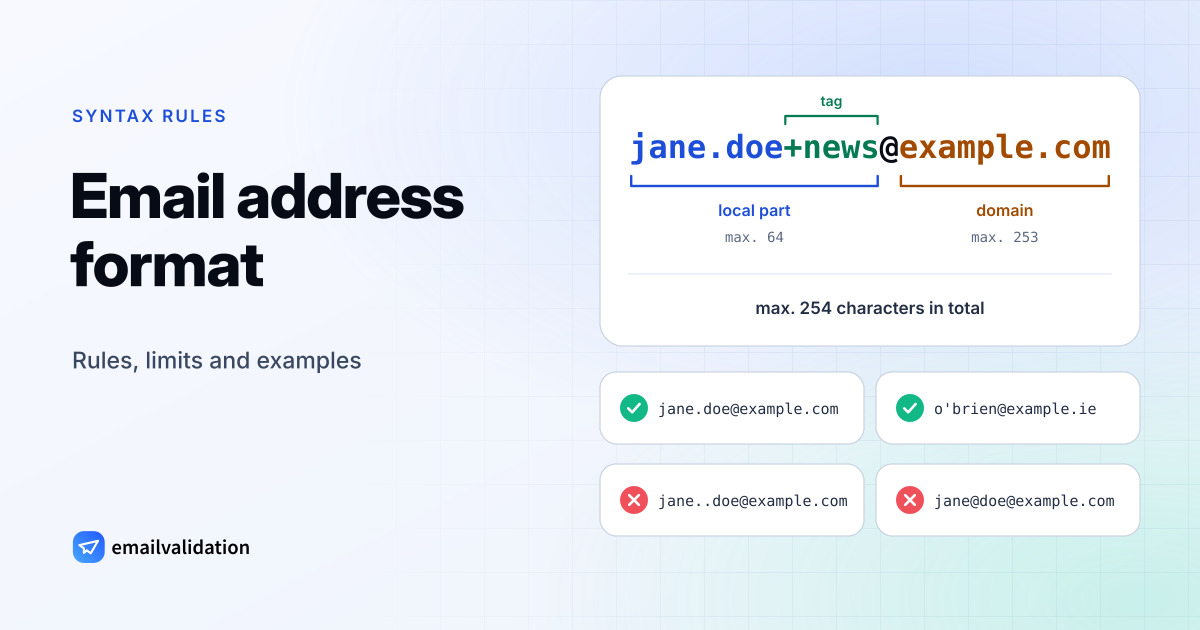
The parts of an email address
Every email address has two parts joined by an @:
- The local part, before the
@, names the mailbox. Only the receiving mail server knows what it means: it can be a person (jane.doe), a group (sales), an alias or a tag (jane+news). - The domain, after the
@, says which mail system is responsible. Senders look up its MX records to find the server to deliver to; the MX lookup shows them.
local part
up to 64 characters
domain
up to 253 characters, each label up to 63
Whole address
At most 254 characters (the RFC 5321 path limit minus the angle brackets).
+news is a tag
Plus addressing: many providers deliver jane.doe+anything to jane
.com is the top-level domain
The last label must be a real TLD: .com, .de, .co, not .con.
The format of the address is defined in RFC 5322 (section 3.4.1, “addr-spec”). The size limits come from the SMTP standard, RFC 5321.
Length limits
| Part | Maximum | Where it comes from |
|---|---|---|
| Local part | 64 characters | RFC 5321, section 4.5.3.1.1 |
| One domain label (between dots) | 63 characters | DNS rules (RFC 1035) |
| Domain | 255 octets, which is 253 characters as written | RFC 5321, section 4.5.3.1.2 |
| Whole address | 254 characters | The SMTP path is limited to 256 characters, including the angle brackets around the address |
The 254-character limit is the one forms should enforce. Longer “addresses” cannot be delivered, whatever their parts look like.
Allowed characters
| Where | Allowed | Not allowed |
|---|---|---|
| Local part, unquoted | a–z, A–Z, 0–9 and ! # $ % & ' * + - / = ? ^ _ { | } ~ and the backtick; dots between characters | Spaces, ( ) , : ; < > @ [ \ ], a dot at the start or end, two dots in a row |
| Local part, in quotes | Almost anything, including spaces and @: "jane doe"@example.com | Nothing practical: most services reject quoted local parts |
| Domain | a–z, 0–9, hyphens inside a label, dots between labels | Underscores, spaces, a hyphen at the start or end of a label, two dots in a row |
| Domain, as an IP address | jane@[192 is allowed by the standard | Rejected by almost every service and form |
In practice, a much smaller set is safe: letters, digits, dots, hyphens, underscores, plus signs and apostrophes (o'brien@example.ie is real and common). If you build a form, accept everything the standard allows in the local part; rejecting an apostrophe or a plus sign turns away real people.
Valid and invalid examples
“Valid” means the address follows RFC 5321 and 5322. Whether a mailbox exists is a different question, answered by asking the mail server.
| Address | Valid? | Why |
|---|---|---|
jane@example.com | Yes | The simplest form |
jane.doe@ | Yes | Dots between characters are fine |
jane_ | Yes | Underscore in the local part, a domain with several labels |
jane+newsletter@ | Yes | A plus tag; most providers deliver it to jane@ |
o'brien@ | Yes | Apostrophes are allowed, and common in names |
1234567890@ | Yes | Digits only is fine |
x@example.co | Yes | One character is enough; .co is a real top-level domain |
jane@ | Yes | One of the newer top-level domains |
JANE@EXAMPLE.COM | Yes | Upper case is allowed and treated like lower case |
jane@ | Yes | An internationalized domain in its ASCII (punycode) form |
jane%example.org@ | Yes, but unusual | A % sign is allowed; it’s a relic of old mail routing |
"jane doe"@example.com | Yes, by the standard | Quoted local part with a space; most services reject it |
jane@[192 | Yes, by the standard | An IP address instead of a domain; almost nobody accepts it |
josé@example.com | Only with SMTPUTF8 | Non-ASCII letters need international email support (see below) |
jane.example.com | No | No @ sign |
jane@ | No | Two @ signs outside quotes |
.jane@ | No | Starts with a dot |
jane | No | Ends with a dot before the @ |
jane..doe@ | No | Two dots in a row |
jane doe@example.com | No | A space outside quotes |
jane@example | No, for internet mail | No top-level domain |
jane@-example.com | No | A domain label can’t start with a hyphen |
jane@ | No | Underscores aren’t allowed in mail domains |
jane@ | No | Empty label between two dots |
jane@example.con | Valid syntax, no such domain | .con is not a top-level domain, so the address can’t receive mail |
Test an address
Type an address to see which rules it passes. The check runs in your browser and follows the rules above, with one exception: domains written as IP addresses are rejected, since almost no service accepts them.
Runs in your browser: nothing is sent anywhere. Results update as you type.
Internationalized email addresses
Since RFC 6531 (SMTPUTF8), addresses may contain letters beyond ASCII, such as josé@example.com or a domain written in Chinese, Cyrillic or Arabic script. Domains have a fallback: they can always be written in ASCII “punycode” (xn--…), and mail servers do that conversion. The local part has no fallback, so a message to josé@ only arrives if every server on the way supports SMTPUTF8. Large providers such as Gmail do; many smaller systems and forms don’t. If you collect addresses, store them as UTF-8 and don’t reject non-ASCII letters outright.
Case sensitivity, dots and plus addressing
- Case: RFC 5321 lets the receiving server treat the local part as case sensitive, but practically none do. Domains are never case sensitive. Compare addresses case-insensitively.
- Dots in Gmail addresses: for
@gmail.comaddresses, Gmail ignores dots in the local part:jane.doe@gmail.comandjanedoe@gmail.comare the same inbox. That is a Gmail rule, not a standard one, and it doesn’t apply to Google Workspace addresses on a company’s own domain. - Plus addressing: Gmail and many other providers deliver
jane+anything@tojane@. People use it to sort mail and to see who shares their address. Accept plus signs in your forms.
Top-level domains: .co, .con, .cc
The last label of the domain must be a top-level domain that exists in the DNS root zone, which IANA publishes. .co (Colombia), .cc (Cocos Islands), .io and newer ones like .email or .app are all real and in use. .con, .cmo and .comm are not, and addresses ending in them are typos. A good checker spots those and suggests the intended domain: the email syntax checker suggests gmail.com for gmial.com.
Format is not existence
A perfectly formatted address can still bounce: the mailbox may never have existed, or may have been deleted. Format rules, including any email regex, only catch typing errors. Checking the mailbox itself is what email verification does. To find out whether mail will arrive, ask the receiving server: find out whether an email address is real with the free validator, or check addresses at sign-up with the email validation API.