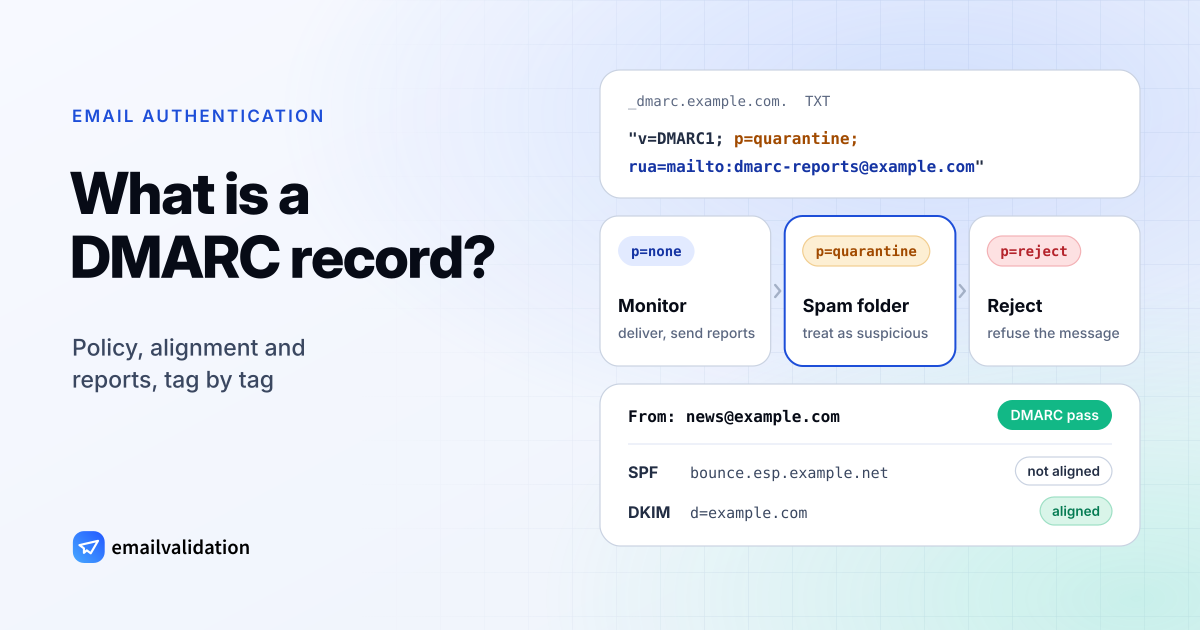
In short, a DMARC record is a TXT record at _dmarc. plus your domain that does three things: it tells receivers to check that SPF or DKIM passed for the domain people see in the From line, it sets a policy for mail that fails (deliver, quarantine or reject), and it names an address for reports. A minimal record looks like this:
_dmarc.example.com. TXT "v=DMARC1; p=none; rua=mailto:dmarc@example.com"
DMARC stands for Domain-based Message Authentication, Reporting, and Conformance. Since May 2026 it is defined by RFC 9989, which obsoletes RFC 7489 and RFC 9091; aggregate reports moved to RFC 9990 and failure reports to RFC 9991. Records written for RFC 7489 keep working.
What DMARC does: alignment, policy and reports
Alignment
SPF checks the envelope sender (the Return-Path domain) and DKIM checks the domain in the signature’s d= tag. Neither has to match the From address your recipients see, which is the gap spoofers use. DMARC closes it: a message passes DMARC only if SPF or DKIM passes and the domain it passed for aligns with the From domain (RFC 9989, section 4.4).
- Relaxed alignment (the default): the two domains share the same organizational domain, so
bounce.example.comaligns withexample.com. - Strict alignment: the two domains are identical.
| From domain | Authenticated domain | Relaxed | Strict |
|---|---|---|---|
example.com | DKIM d=example.com | aligned | aligned |
example.com | SPF on bounce | aligned | not aligned |
example.com | DKIM d= | not aligned | not aligned |
One aligned pass is enough. That is why DKIM matters even with a perfect SPF record: forwarding changes the sending server and breaks SPF, while a DKIM signature usually survives it.
Policy
The p tag says how the domain owner wants failing mail handled: none (no special handling), quarantine (treat the mail as suspicious, for example by delivering it to the spam folder) or reject (refuse it during delivery). Receivers treat the policy as a request; RFC 9989 leaves the final decision to their local policies.
Reports
With a rua address, receivers that support DMARC send daily aggregate reports: XML files that list every IP address that sent mail with your domain in the From line, how many messages, and whether SPF and DKIM passed. They are how you find your own forgotten senders before you tighten the policy.
DMARC record tags
Tags are separated by semicolons; their order doesn’t matter, except that v comes first. This table follows RFC 9989 (section 4.7):
| Tag | Values | Default | What it does |
|---|---|---|---|
v | DMARC1 | required | Version. Must be the first tag, or receivers ignore the record. |
p | none, quarantine, reject | none | Policy for mail that fails DMARC. |
sp | none, quarantine, reject | value of p | Policy for subdomains. |
np | none, quarantine, reject | sp, then p | Policy for subdomains that don’t exist in DNS. |
t | y, n | n | Testing: with t=y, receivers apply one level less (reject acts as quarantine, quarantine as none). |
rua | mailto: URIs, comma-separated | – | Where aggregate reports go. Without it, no aggregate reports. |
ruf | mailto: URIs, comma-separated | – | Where failure reports on single messages go. |
fo | 0, 1, d, s | 0 | When to send failure reports. Ignored without ruf. |
adkim | r, s | r | DKIM alignment: relaxed or strict. |
aspf | r, s | r | SPF alignment: relaxed or strict. |
psd | y, n, u | u | For public suffix operators such as registries. Ordinary domains leave it out. |
Tags from RFC 7489 that are now historic: pct (apply the policy to a percentage of mail), rf (failure report format) and ri (report interval). RFC 9989 replaces pct with t. Not every receiver has switched: Google’s DMARC setup page still documents pct and RFC 7489 (checked October 9, 2026), and says Gmail doesn’t send ruf failure reports. A record with pct=100 is harmless; receivers that follow RFC 9989 ignore it.
DMARC record examples by goal
All examples use example.com; replace the domain and the report address with your own.
; Start monitoring: no effect on delivery, daily reports
_dmarc.example.com.  TXT  "v=DMARC1; p=none; rua=mailto:dmarc@example.com"

; Try quarantine in testing mode: receivers handle failing mail as p=none
_dmarc.example.com.  TXT  "v=DMARC1; p=quarantine; t=y; rua=mailto:dmarc@example.com"

; Full protection, strict alignment for a domain that signs and sends everything itself
_dmarc.example.com.  TXT  "v=DMARC1; p=reject; adkim=s; aspf=s; rua=mailto:dmarc@example.com"

; Main domain on quarantine, subdomains that don't exist rejected
_dmarc.example.com.  TXT  "v=DMARC1; p=quarantine; np=reject; rua=mailto:dmarc@example.com"

; A domain that sends no email
_dmarc.example.com.  TXT  "v=DMARC1; p=reject"
A domain that sends no email should also publish v=spf1 -all as its SPF record, so nothing can pass SPF for it.
Reports to another domain. If rua points outside your own domain, for example to a DMARC report service at reports.example.net, receivers only send reports when that domain agrees. It publishes a TXT record v=DMARC1 at example (RFC 9990, section 4). Report services set this up for their customers; if you point rua at a mailbox on another domain you run, publish it yourself.
Google Workspace. The record is the same for every mailbox provider. Google recommends waiting 48 hours after setting up SPF and DKIM before you turn on DMARC, and starting with p=none.
“No DMARC record found”: what it means and what to do
A checker reports “no DMARC record found” when the TXT lookup at _dmarc.yourdomain returns nothing usable. For a subdomain, receivers then look for the record of the parent domains (RFC 9989 calls this the DNS tree walk), so mail.example.com is covered by the record at _dmarc.example.com.
Without a record, receivers don’t apply DMARC to your mail (section 4.10): anyone can put your domain in the From line, and you get no reports. Gmail and Yahoo also require a DMARC record from bulk senders, so bulk mail from a domain without one risks rejection or the spam folder there; see the Gmail and Yahoo sender requirements.
Common causes when you think you published one:
| Cause | What you see | Fix |
|---|---|---|
Record created at the wrong name, for example _ | No record at _ | Enter only _dmarc in the name field when your DNS host adds the domain itself. |
v=DMARC1 is not the first tag, or it is misspelled | Receivers ignore the record | Start the value with v=DMARC1;. |
| Two DMARC records at the same name | Receivers discard both | Merge them into one. |
Record added on another domain, for example only on www or on the domain of your email service | No record for your From domain | Publish it at _dmarc on the domain in your From address. |
| Record just published | Lookups still return the old answer | Wait until cached answers expire (the record’s TTL). |
To fix it, create a record with the DMARC generator, which shows the field names for GoDaddy, Cloudflare, Namecheap and other DNS hosts, then confirm it with the DMARC checker.
Reading DMARC aggregate reports
Aggregate reports arrive by email as compressed XML attachments, usually one per receiver and day (RFC 9990). The file name contains the receiver, your domain and the time range, for example mail. Inside, each record describes one sending IP address. A shortened example:
<feedback>
  <report_metadata>
    <org_name>mail.receiver.example</org_name>
    <date_range><begin>1013662812</begin><end>1013749130</end></date_range>
  </report_metadata>
  <policy_published>
    <domain>example.com</domain>
    <p>none</p>
  </policy_published>
  <record>
    <row>
      <source_ip>203.0.113.25</source_ip>
      <count>412</count>
      <policy_evaluated>
        <disposition>none</disposition>
        <dkim>pass</dkim>
        <spf>fail</spf>
      </policy_evaluated>
    </row>
    <identifiers><header_from>example.com</header_from></identifiers>
    <auth_results>
      <dkim><domain>example.com</domain><selector>s1</selector><result>pass</result></dkim>
      <spf><domain>bounce.esp.example.net</domain><scope>mfrom</scope><result>pass</result></spf>
    </auth_results>
  </record>
</feedback>
Read it like this: 412 messages from 203.0.113.25 carried example.com in the From line. DKIM passed for example.com, which aligns, so DMARC passed. SPF passed too, but for the service’s own bounce domain, so it doesn’t count as aligned (<spf>fail</spf> in policy_evaluated).
Sort each report’s sources into three groups:
- Your services, passing with alignment. Nothing to do.
- Your services, failing. A newsletter tool or CRM without DKIM for your domain, or missing from your SPF record. Fix these before you move past
p=none. - Sources you don’t recognize. Spoofing, or forwarding by mailing lists. This is the mail your policy is meant to stop.
Raw XML gets unwieldy beyond a handful of sources; DMARC report services parse and group it for you.
Rollout plan
- Set up SPF and DKIM for every service that sends as your domain: SPF record and DKIM record.
- Publish
p=nonewithruaand read the reports for a few weeks, until every legitimate source passes with alignment. - Move to
p=quarantine, optionally witht=yfirst to keep receivers one step below the policy. - Move to
p=rejectonce quarantine causes no complaints. Addspornpif your subdomains need their own policy. A policy at enforcement is also the first requirement for BIMI, which shows your logo next to your messages. - Keep reading reports. Every new tool that sends as your domain needs SPF or DKIM before it goes live.
The DMARC generator writes the record for each step and shows where it goes at your DNS host. Check what receivers see right now:
Live DNS lookup over DNS-over-HTTPS. You can also paste an email address.
Mail rejected under a DMARC policy bounces with codes such as 550 5.7.26 at Gmail and 550 5.7.509 at Microsoft 365; the SMTP error codes reference explains them.