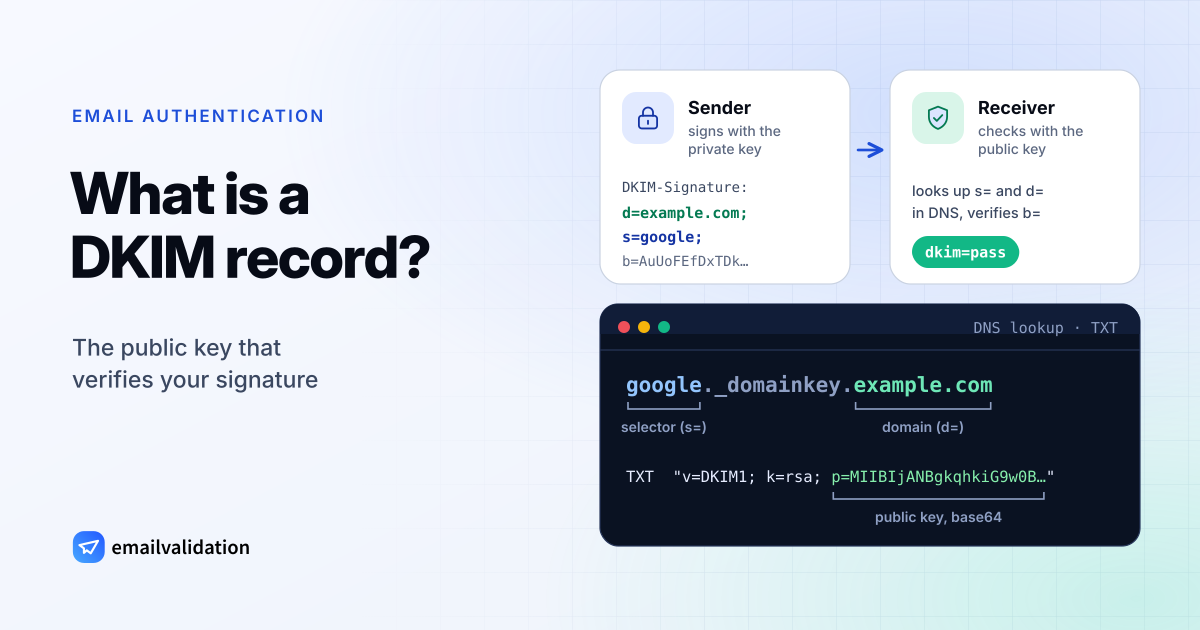
A DKIM record is a TXT record that publishes a public key for DomainKeys Identified Mail (DKIM). Your mail server signs each outgoing message with the matching private key; the receiving server looks up the DKIM record named in the signature and uses the key to verify that the message really comes from your domain and wasn’t changed in transit. DKIM is defined in RFC 6376.
google._domainkey.example.com. TXT "v=DKIM1; k=rsa; p=MIIBIjANBgkqhkiG9w0BAQEFAAOCAQ8AMIIBCgKCAQEA…"
How DKIM signing works
- The sender signs. When a message leaves your mail server, it hashes the body and a chosen set of headers (From, Subject, Date …), signs the hash with the private key, and adds a
DKIM-Signatureheader. - The signature names its key. Two tags in that header tell the receiver where to look:
d=(the signing domain) ands=(the selector). - The receiver fetches the key with a DNS TXT query for
<selector>(section 3.6.2.1).._ domainkey .<domain> - The receiver verifies. If the hashes match and the signature checks out with the public key, DKIM passes.
A signature header looks like this (values shortened):
DKIM-Signature: v=1; a=rsa-sha256; c=relaxed/relaxed; d=example.com; s=google;
        h=from:to:subject:date:message-id; bh=2jUSOH9NhtVGCQWNr9BrIAPreKQjO6Sn7XIkfJVOzv8=;
        b=AuUoFEfDxTDkHlLXSZEpZj79LICEps6eda7W3deTVFOk4yAUoqOB…
a= is the algorithm, h= the list of signed headers, bh= the body hash and b= the signature itself. Receivers record the outcome in the Authentication-Results header as dkim=pass, dkim=fail and so on.
RFC 6376 doesn’t require d= to match the From address (section 3.11): an email service can sign your mail with its own domain. For DMARC, though, only a signature whose d= aligns with your From domain counts, which is why every service that sends as you should sign with your domain. See what is a DMARC record for alignment.
DKIM record format: v=DKIM1, k, p and selectors
The DKIM record is a list of tags separated by semicolons (section 3.6.1):
| Tag | Example | Meaning |
|---|---|---|
v | v=DKIM1 | Version. Optional, but if present it must be first and must be DKIM1. |
k | k=rsa | Key type. rsa is the default; ed25519 is defined in RFC 8463. |
p | p=MIIBIjANBg… | The public key, base64-encoded. An empty p= means the key has been revoked. |
h | h=sha256 | Allowed hash algorithms. Optional; all are allowed if missing. |
t | t=y or t=s | Flags. y means testing: receivers must treat failures like unsigned mail. s means the i= domain in signatures must not be a subdomain of d=. |
s | s=email | Service type. Optional, defaults to all. |
n | n=rotated 2026-10 | Notes for humans. Ignored by software. |
In practice almost every record is v=DKIM1; k=rsa; p=…, sometimes with t=y while a new setup is tested.
Key length
RFC 8301 updated the original rules: signers must use RSA keys of at least 1024 bits and should use at least 2048 bits, verifiers must not accept signatures from keys below 1024 bits, and the old rsa-sha1 algorithm must not be used at all. Use 2048 bits unless your DNS host can’t store a key that long.
The key length decides the record length. A 2048-bit RSA public key is 392 characters of base64; a 1024-bit key is 216. Because one TXT string holds at most 255 characters, a 2048-bit key is published as two or more strings in the same record, which receivers join without spaces (section 3.6.2.2):
s2048._domainkey.example.com.  TXT  ( "v=DKIM1; k=rsa; p=MIIBIjANBgkqhkiG9w0BAQEFAAOCAQ8AMIIBCgKCAQEA…"
                                      "…IDAQAB" )
Some DNS hosts’ web forms split the value for you, others expect the quoted strings; their help pages say which. An Ed25519 key is 44 characters and fits easily. For receivers that don’t support Ed25519 yet, RFC 8463 lets signers add a second signature with an RSA key, under its own selector.
Selectors
The selector is the label before ._domainkey. It lets one domain publish several keys at once (section 3.1): one per sending service, and a new one each time you rotate keys. Selectors are chosen by whoever generates the key; there is no fixed list. Some common ones:
| Provider | Selector |
|---|---|
| Google Workspace | google (default, can be changed) |
| Microsoft 365 | selector1 and selector2 |
| Zoho Mail | chosen by you when you add the key, for example zoho |
To find the selector of any service, open a message it sent, show the original or full headers, and read s= in the DKIM-Signature header. The email header analyzer pulls it out for you, and the DKIM checker lists more common selectors.
DKIM record examples: Google Workspace and Microsoft 365
Steps and values below are from the providers’ documentation, checked October 9, 2026.
Google Workspace
Google generates the key pair for you (Set up DKIM):
In the Admin console, go to Apps > Google Workspace > Gmail > Authenticate email, pick the domain and click Generate New Record. Choose 2048 bits; Google suggests 1024 only if your DNS host doesn’t support 2048-bit keys. The selector prefix defaults to
google.Add the TXT record it shows at your DNS host:
google._domainkey.example.com. TXT "v=DKIM1; k=rsa; p=MIIBIjANBgkqhkiG9w0BAQEFAAOCAQ8AMIIBCgKCAQEA…"Back in the Admin console, click Start authentication. Google says it can take up to 48 hours before signing starts.
Microsoft 365
Microsoft 365 doesn’t sign mail from your custom domains with that domain until you turn DKIM on for it (Microsoft’s DKIM guide). Instead of TXT records, you publish two CNAME records that point to keys Microsoft hosts (in this example, the tenant’s initial domain is example.onmicrosoft.com):
selector1._domainkey.example.com.  CNAME  selector1-example-com._domainkey.example.n-v1.dkim.mail.microsoft.
selector2._domainkey.example.com.  CNAME  selector2-example-com._domainkey.example.n-v1.dkim.mail.microsoft.
The targets above follow the format Microsoft introduced for new custom domains in May 2025; domains added earlier use targets ending in .onmicrosoft.com. The exact values for your tenant are shown in the Defender portal (Email & collaboration > Policies & rules > Threat policies > Email authentication settings > DKIM) or by Get-DkimSigningConfig in PowerShell. Create both CNAMEs, then switch on signing for the domain.
Microsoft’s default key size is 1024 bits. To move to 2048, rotate the key in PowerShell; the new size applies from the next selector that becomes active:
Rotate-DkimSigningConfig -Identity example.com -KeySize 2048
Your own mail server
If you run the signing server yourself (Postfix with OpenDKIM, for example), you create the key pair and publish the public key. With OpenSSL:
openssl genpkey -algorithm RSA -pkeyopt rsa_keygen_bits:2048 -out dkim-private.pem
openssl pkey -in dkim-private.pem -pubout -outform DER | openssl base64 -A
The second command prints the value for p=. The private key stays on the signing server. The DKIM record generator does the same in your browser and writes the finished TXT record. Most hosted email services, as in the two examples above, create the keys themselves; use their values instead. Sending services work the same way: Mailchimp Transactional asks for two DKIM CNAME records, and Brevo’s SMTP relay setup starts with authenticating your domain.
Key rotation
Selectors make rotation safe. RFC 6376 describes the process as publishing the old and the new key side by side for a transition period (section 3.1):
- Generate a new key pair and publish its public key under a new selector, for example
s202610.._ domainkey .example.com - Switch the signing server to the new private key and selector.
- Leave the old record in place for a transition period, so messages already signed with the old key can still be verified.
- Revoke the old key by publishing it with an empty
p=, or remove the record.
Don’t reuse a selector for a new key: RFC 6376 calls that “ill-advised”, because mail signed with the old key then fails. Microsoft 365 builds this pattern in: you start a rotation in the Defender portal or with Rotate-DkimSigningConfig, signing moves between selector1 and selector2, and the new key starts signing four days (96 hours) later.
“No DKIM record found”
A DKIM checker reports this when the TXT lookup at <selector> returns nothing. The usual reasons:
| Cause | Fix |
|---|---|
Wrong selector: you checked default, but your provider signs with google or s1 | Read the selector from the DKIM-Signature header of a sent message. |
| DKIM was never turned on at the provider | Generate the key (Google) or enable signing (Microsoft 365), then publish the record. |
Record created at google | Enter only google when your DNS host adds the domain itself. |
| Microsoft 365 CNAME records missing or pointing to an old target | Copy both values again from the Defender portal. |
| Long key pasted with extra quotes, spaces or line breaks | Enter the value exactly as your provider shows it; split it into quoted strings only if your DNS host asks for that. |
| Record just published | Wait until cached answers expire, then check again. |
Without the key, receivers can’t verify the signature, so DKIM doesn’t pass. DMARC then depends on SPF alone, and that breaks as soon as a message is forwarded. A record with an empty p= is a different case: the key was revoked on purpose.
Check your DKIM record
Enter your domain and, if you know it, the selector. Without a selector, the checker tries the most common ones.
No selector? We try the common ones (Google Workspace, Microsoft 365, Mailchimp, SendGrid …). Find yours in the s= tag of the DKIM-Signature header of an email you sent.
No key yet? Generate a DKIM key in your browser. Then complete the set with an SPF record and a DMARC policy from the DMARC generator.