What the message means
A delivery status notification (DSN) is the standard way mail systems report what happened to a message (RFC 3464). Gmail sends you one, from “Mail Delivery Subsystem”, whenever a message from your account doesn’t arrive:
- Delivery Status Notification (Failure): the message was rejected or could not be delivered at all. Gmail won’t try again.
- Delivery Status Notification (Delay): delivery failed for now. The notice says “Delivery incomplete” and how many more hours Gmail will keep trying.
If you didn’t send the message that bounced, first read why you get Mail Delivery Subsystem emails for messages you never sent.
Read the error line
Most Failure notices have a heading, a sentence naming the recipient and, under “The response from the remote server was:”, the reply of the server that refused the message. When the domain doesn’t exist at all there is no remote server to answer, and Gmail shows a DNS error instead.
| Heading | Typical sentence | What it means |
|---|---|---|
| Address not found | “Your message wasn’t delivered to … because the address couldn’t be found, or is unable to receive mail.” | The mailbox doesn’t exist (550 5.1.1), or the account is disabled (550 5.2.1). |
| Address not found (domain) | The domain couldn’t be found | There is no domain by that name, often a typo such as gmialNXDOMAIN instead of a server reply. |
| Message blocked | “Your message to … has been blocked. See technical details below for more information.” | The receiver refused your message: authentication, reputation, content or a local rule (550 5.7.x, “550 permanent failure for one or more recipients”). |
| Message not delivered | There was a problem delivering your message | Another permanent error: the message is too large (552 5.3.4), a mail loop (554 5.4.6), or a misconfigured server. |
| Delivery incomplete | Gmail will retry for … more hours | A temporary problem such as a full mailbox (452 4.2.2) or an unreachable server. Nothing to do yet. |
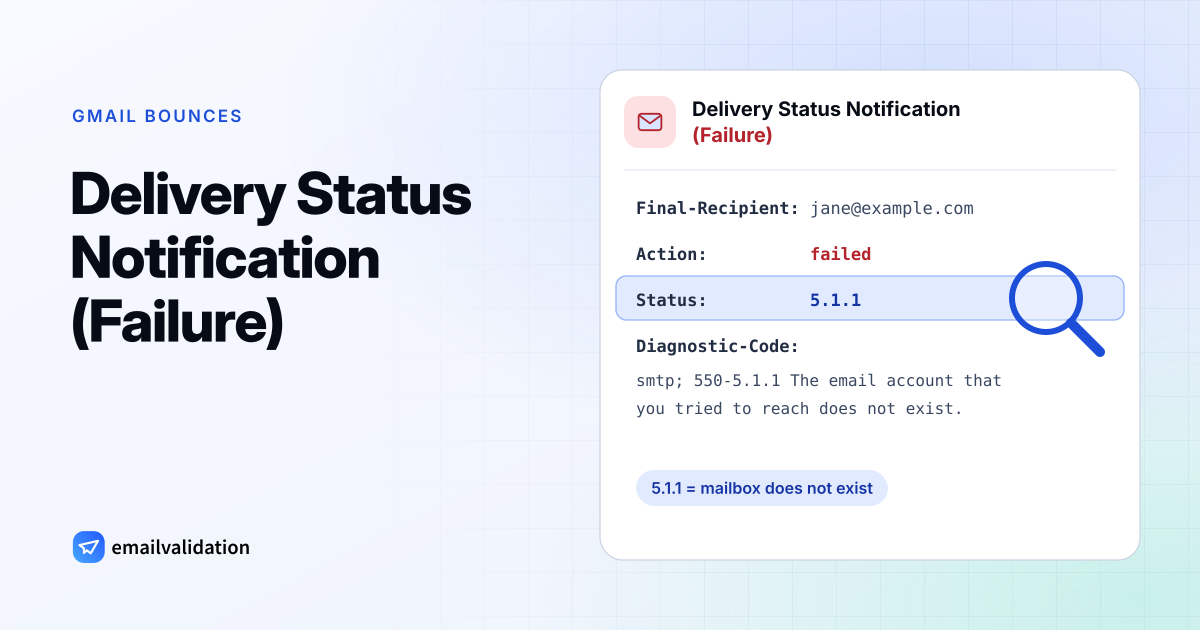
At the end of the notice, a technical section repeats the result in a fixed format. This is the part to forward to an IT team:
Final-Recipient: rfc822; jane@example.com
Action: failed
Status: 5.1.1
Diagnostic-Code: smtp; 550-5.1.1 The email account that you tried to reach does not exist.
Action: failed means a permanent failure (delayed for a Delay notice), Status is the enhanced status code, and Diagnostic-Code is the receiving server’s reply word for word.
Fixes by cause
The address doesn’t exist
- Compare the address with an email from that person or their signature. A single swapped letter is enough.
- Check the domain:
gmial.com,hotmial.comandyaho.comare common typos; the domain part must match the company’s website. - If the address is right, the mailbox was closed. Ask the person for a new address and delete the old one from your contacts and lists.
You can check an address before writing to it with the email checker: it asks the receiving server about the mailbox without sending anything. For a whole list, use the bulk email verifier.
The message was blocked
- Read the reply after “The response from the remote server was:”. It often names the reason, such as a DMARC policy, a blocklist or suspicious content.
- If you send from your own domain, check its SPF, DKIM and DMARC records. Gmail and other large providers refuse unauthenticated mail more and more often; Gmail’s reply for that is
550 5.7.26. - Remove link shorteners and unusual attachments, and try again with a plain message.
- Ask the recipient, by phone or another address, to check their spam filter or ask their IT team to allow your domain.
If your messages are blocked again and again, the cause is usually your sending setup rather than one recipient. The email deliverability guide covers authentication, sender reputation and list quality.
The message was not delivered for another reason
- Too large: send big files as a link instead of an attachment.
- Mail loop: the recipient’s forwarding rules send the message in a circle; only they can fix it.
- Server misconfigured: the recipient domain’s mail servers (MX records) are wrong or don’t respond. Check them with the MX lookup and tell the recipient.
The notice says Delay
Wait. A full mailbox, greylisting or an overloaded server are temporary, and Gmail retries automatically. If the problem lasts until the retry period ends, you get a Failure notice instead. The guide to hard vs. soft bounces explains the difference.
When you didn’t send the original email
Open your Sent folder. If the bounced message isn’t there, a spammer used your address as the sender and the bounce came back to you: annoying, but your account is safe. If it is there and you didn’t write it, someone has access to your account: change the password, turn on 2-Step Verification and remove unknown forwarding rules and apps. The Mail Delivery Subsystem guide covers both cases and how to recognize fake bounce messages.