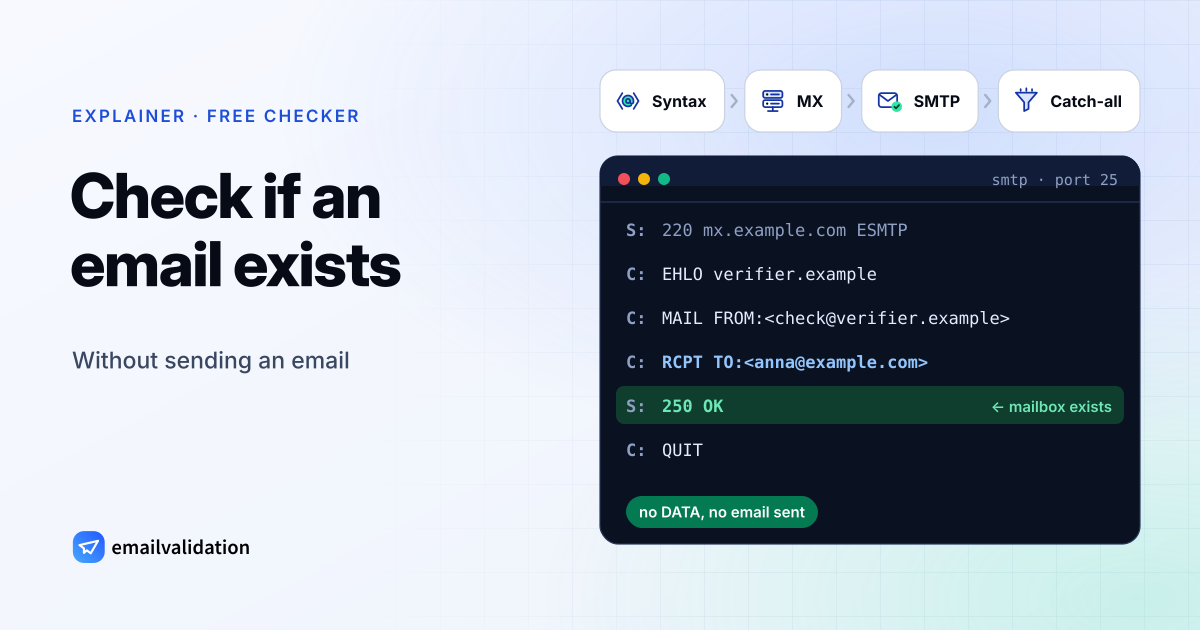
Checks syntax, MX records and the mailbox itself over SMTP. No email is sent.
To check if an email exists, a verifier does what a sending mail server does, step by step, and stops right before the message would be handed over. The steps below are the ones the checker above runs, and the page is this a real email address? explains every field of a result. For the bigger picture, including what these checks can’t tell you, read our overview of email verification.
How to check if an email address exists and is valid
Step 1: Syntax
The address must follow the format rules: one @, a local part of up to 64 characters, a valid domain. The email address format guide lists the rules, and the email syntax checker tests them.
Step 2: The domain and its mail servers
A DNS query for the domain’s MX records returns the servers that receive its email. No MX record (and no A record) means nobody can receive mail there. Try the MX lookup.
Step 3: The SMTP handshake
The verifier connects to the preferred mail server (the lowest MX number) on port 25 and starts a normal delivery, but stops before the message:
S: 220 mx.example.com ESMTP
C: EHLO verifier.example
S: 250 mx.example.com
C: MAIL FROM:<check@verifier.example>
S: 250 OK
C: RCPT TO:<anna@example.com>
S: 250 OK                  ← mailbox exists
   (or: 550 5.1.1 User unknown  ← it does not)
C: QUIT
No DATA command is sent, so no email is delivered. SMTP defines this answer: when the server doesn’t know the mailbox, it returns a 550 reply to RCPT (RFC 5321, section 3.3). The protocol also has a VRFY command meant for asking about an address, but the same RFC lets servers disable it for security reasons (section 3.5.2), and a server that can’t verify in real time is told to answer 252 (section 3.5.3). That’s why verifiers rely on RCPT TO instead. What a 550 5.1.1 means in detail: 550 5.1.1 explained.
Step 4: Catch-all detection
Some servers answer 250 OK to every recipient. To spot them, the verifier also asks about a random address like x7q2k9z@example.com. If that is accepted too, the domain is catch-all, and a 250 for the real address proves nothing.
In the emailvalidation.io API this test runs on request, with catch_all=1 on paid plans from Small; the free checker on this page doesn’t run it. For domains we already know to be catch-all, the mailbox check is skipped and the address comes back as deliverable with the reason low_deliverability, which the free checker shows as Catch-all. More in catch-all email addresses.
What the result tells you
The checker above sorts every address into one of six results:
| Result | What the mail server said | What to do |
|---|---|---|
| Valid | It accepts this mailbox | Send |
| Catch-all | It accepts every address on the domain, so the mailbox can’t be confirmed | Send with care |
| Risky | The mailbox exists but is full | Check again later |
| Do not mail | The address belongs to a disposable inbox service | Don’t send, or ask for another address |
| Invalid | The mailbox or the domain doesn’t exist, or the address is malformed | Don’t send: it would hard bounce |
| Unknown | No clear answer (timeout, greylisting, server unreachable) | Check again later |
A “valid” answer is what the server said at the moment of the check. A server can accept a recipient during the conversation and still bounce the message later, and no check made without sending can see that.
Checking Gmail addresses
Gmail rejects unknown recipients with a clear code. Google’s list of Gmail SMTP errors (checked October 9, 2026) includes:
| Reply | Gmail’s message |
|---|---|
550 5.1.1 | “The email account that you tried to reach does not exist.” |
550 5.2.1 | “The email account that you tried to reach is inactive.” |
452 4.2.2 | “The recipient’s inbox is out of storage space.” |
What a check can’t tell you for Gmail:
- Dots don’t matter. For personal Gmail accounts,
jane.doe@gmail.comandjanedoe@gmail.comreach the same inbox; Google says that “emails sent to any dotted version of your address will only go to you” (Gmail Help). Both versions check as deliverable, so a check doesn’t tell you that two rows on your list are one person. For Gmail through work or school, dots do change the address. - Plus addresses. Google suggests adding “a plus sign (+) and any word before the @ sign” to create task-specific addresses such as
jane+news@example.com(Google Workspace Learning Center). The API returns the part after the plus in thetagfield. - Full inboxes answer with a temporary
452 4.2.2. The address exists, but mail may not arrive until the owner makes room.
Checking Yahoo addresses
Yahoo’s SMTP error codes page (checked October 9, 2026) shows the bounce for an address that doesn’t exist: 554 delivery error: dd This user doesn't have a yahoo.com account. Yahoo’s advice is not to retry, because delivery will never succeed, and to remove the address from your list.
What the page doesn’t say is at which step of the SMTP conversation that answer comes. So read a Yahoo result the way you’d read any other: it reflects what the server answered to RCPT TO. If the address is accepted at that point and the message bounces afterwards, a check can’t foresee it.
Yahoo also has a section on “excessive unknown recipients”: a server that sends to a large number of invalid recipients looks like an open relay or proxy to Yahoo, and Yahoo doesn’t accept mail from those. That is another reason not to probe addresses from your own sending server.
Checking Outlook.com and Microsoft 365 addresses
Microsoft runs two very different mail systems:
- Outlook.com (personal accounts such as outlook.com and hotmail.com). Microsoft’s postmaster policies (checked October 9, 2026) say a sender must not retransmit after a permanent
5xxreply and must stop after multiple non-delivery responses. - Microsoft 365 (company domains on Exchange Online). With Directory-Based Edge Blocking, Exchange Online rejects messages for invalid recipients at the network perimeter with
550 5.4.1 Recipient address rejected: Access denied. According to Microsoft Learn (checked October 9, 2026), this is in effect when all of a domain’s recipients are in Exchange Online. Admins turn it on by setting the domain to “Authoritative”; while a domain is still set to “Internal relay”, for example during a migration, unknown addresses aren’t rejected this way, so a check can’t tell real from made-up mailboxes there. Microsoft also notes there “might be infrequent instances” where addresses that don’t exist relay through the service. Other Microsoft 365 bounces are covered in 550 5.1.10 and 550 5.4.1.
How to check if an email address is legit or suspicious
Whether an address exists and whether an email from it can be trusted are separate questions. A scammer can write from a real, working Gmail account, and a forged sender can use someone else’s real address. To check a suspicious email address:
- Read the domain letter by letter. Look for look-alike spellings: a
1for anl,rnform, or an added word such as-supportor-billing. - Check for free webmail claiming to be a company. Companies normally write from their own domain, not from a free mailbox.
- Check whether it’s a throwaway address with the disposable email checker.
- Look at the authentication results. The email header analyzer reads SPF, DKIM and DMARC from the message headers, and the DMARC checker shows whether the sender’s domain protects itself against spoofing.
The scam email checker combines these signals for a sender address. It shows signals, not a verdict.
Why you should not do this yourself
- Port 25 is blocked by default at the big cloud providers. AWS blocks it to public addresses until you request removal, Google Cloud blocks egress to port 25 of external addresses, and Azure blocks it for most subscription types (all checked October 9, 2026).
- Reputation: mail servers notice repeated probes from one IP and block it or put it on a blocklist. Yahoo treats many unknown recipients as a sign of an open relay (see above).
- Greylisting rejects first attempts on purpose; you need retries with delays.
- Provider quirks: each big provider behaves differently, as the sections above show.
A verification service runs these checks from its own infrastructure and returns a clean result. To verify an email address for free, use the email checker on our homepage or the checker at the top of this page. For more than one address:
- Up to 50 addresses at a time: the free bulk email verifier (without an account, it checks a few addresses an hour).
- A whole CSV file: the email list cleaning service.
- Sign-up forms and CRM imports: the email validation API, with 100 free requests a month.