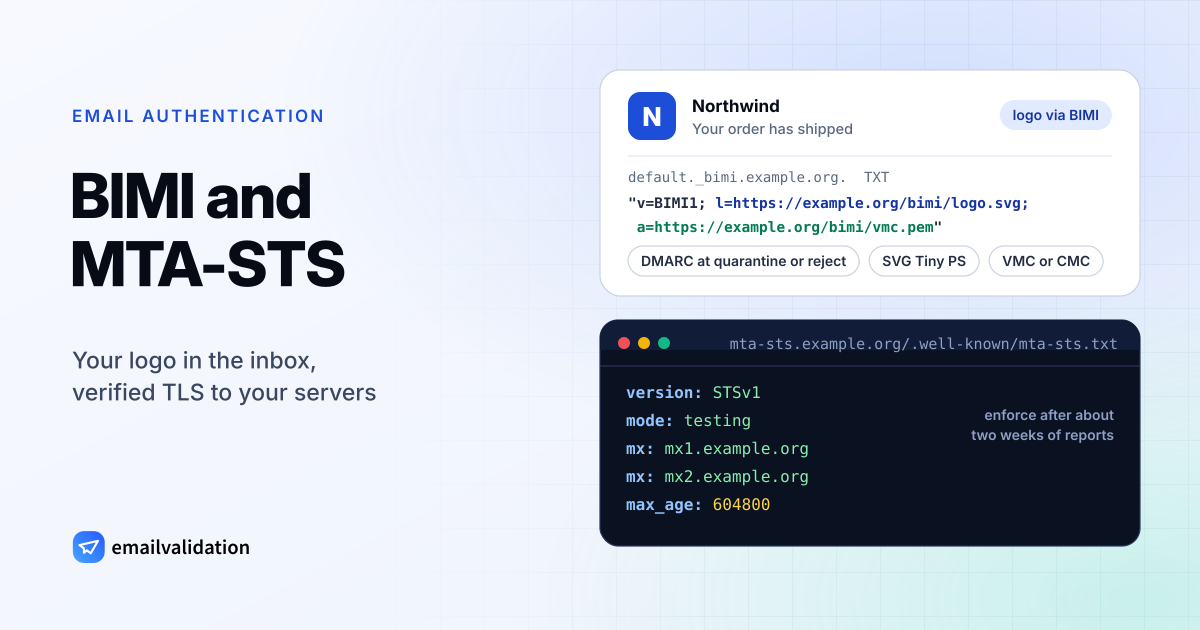
A BIMI record is a DNS TXT record that tells mailbox providers where to find your brand logo, so they can show it next to your messages. MTA-STS is the transport-security counterpart: a TXT record and a small policy file that make sending servers deliver to you only over verified TLS. Neither works without groundwork: BIMI needs DMARC at enforcement, and MTA-STS needs a web server with a valid certificate. Here is what each provider requires, the records you publish and how to roll them out.
BIMI requirements: DMARC, logo and certificate
BIMI (Brand Indicators for Message Identification) is still an Internet-Draft, not an RFC: revision 14 from May 1, 2026, an individual draft, was still the current version on October 29, 2026. Each mailbox provider decides on its own when to show a logo, so the rules below come from each provider’s own page.
| Requirement | Gmail | Yahoo | Apple Mail |
|---|---|---|---|
| DMARC policy | p=quarantine or p=reject, pct=100 | p=quarantine or p=reject | DMARC required |
| Logo | SVG Tiny PS, at least 96 × 96 pixels | SVG | Not specified |
| Certificate | VMC or CMC | Not required; a VMC counts toward eligibility | VMC or another BIMI evidence document |
| Other conditions | Checkmark only with a VMC | Bulk mail only, with “sufficient reputation and engagement” | iOS 16, iPadOS 16, macOS Ventura 13 or later, iCloud.com |
Sources: Google, Yahoo, Apple.
DMARC at enforcement
The BIMI draft asks for a strong DMARC policy on both the organizational domain and the domain in the From line: p=reject, or p=quarantine with pct=100, and no sp=none for subdomains. The BIMI Group implementation guide puts it the same way: “None” policies and a pct below 100 are not accepted, and all of your mail should be authenticated with SPF, DKIM and DMARC, with alignment.
Two details for records written under RFC 9989, the DMARC standard since May 2026:
pctis gone from the standard. A record withoutpctis fine: under the old RFC 7489 the default was already 100 (section 6.3). Gmail’s BIMI page still listspct=100as a requirement, so leavingpct=100in the record does no harm.t=ylowers your policy. With the new testing flag, receivers apply one level less, sop=quarantine; t=yacts likep=none. Removet=ybefore you publish BIMI.
A BIMI-ready DMARC record:
_dmarc.example.com. TXT "v=DMARC1; p=reject; rua=mailto:dmarc-reports@example.com"
Getting there takes weeks of reports at p=none first; the rollout is in what is a DMARC record.
The logo: SVG Tiny PS
The logo must be an SVG file in the Tiny Portable/Secure profile. The BIMI Group’s SVG guidance lists what that means:
baseProfile="tiny-ps"andversion="1.2"on the root element- a
<title>element with the company name - a square image with the logo centered, because providers may display it as a circle or a square with rounded corners
- a solid background color, because transparent backgrounds may not display as expected
- no scripts, animation or interactive elements, and no external links or references
- no
x=ory=attributes on the root<svg>element - a file that “should not exceed 32 kilobytes”
A skeleton with those attributes:
<svg xmlns="http://www.w3.org/2000/svg" version="1.2" baseProfile="tiny-ps" viewBox="0 0 512 512">
  <title>Example Inc</title>
  <rect width="512" height="512" fill="#ffffff"/>
  <!-- logo paths, centered -->
</svg>
Check the file against these rules before you order a certificate, so the certificate is issued for the logo you actually publish.
VMC or CMC
A mark certificate proves that the logo belongs to the organization that owns the domain. The BIMI Group describes two types:
- Verified Mark Certificate (VMC): for “organizations with registered or acknowledged government trademarks”. Gmail shows a checkmark next to senders verified with a VMC, on the web and, since September 2024, in its Android and iOS apps (Google Workspace Updates).
- Common Mark Certificate (CMC): for “marks that may not be registered trademarks”, such as logos with a history of use. Gmail has accepted CMCs since September 24, 2024; they show the logo but no checkmark.
Google warns that registering a trademark can take 6 to 12 months and points to the BIMI Group’s list of certificate issuers. Self-asserted records, without a certificate, work at only a few providers; the BIMI Group names Yahoo, Fastmail and La Poste.
BIMI record: syntax and examples
The record is a TXT record at <selector>._bimi.<domain>. Without a selector, providers look up default:
default._bimi.example.com. TXT "v=BIMI1; l=https://example.com/bimi/logo.svg; a=https://example.com/bimi/vmc.pem"
| Tag | Required | What it holds |
|---|---|---|
v | Yes, first | BIMI1 |
l | Yes | One HTTPS URL of the SVG logo |
a | No | One HTTPS URL of the mark certificate (VMC or CMC) as a PEM file |
lps | No | Local-part selector, for different logos per sending address (draft 14) |
avp | No | brand (default) or personal: whether a personal avatar or the brand logo is shown where providers support avatars (draft 14) |
Rules from the draft worth knowing:
- HTTPS only, one URL each.
l=anda=each take a single URI, and the only supported transport is HTTPS. - Self-asserted record. Leave
a=empty or out:v=BIMI1; l=https://example.com/bimi/logo.svg;. Gmail won’t show it; Yahoo can. - Opting out.
v=BIMI1; l=; a=;declares that the domain doesn’t want a logo shown. That is not the same as publishing no record. - Other selectors. To use a different logo for one mail stream, publish it at, say,
brand2._bimi.example.comand add a header to those messages. The header should be covered by your DMARC-aligned DKIM signature; if it isn’t, the draft tells receivers to ignore it:
BIMI-Selector: v=BIMI1; s=brand2;
Subdomains. Yahoo honors BIMI records on subdomains but prefers BIMI and DMARC on the organizational domain. A logo for news.example.com mail goes at default.
No BIMI generator needed. Since the record is one line with two URLs, fill in the template above. What actually takes time is the DMARC rollout, the SVG file and the certificate. After you publish, Google says the logo can take up to 48 hours to appear.
MTA-STS: policy file and TXT record
SMTP between mail servers usually uses opportunistic TLS, and RFC 8461 explains why that isn’t enough on its own: any attacker who can delete parts of the SMTP session can strip the encryption, or redirect the session to another server. MTA-STS (RFC 8461) lets your domain say “my MX hosts support TLS with a valid certificate; don’t deliver otherwise.” It protects mail that others send to you, so it is about the domains that receive mail, while SPF, DKIM, DMARC and BIMI are about what you send.
Gmail complies with MTA-STS when it sends to domains with a policy in enforce mode (Google), and Exchange Online validates MTA-STS for all outbound mail, with no setting to turn on (Microsoft).
MTA-STS has two parts.
1. The TXT record at _mta-sts.<domain>:
_mta-sts.example.com. TXT "v=STSv1; id=20261010T120000"
id is 1 to 32 letters and digits that identify the current policy version. Change it every time you change the policy file: senders cache the policy until max_age runs out and use the id to notice that a new one exists. Google and Microsoft both suggest the date and time as the value.
2. The policy file at a fixed URL, served over HTTPS:
https://mta-sts.example.com/.well-known/mta-sts.txt
version: STSv1
mode: testing
mx: mx1.example.com
mx: mx2.example.com
max_age: 604800
| Field | Values | Notes |
|---|---|---|
version | STSv1 | Must be the first line (Google). |
mode | enforce, testing, none | testing: deliver anyway and report failures. enforce: don’t deliver to an MX that fails. |
mx | One line per MX host | Must cover every MX record of the domain; *.example.net matches one leftmost label. |
max_age | Seconds, up to 31557600 | How long senders cache the policy. Google recommends 604800 to 1209600 (one to two weeks) while testing. |
Hosting rules from RFC 8461 that cause most setup failures:
- The host
mta-sts.example.comneeds a certificate valid for that name, issued by a trusted CA and not expired. - The file must return HTTP status 200. Senders don’t follow redirects, so
http://tohttps://orwwwredirects break it. - Serve it as
text/plain. Each domain needs its own policy file, even if the contents are identical (Google).
Microsoft 365. If your MX points straight to Exchange Online, Microsoft’s example policy uses mx: *; use that wildcard only if all your mail goes to Exchange Online, and list other providers’ MX hosts as well. Exchange Online doesn’t host the policy file for you; Microsoft suggests a static web host that issues the certificate automatically.
Rollout. Start with mode: testing. Google suggests about two weeks of reports before you switch to enforce and change the id. If enforcement causes delivery problems, Microsoft’s advice is to switch back to testing and change the id again. In enforce mode, a sender must not deliver to a host that fails MX matching or certificate validation; RFC 8461 asks it to look for an updated policy and retry later before it gives up. Exchange Online then bounces with 5.4.8 (MX host not in the policy) or 5.7.5 (certificate validation failed). To retire MTA-STS, publish mode: none with a short max_age and a new id, and remove the records only after the old cached policies have expired. Use the MX lookup to list every host the mx lines need to cover, and see the MX record guide for how they are chosen.
TLS-RPT: reports on failed TLS connections
TLS reporting (RFC 8460) is a TXT record that asks sending servers for a daily report on their TLS connections to your MX hosts. It works with MTA-STS and with DANE, and it is what makes mode: testing useful: without it, you don’t see what would have failed.
_smtp._tls.example.com. TXT "v=TLSRPTv1; rua=mailto:tlsrpt@example.com"
ruatakes amailto:address or anhttps:URL that receives reports by POST. Several destinations are separated by commas.- Reports are JSON, usually gzip-compressed (
.json.gz), and cover one UTC day. - Each report lists the policy found (an MTA-STS policy, a DANE TLSA record or none), the number of successful and failed sessions, and failure types such as
starttls-not-supported,certificate-expired,sts-policy-fetch-errorortlsa-invalid.
Publish TLS-RPT first, then the MTA-STS record in testing mode, read the reports, then enforce.
Check DMARC first
BIMI stops at DMARC: without p=quarantine or p=reject on the domain in your From line, no provider shows the logo, whatever the certificate says. Check what receivers see today:
Live DNS lookup over DNS-over-HTTPS. You can also paste an email address.
The DMARC checker shows the same result with each tag explained. If the policy is still p=none, or the record is missing, build the next step with the DMARC generator, and make sure every service that sends as your domain passes DKIM or SPF with alignment before you move to enforcement. Changes in provider rules for BIMI and authentication are tracked in our email deliverability news.
Sources
All checked October 29, 2026:
- BIMI: Internet-Draft, revision 14, BIMI Group implementation guide, SVG logo files and certificate types
- Providers: Google Set up BIMI and BIMI update of September 24, 2024, Yahoo BIMI, Apple: BIMI in Apple Mail
- MTA-STS and TLS-RPT: RFC 8461, RFC 8460, Google about MTA-STS and TLS reporting, create a policy and turn on MTA-STS and TLS reporting, Microsoft: MTA-STS in Exchange Online
- DMARC: RFC 9989, RFC 7489, section 6.3